Pause Button Facilitator Guide Mission Control: Phase 1
Pause Button
Facilitator Guide
Topic: Impulse Control
Objective
Students will learn to identify internal "impulse signals" and apply the 3-step 'Brain Brake' technique to pause before acting.
Duration
45–60 Minutes
(Flexible for individual or group therapy)
Materials
Brain Brake Worksheet
Impulse Control Chart
Colored markers
1
The Rocket Launch Fail
Introduce the concept: "Imagine a rocket launching before the countdown is finished. It hasn't checked its fuel, its engines, or its navigation. What happens? It crashes."
"In Mission Control, we never launch without a green light. Our brain needs a 'Pause Button' to check our signals before we act."
2
The Brain Brake Strategy
Introduce the 3-step sequence using the **Impulse Control Chart**:
Step 1
STOP
Freeze the action.
Step 2
THINK
Check the outcome.
Step 3
CHOOSE
Proceed safely.
3
Mission Simulation
Distribute the **Brain Brake Mission Worksheet**. Work through the first scenario together.
Scenario: You are playing a game and someone takes your turn by mistake.Impulse: Shout "Hey! That's mine!" or push them.The Pause: Stop... Take a breath... Think (Is shouting helpful? No.)... Choose (Ask politely or tell the teacher).
4
Debrief & Personal Goal
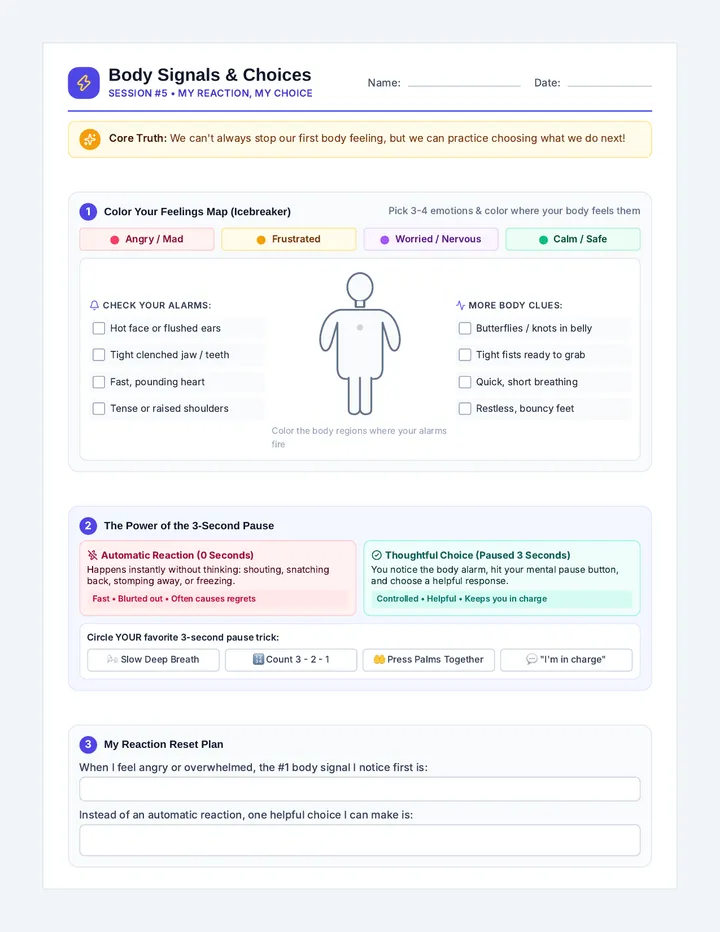
Have students identify one "Signal" they feel in their body when they have an impulse (e.g., tight fists, heart racing, butterflies).
Discussion Questions:
Why is it harder to use the Pause Button when we are angry or excited?
How does pausing help our "Crew" (friends and teachers)?
What is one thing you can do to remind yourself to STOP today?
Mission Adjustments
For Younger Explorers
Focus on physical "Stop" games like Red Light, Green Light to build the inhibitory control muscle before applying it to social situations.
For Advanced Cadets
Discuss the "Inner Critic" vs "Inner Pilot." How do our thoughts fuel our impulses? Practice reframing thoughts during the 'Think' step.
Brain Brake Mission Worksheet Brain Brake Mission
Master Your Impulse Controls
CADET: ____________________
STARDATE: _________________
1
STOP
Freeze your body and take a deep breath.
2
THINK
What will happen next if I do this?
3
CHOOSE
Pick the best action for the mission.
Scenario A: The Interruption
"You are working on a puzzle and really want to tell your teacher about your weekend, but she is busy talking to another student."
1. My Impulse (Initial Urge):
2. My Brain Brake (Better Choice):
Scenario B: The Losing Streak
"You just lost a game of Connect Four and you feel very frustrated. You want to knock all the pieces off the table."
1. My Impulse (Initial Urge):
2. My Brain Brake (Better Choice):
My Personal Mission Today
Describe one specific time today when you will need to use your Brain Brake:
Space Cadet Facilitator Guide Mission Control: Phase 2
Space Cadet
Facilitator Guide
Topic: Personal Space
Objective
Students will define "Personal Space Bubbles" and identify social cues that signal when they are too close to others.
Duration
45 Minutes
Materials
Space Bubble Mission Map
Hula hoop or string (optional)
Stickers
1
Atmosphere Check
"Every planet has an atmosphere—a layer of air that protects it. Humans have a social atmosphere too. We call it our 'Space Bubble.' If you get too close to a planet's surface without permission, you might crash or burn up!"
"Today, we are training to be expert pilots who know how to keep a safe distance from other ships in the fleet."
2
The One-Arm Launch
Demonstrate the physical distance of a "Safe Orbit."
Have the student stand up and reach out one arm. This is the edge of their "Atmosphere."
**Social Cue Drill:** Approach the student slowly. Have them say "Red Alert" or hold up a hand when they feel you have entered their bubble.
Switch roles. Have the student approach you and look for "Body Language Alarms" (leaning back, looking away, crossed arms).
3
The Mission Map
Introduce the **Space Bubble Mission Map**. Students will categorize people into different "Orbits" (Family, Friends, Acquaintances, Strangers) and the appropriate distance for each.
Space Bubble Mission Map Mission Map
Personal Space Orbit Chart
PILOT: ____________________
SECTOR: ___________________
Orbit 3: Public Space
Orbit 2: Social Space
Orbit 1: Close Space
Orbit 1: Friends & Family
Distance: 1-2 feet. Hugs and high-fives are usually okay here.
Orbit 2: Teachers & Classmates
Distance: 3-4 feet. Reach out one arm to check your orbit.
Orbit 3: Strangers
Distance: 5+ feet. Give plenty of space to stay safe.
Space Cadet Tip:
If you see someone **leaning away**, **stepping back**, or **looking at their watch**, your ship is drifting too close! Adjust your thrusters and move back to Orbit 2.
Friendship Lab Facilitator Guide Mission Control: Phase 3
Friendship Lab
Facilitator Guide
Topic: Peer Relationships
Objective
Students will practice active listening and identifying emotions in others to strengthen peer connections.
Duration
60 Minutes
Materials
Social Signal Decoder
Empathy Scenario Cards
"Friendship Fuel" Stickers
1
The Crew Connection
"A spacecraft can't function if the crew members aren't talking to each other. If the Navigator isn't listening to the Pilot, we get lost! Today, we are in the 'Friendship Lab' to study how to read our crew's signals."
2
Signal Receiving
Teach the "L.O.O.K." Strategy for active listening:
L
Listen
O
Observe
O
Open Mind
K
Keep Still
3
Decoding Emotions
Use the **Social Signal Decoder**. Practice looking at "Face Data" and "Voice Data" to determine how a crew member is feeling.
Practice Prompts:
- "Your friend drops their lunch tray. What does their face say? What does their voice say?"
- "Someone wins the game you both played. How should your 'Crew Connection' look?"
Social Signal Decoder Worksheet Social Decoder
Reading Crew Signals
Signal Analysis Report
Crew Member Signals What does this mean? (Emotion) Downcast eyes, slumped shoulders, quiet voice. Clenched fists, loud voice, furrowed eyebrows.
|
| Wide eyes, tapping feet, talking very fast. |
|
| Smiling, leaning in, laughing. |
|
Empathy Override
When a crew member is sending a "Distress Signal" (feeling sad or mad), how can you help?
The Signal:
"Your friend's tower of blocks fell over and they look like they are about to cry."
My Action:
The Signal:
"A classmate is sitting alone at lunch and looking at the floor."
My Action:
Unit: Friendship Lab Cadet: ____________________ Date: ____________________
Orderly Orbit Facilitator Guide Mission Control: Phase 4
Orderly Orbit
Facilitator Guide
Topic: Organization & Planning
Objective
Students will create a visual system for organizing their "Cargo" (materials) and "Flight Path" (schedule).
Duration
45 Minutes
Materials
Orderly Orbit Chart
Labels / Stickers
Student backpack/desk
1
Space Junk Alert
"If a spacecraft is full of loose tools, floating trash, and missing maps, it's called 'Space Junk.' Space junk causes crashes! Today we are clearing the debris to keep our orbit orderly."
2
Cargo Inspection
Guide the student through an "Inspection" of their physical space (desk or backpack).
The 3-Bin System:
Fuel Bin: Things I need every day (Pencils, Planner).Cargo Bay: Things I need later (Homework folders, Books).Debris: Things I can throw away (Old scraps, trash).
3
The Orbit Chart
Introduce the **Orderly Orbit Chart**. This is a visual checklist for the student to use at the beginning and end of each "Mission" (school day) to ensure no cargo is lost.
Orbit Organizer Checklist Orbit Checklist
Pre-Flight & Post-Flight Cargo Check
Morning Launch
Flight Folder (Homework)
Navigation Tools (Pencils/Pens)
Fuel Cell (Lunch/Snack)
Communication Device (Planner)
Custom Cargo...
Landing Check
Clear Debris (Trash out of bag)
Stow Gear (Close folders)
Check Flight Path (Plan for tomorrow)
Secure Hatch (Zip bag closed)
Custom Cargo...
Orbit Success Log
Monday
Tuesday
Wednesday
Thursday
Friday
Unit: Orderly Orbit
Cadet: ____________________ Stardate: ____________________