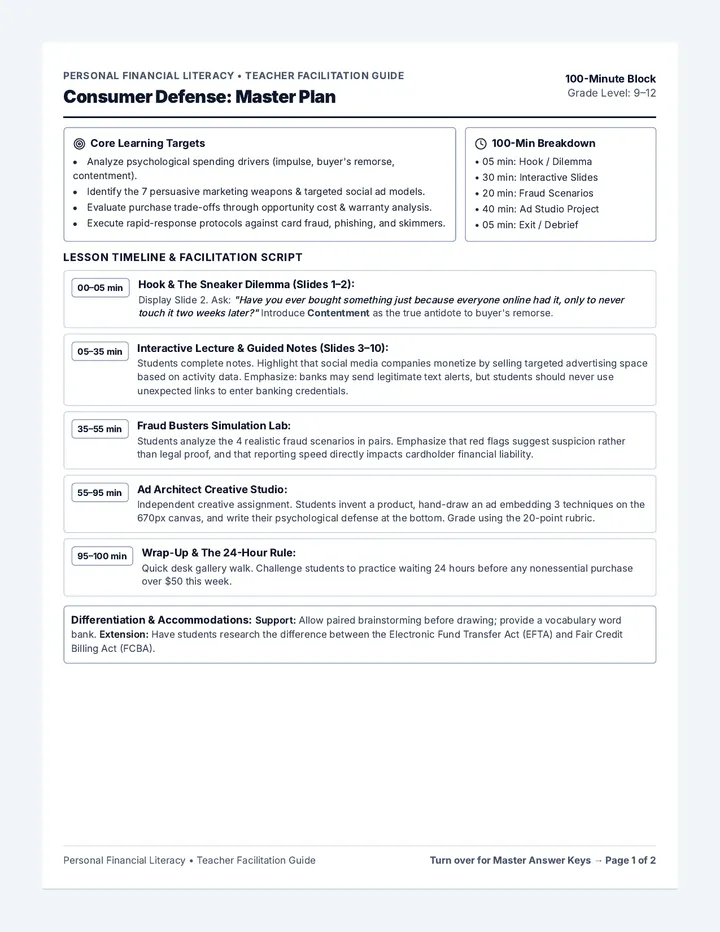
Priority Puzzle Slides Professional Simulation
Priority Puzzle
Mastering the Art of Triage in Special Education
Unit: Simulating the Caseload
Lesson 1: The Triage Matrix
The Hook: Packing Under Pressure
The Mission:
Pack your suitcase for a 7-day professional conference from a list of 50 possible items.
The Twist:
Every 60 seconds, your allowable weight limit drops. You must discard items instantly.
05:00
Timer Ready
What is Triage?
Urgent
Tasks that require immediate attention. They are often "loud" and "time-sensitive."
Important
Tasks that contribute to long-term goals and values. They are "quiet" but "essential."
Triage
The process of determining the priority of tasks based on their severity or importance.
The Eisenhower Matrix
Q1
Do First
Urgent & Important
• Crisis management
• Deadlines (Today/Tomorrow)
• Legal compliance issues
Q2
Schedule
Not Urgent & Important
• Long-term planning
• Relationship building
• Skill development
Q3
Delegate
Urgent & Not Important
• Most emails/phone calls
• Some meetings
• Interruptions
Q4
Eliminate
Not Urgent & Not Important
• Time wasters
• Junk mail
• Busy work
The Caseload Context
Where do these fall?
An IEP meeting is in 2 hours and the draft isn't finished.
Reviewing progress data for a student whose triennial is in 2 months.
A general education teacher stops by to vent about a student.
Color-coding your filing cabinet for the third time this week.
The "SpEd Trap"
Urgent Bias
We tend to do whatever is "loudest" even if it isn't important.
Procrastination Q2
If we ignore Q2 (Important/Not Urgent), it eventually becomes Q1 (A Crisis).
Case Study: The Overwhelmed Rookie
"It's 8:00 AM. Mr. J has an IEP meeting at 10:00 AM. Just as he sits down to finish the report, a student enters in crisis. Then, the printer jams. His phone rings—it's the District office asking for a missing signature from last week."
1st
What is the Q1 crisis?
2nd
What can wait 30 min?
3rd
What should be ignored?
Ready to Triage?
Open your Scenario Sort Cards . With your partner, categorize each task into the matrix. Be prepared to defend your choices!
Analyze
Categorize
Defend
Task Triage Cards Task Triage Sorting Cards
Lesson 1: The Triage Matrix • Scenario Analysis
Student Activity
Name
Date
Instructions
Cut out the task cards below. With your team, discuss where each task fits on the Eisenhower Matrix . Consider: Is it truly urgent (time-sensitive)? Is it truly important (long-term impact)? Be ready to justify your placement.
1
A student has a behavioral meltdown in the hallway and needs immediate de-escalation.
Category: _________
2
Checking a student's triennial re-evaluation date for a meeting that is 4 months away.
Category: _________
3
Organizing your digital stickers by color for future IEP draft comments.
Category: _________
4
A parent calls to complain that their child's bus was 5 minutes late this morning.
Category: _________
5
Writing a goal progress report that is legally due by the end of the school day today.
Category: _________
6
Attending a voluntary "Tech Tip" breakfast meeting about a new spreadsheet app.
Category: _________
7
A colleague pops in to ask if you've seen the latest viral video about the school board.
Category: _________
8
Updating your "Master Caseload Tracker" to ensure no deadlines are missed this month.
Category: _________
Total Cards: 8 • Cut along the dashed lines • Sort into Quadrants 1-4
Matrix Map Worksheet Matrix Map Worksheet
Lesson 1: The Triage Matrix • Mapping the Caseload
Student Name
Date
Importance
Urgency
Q1: Urgent & Important
01
DO NOW: CRISIS & DEADLINES
Q2: Not Urgent & Important
02
PLAN: GROWTH & PREVENTION
Q3: Urgent & Not Important
03
DELEGATE: INTERRUPTIONS
Q4: Not Urgent & Not Important
04
ELIMINATE: TIME WASTERS
Reasoning & Reflection
Which task was the hardest to categorize? Why?
What happens to your week if you only focus on Q1 and Q3?
Morning Rush Slides Phase 1: Simulation
Morning Rush
Can you survive the first 60 minutes of the workday?
Unit: Simulating the Caseload
Lesson 2: The Simulation Begins
Rules of Engagement
1
The Mission: Complete your "Mission Log" for the day using the task list provided.
2
The Clock: The simulation runs in "compressed time." 10 minutes real-time = 1 hour simulation time.
3
The Injections: At any moment, an "Inbox Injection" will appear. You must decide how to handle it immediately.
"The Plan is nothing. Planning is everything."
— Dwight D. Eisenhower
Today's Load (8:00 AM)
Fixed Appointments
9:00 AM Parent Meeting: Sarah T.
11:30 AM Student Observation: Marcus L.
1:00 PM Admin Meeting (Required)
Flexible Tasks
Draft Progress Reports (Due Tomorrow) - 2 Hours
Return 4 parent phone calls - 30 Mins
Organize Triennial Files - 45 Mins
Check student work samples - 30 Mins
Simulation Active
08:00
START
Map out your day on your Mission Log now.
Inbox Injection #1
Timestamp: 08:15 AM
NEW NOTIFICATION
From: Principal Harris
Subject: URGENT FILE REQUEST
"I need Marcus L.'s current behavior plan for a parent who just walked in without an appointment. I need it printed and on my desk in the next 5 minutes. No exceptions."
Decision A
Drop everything and go.
Decision B
Delegate to an assistant.
Decision C
Finish current task first.
Status Check
It is now 09:30 AM in the simulation. Look at your Mission Log . What has changed? What tasks have you already "failed" to complete?
Simulation Resumes in 30 Seconds
Morning Mission Log Morning Mission Log
Simulation Phase 1: High-Pressure Caseload Management
Case Manager Name
Simulation Date
The Initial Schedule (8:00 AM Plan)
08:00 AM
09:00 AM
FIXED: Parent Meeting (Sarah T.)
10:00 AM
11:00 AM
12:00 PM
01:00 PM
FIXED: Admin Meeting (Required)
Priority Goals
What MUST be finished by the end of this simulation?
Success Metric
If I don't finish my progress reports, the district is out of compliance. If I miss the Marcus L. observation, I have no data for his triennial.
The Reality Log (Injections & Audibles)
Time The "Injection" (What happened?) Immediate Action Taken Quadrant (1-4)
Tasks Completed
__/7
Deadlines Met
__/3
Q3/Q4 Interruptions
__
Current Stress Level
__/10
Inbox Injection Cards Inbox Injection Cards
Teacher Facilitation Guide • Simulation Phase 1
Teacher Resource
Facilitator Note: Cut these cards and deliver them to students (or project them) at the designated simulation times. These represent the "noise" that disrupts their planned schedule. Each card includes a "Triage Truth" to help you debrief.
INJECTION #1 08:15 AM
The "Principal Pop-In"
"I need Marcus L.'s current behavior plan for a parent who just walked in without an appointment. Desk in 5 mins."
Triage Truth
Quadrant 1 (Crisis). Even though the parent is unscheduled, the Principal's request makes this immediate. Students must adjust their 8:15-8:30 block.
INJECTION #2 08:45 AM
The "Chatty Colleague"
A co-worker stops by to talk about their weekend for "just a second." They end up staying for 15 minutes.
Triage Truth
Quadrant 4 (Time Waster). Students must learn to use a "Professional Pivot" to end the conversation or they will be late for their 9:00 AM meeting.
INJECTION #3 10:15 AM
The "Parent Phone Call"
Mrs. Smith calls (3rd time today) because she can't find the link to the virtual meeting next week.
Triage Truth
Quadrant 3 (Urgent/Not Important). It feels urgent to her, but it's not important for the case manager right now . Should be delegated or returned later.
INJECTION #4 11:00 AM
The "Equipment Fail"
The printer jams while you are trying to print draft IEPs for your 1:00 PM meeting. It requires a technician.
Triage Truth
Quadrant 1 (Crisis). Forces a transition from "Drafting" to "Problem Solving." Students may need to find a new printer or go digital.
INJECTION #5 12:30 PM
The "Legal Leak"
You realize you forgot to send home a "Notice of Meeting" for a student whose IEP is tomorrow.
Triage Truth
Quadrant 1 (Legal Crisis). This must be handled immediately to avoid a compliance violation. This overrides lunch.
INJECTION #6 02:30 PM
The "System Spam"
The district sends an all-staff email asking everyone to update their emergency contact info by Friday.
Triage Truth
Quadrant 2 (Not Urgent/Important). Do not do this now. Schedule it for a "low-energy" block on Friday morning.
Focus Fortress Slides Phase 2: Focus
Focus Fortress
Building Walls Around Your Deep Work
Unit: Simulating the Caseload
Lesson 3: The Data Deadline
The Cost of Interruption
23 Minutes
The average time it takes to return to deep focus after a single minor interruption (email, text, pop-in).
"Attention Residue"
When you switch tasks, part of your brain stays stuck on the previous task, reducing your IQ by up to 10 points.
In the Caseload...
IEP Writing requires Deep Work .
Data Analysis requires Deep Work .
Emails/Calls are Shallow Work .
Strategy: Time Batching
The "Swiss Cheese" Method (Wrong)
Doing 5 minutes of a report, checking 1 email, answering 1 text, doing 5 more minutes of report.
High Attention Residue
The "Deep Block" Method (Right)
A 90-minute block where ALL shallow work (email/calls) is strictly banned.
Maximum Brain Power
Defensive Communication
Visual Signals
"Closed door" or a specific sign on your desk that says "Deep Work in Progress - See me at 2 PM."
Auto-Replies
"I am currently in a deep focus block. I will respond to all emails starting at 3 PM today."
Digital Dark
Phone in a drawer. No browser tabs except the report. Desktop notifications turned OFF.
The Data Sprint
You have 15 minutes to summarize 3 students' progress data into a single paragraph each. We will play classroom noise. Your goal: Zero distractions.
Fortress Up!
Progress Report Sprint Worksheet Progress Data Sprint
Simulation Phase 2: Deep Work Maintenance
Case Manager
Sprint Timer (Mins)
The Mission
Synthesize the raw data for the three students below into a professional 3-4 sentence Summary of Progress . Your summary must include at least two specific data points (percentages or ratios).
Distraction Rule: Your teacher will play background noise. You may NOT talk, look up, or check your phone. Record any "Focus Breaks" (moments you got distracted) at the bottom.
Student: Alex M. (Reading Goal) Raw Data
Observations
Week 1: 65% accuracy
Week 2: 70% accuracy
Week 3: 62% accuracy (tired)
Week 4: 85% accuracy
Synthesis Area (Write Summary Here)
Student: Jordan P. (Behavior Goal) Raw Data
Observations
On-task: 4/10 intervals
On-task: 6/10 intervals
On-task: 3/10 intervals
On-task: 5/10 intervals
Synthesis Area (Write Summary Here)
Student: Casey S. (Social Skills) Raw Data
Observations
Initiated convo: 2 times
Initiated convo: 1 time
Initiated convo: 4 times
Target: 5 initiations/day
Synthesis Area (Write Summary Here)
Distraction Audit
Be honest: How many times did you look away from your paper or stop writing due to noise/movement?
Total Focus Breaks
Biggest Distraction Trigger
Assertive Ally Slides Phase 3: Communication
Assertive Ally
The Art of the Professional "No"
Unit: Simulating the Caseload
Lesson 4: Conflict and Negotiation
The Pressure Trap
In a high-stakes professional environment, you will face:
Schedule Overlaps (Double Bookings)
Unreasonable Last-Minute Demands
High-Stakes Compliance Pressure
The Goal:
Maintain Respect
"Being professional doesn't mean saying 'yes' to everything. It means managing everything effectively."
The Communication Spectrum
Passive
"Okay, I'll try to do it even though I'm already late for another meeting."
Outcome: Burnout, resentment, and dropped balls.
Assertive
"I value this request, but I have a conflicting priority. Can we look at our schedules to find a 15-minute slot tomorrow?"
Outcome: Clear boundaries and professional respect.
Aggressive
"I don't have time for this. You should have asked me last week!"
Outcome: Damaged relationships and lost influence.
The "Script" for Negotiation
1. Validate
"I understand this is a priority..."
2. Limit
"...however, I am currently committed to [Task X] until [Time Y]."
3. Propose
"I can complete this by [Time Z] instead."
4. Confirm
"Will that work for your deadline?"
"I hear you, here's my boundary,
Script to Stage
Pick up a Conflict Scenario Card . With your partner, practice the 4-step negotiation script. One of you is the "Pressure Provider," the other is the "Assertive Ally."
Practice 3 Scenarios
Professional Script Sheet The Assertive Script Sheet
Communication Toolbox • Lesson 4: Negotiation
The 4-Step Negotiation Framework
01
Validate
Acknowledge the other person's need or the urgency of the situation.
02
Boundary
State your current commitment or limitation clearly without over-explaining.
03
Alternative
Propose a realistic time, place, or method to handle the request.
04
Confirm
Close with a question to ensure agreement and shared expectation.
The "Last-Minute" Demand
Scenario
A teacher asks you to attend a meeting that starts in 10 minutes that you weren't told about.
The Script
"I understand this meeting is important for the student. However, I have a scheduled observation during that time that I cannot move. Could you send me the notes, and I will add my input by the end of the day? Does that work for the team?"
The "Priority Conflict"
Scenario
Your principal asks for a data report while you are in the middle of a legal deadline for an IEP.
The Script
"I'm happy to pull that data for you. Right now, I'm finishing the IEP for Marcus L. which is legally due by 3:00 PM. I can have that report on your desk by 9:00 AM tomorrow morning. Will that timeline meet your needs?"
The "Chatty Interruption"
Scenario
A colleague enters your office to vent about a personal issue during your planning period.
The Script
"It sounds like you've had a really tough morning. I really want to hear more, but I'm currently in a focus block to finish this draft. Could we catch up for 10 minutes during lunch instead? I'd love to hear the rest then."
The "After-Hours" Email
Scenario
A parent emails you at 8:00 PM with an 'urgent' question that isn't actually a crisis.
The Script
"Thank you for reaching out, Mrs. Jordan. I am currently away from my work computer. I will look into your question as soon as I am back in the office at 8:00 AM tomorrow and send you an update then. Have a great evening!"
Pro-Tip: If you don't defend your time, nobody else will.
Debrief Dashboard Slides Phase 4: Post-Mortem
Analyzing the Wreckage
What did we lose in the rush?
Unit: Simulating the Caseload
Lesson 5: The Final Debrief
The Simulation Dashboard
Legal Compliance
"Did you miss a deadline?"
DISTRICT AT RISK
Student Success
"Did the students get their minutes?"
PROGRESS STALLED
Staff Wellness
"Did you skip lunch or stay late?"
CRITICAL BURNOUT
Root Cause Analysis
Individual Choice
• Poor prioritization (Doing Q4 over Q1)
• Inability to say "no" (Passive)
• Allowing distractions (Shallow work focus)
• Failure to plan the day early
System Failure
• Unrealistic caseload size
• Toxic workplace culture (Interruptions normal)
• Lack of administrative support
• Technical issues (Printer, Wi-Fi)
"You can only control one of these. Which is it?"
The Professional Triage Rules
01
If you don't schedule your Q2 (Long-term growth), it will eventually become a Q1 (Crisis).
02
The loudest person in the room isn't always the highest priority.
03
Deep Work is a finite resource. Protect it like it's gold.
04
A professional "No" is actually a "Yes" to your most important results.
Mission Accomplished
Complete your Post-Mortem Analysis . Then, draft your Professional Growth Plan . What skills will you take with you into your first job?
Simulation Complete
Simulation Post-Mortem Worksheet Simulation Post-Mortem
Reflective Analysis • Lesson 5: Analyzing the Wreckage
Analyst Name
Final Stress Level (1-10)
The Data Dump
Fixed Deadlines
Parent Meeting (9:00)
Marcus L. Obs (11:30)
Admin Meeting (1:00)
The Flexible Tasks
Reports:
Phone Calls:
Filing:
Compliance Score
__%
(Deadlines met / Total Deadlines)
Individual Choices Analysis
"When the Principal asked for Marcus L.'s file at 8:15 AM, how did you react? Looking back, was that the most effective choice?"
"During the Data Sprint, what was your biggest distraction? How would you build a better 'fortress' next time?"
System Failure Analysis
"Which interruption felt the most 'unfair' or 'out of your control'? If you were the supervisor, how would you change the system to prevent it?"
The "One Thing"
If you could go back to 8:00 AM on Simulation Day 1 with the knowledge you have now, what is the **single biggest change** you would make to your strategy?