A cohesive social-emotional learning program using space-themed cockpit and flight metaphors to teach students body control, personal space, and emotional self-regulation coping skills.
Met all target behaviors safely in 4-5 opportunities. Active shield maintained with minimal verbal prompting.
Level 2: Co-Pilot
Met target behaviors in 3 opportunities. Needed occasional reminders to keep thrusters parked or stay in coordinates.
Level 1: Cadet-in-Training
Met target behaviors in 0-2 opportunities. Frequent physical/verbal guidance required to prevent boundary collisions.
Body Pilots Goal Progress Kit Page 1 of 2
PILOT SELF-MONITORING CHART
Daily Flight Check
Color in your daily progress stars at the end of every school day!
Pilot Name:
Goal Target: 4 / 5 Stars!
How to rate your flight: Evaluate your daily starship control with your teacher at the end of each day. Color in the stars you earned:
3 Stars: Fully Controlled (Master) 2 Stars: Minor Space Bump (Co-Pilot) 1 Star: Engines Overheated (Needs Training)
Monday Flight Status
I kept my thrusters parked & respected shields
Tuesday Flight Status
I kept my thrusters parked & respected shields
Wednesday Flight Status
I kept my thrusters parked & respected shields
Thursday Flight Status
I kept my thrusters parked & respected shields
Friday Flight Status
I kept my thrusters parked & respected shields
Pilot's Mission Review Note (Write or Dictate to Teacher)
My most successful flight moment of the week was ________ because ________.
Body Pilots Goal Progress Kit Page 2 of 2
The Lagging Server: Simulate losing an exciting game or puzzle. Prompt: "Engines overheating! Pick your Coping Button now." (Encourage raising a hand or deep breathing).
The Fuel Transfer: A surprise transition from free play to clean up. Prompt: "Sudden orbit change! Calmly radio Mission Control to ask what comes next instead of shouting."
Phase 4: Personal Dashboard Crafting (10 mins)
Distribute My Coping Dashboard. Students identify their engine warning zones, pick which two Coping Control buttons are their absolute favorites, and write down words they can say when "Radioing Base" for help.
Coaching Coping Strategies Under Tension
This tracking protocol focuses heavily on capturing functional replacement behaviors. Ensure the student has immediate access to their desk-sized "Coping Dashboard" visual during difficult transitions or activities.
1. Proactive Cue
Prompt the student *before* tricky games or transitions: "Remember to locate your Dashboard Buttons."
2. Identify Met / Not
Mark a "+" on the tracking sheet if they utilize a strategy (or accept a prompt to use one) in place of behaviors.
3. Immediate Praise
Provide labeled verbal praise: "Incredible job using your Radio Button to ask for a break, Pilot!"
Proactive Prompts & Redirections
🚀 Pre-Trigger Reminder
"Pilot, we are entering an asteroid field (this math worksheet). I'm looking to see you keep your engines calm. Remember your Radio Base and Space Dock controls!"
⚠️ Heat Check (De-escalation)
"I see your alarm sensors are blinking (clenched hands). Your engines are starting to heat up. Let's hit your O2 Cycle button together right now. Take a deep breath..."
Coping Controls Lesson Package Page 2 of 2
Intervention Performance Rubric
Level 3: Independent Pilot
Met target coping strategies independently in 4-5 opportunities. Identified internal overheat signs early.
Level 2: Co-Pilot Assisted
Met target coping strategies in 3-4 opportunities, accepting a gentle proactive visual or verbal dashboard cue.
Level 1: Grounded (Needs Support)
Met coping strategies in 0-2 opportunities. Needed active teacher co-regulation or physical support to calm engines.
Coping Controls Goal Progress Kit Page 1 of 2
PILOT SELF-MONITORING CHART
Daily Engine Check
Color in your daily progress stars at the end of every school day!
Pilot Name:
Goal Target: 4 / 5 Stars!
How to rate your flight: Work with your teacher to grade your engine temperature today. Color in your stars:
3 Stars: Super Cool & Calibrated 2 Stars: Warm but used my buttons 1 Star: Overheated Engines
Monday Calibration
I noticed my sensors & pressed my coping buttons
Tuesday Calibration
I noticed my sensors & pressed my coping buttons
Wednesday Calibration
I noticed my sensors & pressed my coping buttons
Thursday Calibration
I noticed my sensors & pressed my coping buttons
Friday Calibration
I noticed my sensors & pressed my coping buttons
Pilot's Mission Review Note (Write or Dictate to Teacher)
My favorite coping button to press this week was ________ because ________.
Coping Controls Goal Progress Kit Page 2 of 2
Step 1: Check Sensors:"This is unfamiliar. My engines feel stuck."
Step 2: Deploy Scanner: Point to the desk visual aid, ask a peer for clarification, or raise a hand for the teacher.
Step 3: Ignite Warp: Begin writing or completing step 1 within 60 seconds.
Phase 4: Student Scanner Log (10 mins)
Have students fill out their Uncharted Sectors Log. They will design their "flight visual maps" and sign their Warp-Speed Initiation commitment contract.
Standard Prompt Hierarchy for Goal Tracking
The IEP goal requires initiation with no more than 2 prompts. Use this specific, structured 3-tier priming strategy to protect the trial limits:
1. Proactive Cue (Zero Prompt)
"Here is your sector map. Take out your scanner tools to plot your launch." (Walk away, wait 60 seconds).
2. Prompts 1 & 2 (Verbal/Gestural)
P1: "Check your scanners. Pick help, break, or your visual."
P2 (30s later): "Point to step 1. Let's do it together."
3. Prompt 3+ (Over-Limit)
Any further verbal directions or hand-over-hand directives. Note as "-" on the trial data tracker.
Task Launch Affirmations
🚀 Fast-Launch Reinforcement
"Incredible launch, Captain! You saw the sector was foggy, checked your Visual Map, and started writing within 20 seconds. Warp speed attained!"
⚠️ Stall Warning (Under-Prompting)
"Pilot, we are stalled in coordinates. Deploy your Radio Scanner or request a Space Dock break now so we don't drop out of warp."
Pilot's Mission Review Note (Write or Dictate to Teacher)
My most successful fast-launch of the week was during ________ because ________.
Uncharted Sectors Goal Progress Kit Page 2 of 2
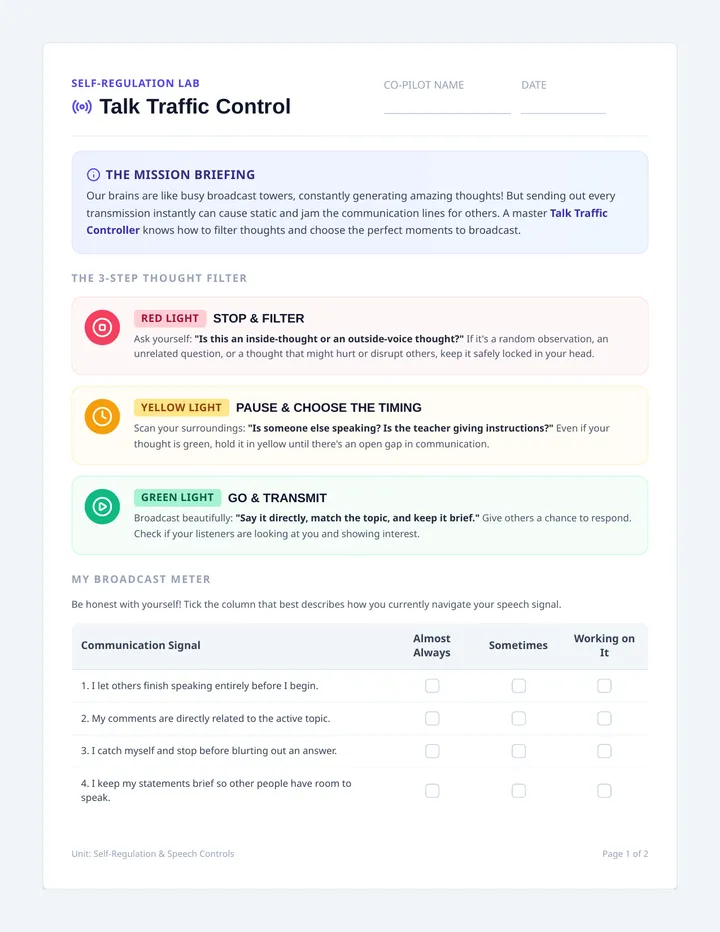
Scenario A: The teacher is teaching subtraction. A student raises their hand and asks: "Can we take away five blocks?" (Clean Signal).
Scenario B: The teacher is explaining writing. A student blurt out: "My cousin has a blue go-kart!" (Static Interference).
Phase 4: Frequency Log Activity (10 mins)
Distribute the Frequency Log. Students practice sorting potential classroom remarks into "Mission Signal" (On-Topic) and "Static" (Off-Topic).
Coaching & Tracking "Channel Check" Prompts
The IEP goal measures accuracy in limiting comments to lesson-related topics and refraining from off-topic remarks, aiming for 75% accuracy. To record clean trials:
1. The "Channel Check" Cue
When the student begins to make an off-topic remark, gently state: "Channel Check, Pilot."
2. Scoring Met vs. Not
Mark "+" if the student stops, re-calibrates, and either stays on-topic or waits patiently. Mark "-" if they continue with off-topic remarks.
3. Shared Metric
Assess 5 discussion blocks daily. Goal is attained when 4 out of 5 observed opportunities are clean (+).
Proactive Prompts & Redirections
🚀 Pre-Discussion Priming
"Pilots, we are opening the Mission Channel for reading. Keep your frequencies locked to the story. No static today so we can hear everyone clearly!"
⚠️ Frequency Re-Calibration Cue
"Channel Check, Captain. That is a fun story about your dog, but right now our channel is locked on fractions. Let's re-calibrate to the math board."
Comms Calibration Lesson Package Page 2 of 2
3 Stars: Clear Signal (Always on-topic) 2 Stars: Quick Calibration (Stayed on topic after prompt) 1 Star: Heavy Static (Off-topic blurts)
Monday Signal Status
I filtered out static and kept my comments lesson-related
Tuesday Signal Status
I filtered out static and kept my comments lesson-related
Wednesday Signal Status
I filtered out static and kept my comments lesson-related
Thursday Signal Status
I filtered out static and kept my comments lesson-related
Friday Signal Status
I filtered out static and kept my comments lesson-related
Pilot's Mission Review Note (Write or Dictate to Teacher)
My clearest and most focused on-topic lesson of the week was ________ because ________.
Comms Calibration Goal Progress Kit Page 2 of 2
Conduct a mock classroom discussion about "Our solar system planets." Introduce off-topic trigger comments. Play a game where students show a "Thumbs Up" for a Clear Signal and cross their arms like an "X" for Space Static.
Teacher: "Mars is called the Red Planet." Student comment: "I have a red skateboard." (Class crosses arms - Static!).
Teacher: "Mars has two moons." Student comment: "How big are the moons?" (Class Thumbs Up - Clear Signal!).
Phase 4: Comms Calibration Contract (10 mins)
Distribute the Flight Frequency Log. Students practice sorting comments and write down their personal "Signal Buffer" pledge (where they agree to hold their off-topic thoughts until transitions).
Coaching & Measuring the 75% Discussion Accuracy Goal
The goal targets maintaining appropriate discussion and reducing peer distractions with 75% accuracy when prompted. Implement this structured system to track comments:
1. Set Discussion Trials
A trial block consists of a 15-minute discussion where the student contributes up to 4 comments.
2. Redirection Prompt
If student makes an off-topic comment, give 1 verbal prompt: "Please calibrate to the lesson frequency."
3. Calculate % Accuracy
Track comment outcomes (+ for on-topic, - for off-topic). 3 out of 4 on-topic remarks matches the 75% criteria!
Proactive Prompts & Signal Redirections
🚀 Proactive Frequency Tuning
"Pilots, we are launching our reading lesson frequency. Tune your radio channels directly to this story. Keep all static thoughts in your buffer so we can keep our signal clear!"
⚠️ Static Redirection Cue
"Pilot, we are getting a bit of static on our comms channel. Let's calibrate and re-tune back to our lesson coordinates. What is your question about our reading planet?"
Flight Frequency Lesson Package Page 2 of 2
How to rate your signal: At the end of every school day, review your comments with your teacher. Color in the signal bars you earned:
I kept my comments on-topic and buffered recess stories
Tuesday Tuning Check
I kept my comments on-topic and buffered recess stories
Wednesday Tuning Check
I kept my comments on-topic and buffered recess stories
Thursday Tuning Check
I kept my comments on-topic and buffered recess stories
Friday Tuning Check
I kept my comments on-topic and buffered recess stories
Pilot's Mission Review Note (Write or Dictate to Teacher)
My most stable and clear comms day of the week was ________ because ________.
Flight Frequency Goal Progress Kit Page 2 of 2
Conduct a physical walkthrough of unstructured zones to practice real-life transition expectations:
The Hallway Transit: Walk silently in line. Keep hands folded in front or in pockets. No swerving or jumping into other lanes.
Restroom Docking: Walk into the restroom. Close the stall door completely. Finish task, wash hands, and exit immediately. No looking under doors, shouting, or silly body displays.
Phase 4: Personal Docking Map (10 mins)
Have students fill out their Docking Bays Log. They sort safe/unsafe behaviors, check off their privacy checklist, and sign the Secure Docking Agreement.
BIP Integration & 100% Consistency Tracking
The IEP goal targets 100% consistency in refraining from inappropriate/lewd behaviors in unstructured zones. Follow these behavior plan guidelines:
1. Pre-Transition Prime
Always review the "Docking Code" visuals 1 minute before entering hallways, restrooms, or specials.
2. Active Staff Escort
Staff must actively monitor/shadow hallway and restroom boundaries to deliver immediate redirection prompts if needed.
3. Mark Consistency
Mark "+" only if transition occurred with zero inappropriate behaviors. Goal is 100% perfect compliance on daily trials.
Proactive Prompts & Signal Redirections
🚀 Proactive Docking Prime
"Pilot, we are approaching the transition lane. Check your Docking Code. Keep your hatches closed, keep your engines silent, and let's dock at Specials with 100% clearance!"
⚠️ Decorum Redirection Cue
"Pilot, halt. Your hatches are opening (silly body movements/exposure). We need 100% protocol match. Please close your hatches and lock in silent thruster mode."
Docking Bays Lesson Package Page 2 of 2
Star Earned: 100% Safe Landing (Hatches Closed) No Star: Needed direct overrides to lock controls
Pilot's Mission Review Note (Write or Dictate to Teacher)
The easiest docking bay for me to navigate with perfect decorum this week was ________ because ________.
Docking Bays Goal Progress Kit Page 2 of 2
Station Protocol Guide
BIP Implementation & 100% Consistency Tracking
Target Goal 100% Acc.
Instructional Sequence (Continued)
Phase 3: Station Simulations (15 mins)
Conduct targeted physical rehearsals. Rehearse the exact transitions:
Fueling Pod Rehearsal: Walk to the school restroom. Prompt: "Deploying privacy coordinates. Keep eyes forward, enter stall immediately."
Gravity Tube Rehearsal: Practice stepping into the hallway. Prompt: "Lining up. Feet forward, thrusters in pockets. Quiet transit engaged."
Phase 4: Station Log Worksheet (10 mins)
Distribute the Station Protocol Log. Students evaluate hallway and restroom choices, identify "Station Violations" (off-track actions), and sign their Station Safety Contract.
Maintaining 100% Behavior Compliance in Unstructured Zones
The IEP goal targets 100% consistency in refraining from inappropriate actions/lewdness in unstructured settings. Follow these precise BIP strategies:
1. Pre-Transition Prime
Immediately before any restroom, specials, or recess transition, review the 3 visual protocol rules together.
2. Silent Hand Prompts
Use discrete visual prompts (flat palm for stop, hand in pocket gesture) to remind them of safety boundaries.
3. 100% Verification
Observe and document every single transition. If any violation occurs, assist student to re-track and log trial.
Proactive Prompts & Station Redirections
🚀 Proactive Station Protocol Cue
"Pilot, we are entering the Fueling Pod zone. Remember our Station Protocols: eyes on your console, doors locked, thrusters parked, clean and quick. Launch protocol!"
⚠️ Protocol Deviation Redirection
"Pilot, check your flight rules. We have a deviation from our Station Protocol. Please keep your thrusters down and follow the privacy guidelines. Let's re-align."
Station Protocol Lesson Package Page 2 of 2
Monday Station Badges
I kept all bathroom, hallway, and recess transitions safe and appropriate
Tuesday Station Badges
I kept all bathroom, hallway, and recess transitions safe and appropriate
Wednesday Station Badges
I kept all bathroom, hallway, and recess transitions safe and appropriate
Thursday Station Badges
I kept all bathroom, hallway, and recess transitions safe and appropriate
Friday Station Badges
I kept all bathroom, hallway, and recess transitions safe and appropriate
Pilot's Mission Review Note (Write or Dictate to Teacher)
My most safe and compliant transition of the week was ________ because ________.