Barrier-Free Learning Slides
Engagement
The "Why" of Learning
Representation
The "What" of Learning
Action & Expression
The "How" of Learning
K–12 Practice Guide
Instructional Framework
Universal Design for Learning
Designing proactive, barrier-free classrooms that honor learner variability from day one.
01 · Overview of the Practice
What Is Universal Design for Learning?
UDL is a proactive instructional framework grounded in cognitive neuroscience (CAST, 2024; Meyer et al., 2014). Instead of retrofitting lessons for individual students, educators design flexible goals, materials, and assessments from the start to accommodate learner variability.
Engagement
The "Why": Recruiting interest, sustaining effort, and building self-regulation through choice and relevance.
Representation
The "What": Offering information in multiple formats—visual, audio, tactile, and scaffolded text.
Action & Expression
The "How": Giving students varied ways to navigate tasks, use tools, and demonstrate mastery.
01 · Overview of the Practice
Why UDL Matters & Research Support
Why It Is Important
- Shifts the focus: Views barriers as design flaws in the environment, not deficits in the learner (Meyer et al., 2014).
- Reduces stigma: Flexibility is built in for everyone, eliminating "special" pull-outs.
- Builds expert learners: Develops resourceful, strategic, and goal-directed students (CAST, 2024).
Relevant Research
- CAST & Neuroscience: Mapped UDL to affective, recognition, and strategic brain networks (Meyer et al., 2014).
- Meta-Analysis: UDL implementation shows positive effects on K–12 academic outcomes (Capp, 2017).
- Federal Policy: Endorsed as a scientifically valid framework for all learners (ESSA, 2015).
01 · Overview of the Practice
Connection to Inclusive Education
"Necessary for some, beneficial for all." UDL turns inclusive classrooms from an add-on accommodation into the default design.
Strengthens Tier 1
Embeds high-leverage supports directly into core MTSS/RTI instruction, reducing unnecessary Tier 2 and 3 referrals.
Supports Diverse Profiles
Simultaneously serves students with IEPs/504s, multilingual learners, neurodivergent students, and advanced learners.
Fosters Belonging
Students work alongside peers in the Least Restrictive Environment using tools that normalize difference.
02 · Developmental Applications
Primary Grades (K–2)
Ages 5–8
What UDL Looks Like
- • Visual schedules and picture-supported directions
- • Hands-on manipulatives and sensory stations
- • Choice of drawing, acting, or dictating responses
Common Student Needs
- • Foundational decoding and fine-motor support
- • Explicit modeling of emotional self-regulation
- • Frequent movement and concrete examples
Potential Challenges
- • Too many open choices can overwhelm young learners
- • High prep time for tactile and visual materials
- • Balancing structured phonics with flexible expression
02 · Developmental Applications
Intermediate Grades (3–5)
Ages 8–11
What UDL Looks Like
- • Text-to-speech, audiobooks, and leveled texts
- • Graphic organizers for multi-step writing
- • Choice boards for projects (posters, slides, skits)
Common Student Needs
- • Transition from "learning to read" to "reading to learn"
- • Executive functioning scaffolds for longer tasks
- • Structured peer collaboration and feedback
Potential Challenges
- • Wide academic gaps in literacy and math fluency
- • Managing digital tools without distraction
- • Growing self-consciousness about using supports
02 · Developmental Applications
Middle School (6–8)
Ages 11–14
What UDL Looks Like
- • Single-point rubrics with clear success criteria
- • Collaborative playlists and flexible seating
- • Multimedia note-taking (sketch, digital, Cornell)
Common Student Needs
- • Autonomy, identity affirmation, and peer connection
- • Organization across 6–7 rotating classes
- • Safe, low-stakes entry points for risk-taking
Potential Challenges
- • Fear of standing out makes students reject visible help
- • Shorter 45–50 minute periods limit project time
- • Inconsistent UDL practices across department teams
02 · Developmental Applications
High School (9–12)
Ages 14–18
What UDL Looks Like
- • Authentic, real-world capstones and inquiries
- • Self-paced modules with video mini-lessons
- • Mastery demos via podcasts, essays, or labs
Common Student Needs
- • Self-advocacy and metacognitive goal-setting
- • Relevance to college, career, and civic life
- • Flexible pacing for work or family responsibilities
Potential Challenges
- • Rigid standardized testing and AP/IB pacing pressures
- • Deeply ingrained lecture-and-test traditions
- • Learned helplessness in students used to passive roles
03 · Classroom Tools & Strategies
Practical Resources (1 of 2)
1. UDL Lesson Planning Template
A 3-step backward-design organizer that identifies predictable barriers before teaching begins:
Goal: Separate the standard from the means.
Barriers: Where might students get stuck?
Options: Add 2+ ways to engage, access, and show.
2. Student Self-Monitoring Form
Builds executive function and metacognition by guiding students to track their own learning choices:
Before: "My goal today is... I will use tool..."
During: "Am I stuck? What strategy helps?"
After: "What worked well for me today?"
03 · Classroom Tools & Strategies
Practical Resources (2 of 2)
3. UDL Classroom Checklist
A quick audit educators use weekly to verify universal access:
- ☐ Captions on all videos & alt-text on images
- ☐ Directions posted visually and explained aloud
- ☐ Exemplars and non-exemplars provided
4. Co-Planning & Graphic Organizers
Shared protocol for general and special educators to embed tiered scaffolds directly into graphic organizers:
- • Sentence stems & word banks built into frames
- • Color-coded sections for multi-part reasoning
- • Shared roles for co-teaching station rotations
04 · Professional Recommendations
Three Key Takeaways for Educators
1
Start Small with "Plus-One" Thinking
You do not need to overhaul every lesson overnight. Add one new way to access content or show learning per unit.
2
Keep Goals Firm, Means Flexible
Never water down rigor. Clarify the core learning standard so every pathway leads to the same high expectation.
3
Invite Student Voice into Design
Ask students which tools and formats helped them most—their feedback is your fastest barrier detector.
04 · Professional Recommendations
Two Common Mistakes to Avoid
Mistake 1: Confusing Choice with Rigor
Offering a poster or video option without aligned rubrics can lower academic demand. Every option must require the same depth of thinking and evidence.
Mistake 2: Treating UDL as a Checklist
Using technology or "learning styles" labels without targeting real barriers wastes time. Always anchor design choices to the specific learning goal.
Design for the margins, and the entire classroom thrives.
APA 7th Edition
References
Capp, M. J. (2017). The effectiveness of universal design for learning: A meta-analysis of literature between 2013 and 2016. International Journal of Inclusive Education, 21(8), 791–807. https://doi.org/10.1080/13603116.2017.1325074
CAST. (2024). Universal Design for Learning Guidelines version 3.0. https://udlguidelines.cast.org
Every Student Succeeds Act, 20 U.S.C. § 6301 (2015). https://www.congress.gov/bill/114th-congress/senate-bill/1177
Meyer, A., Rose, D. H., & Gordon, D. (2014). Universal design for learning: Theory and practice. CAST Professional Publishing.
Barrier-Free Learning Notes
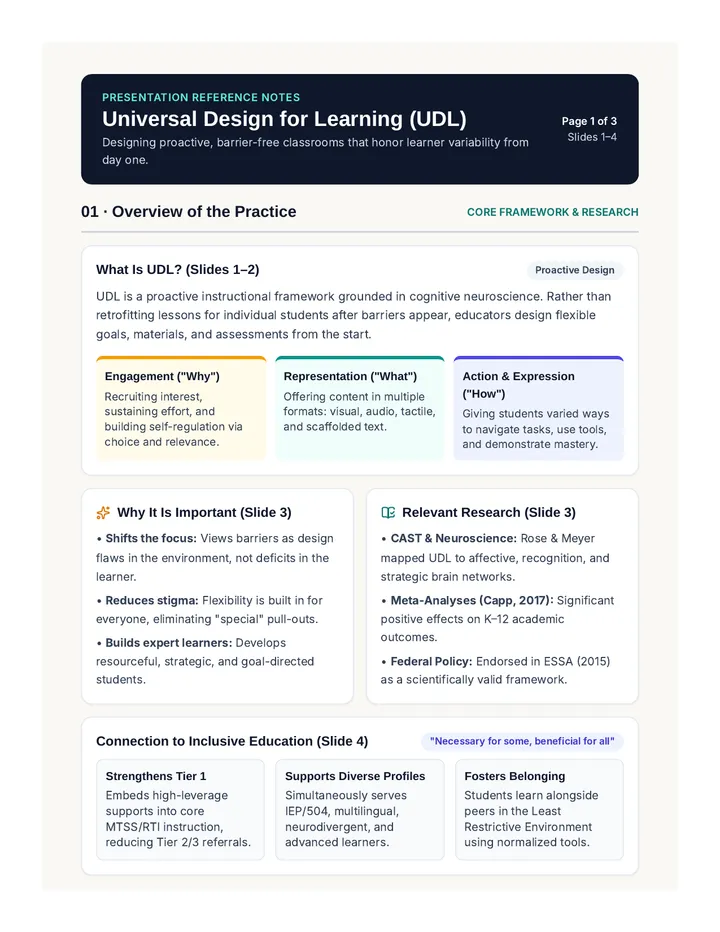
Presentation Reference Notes
Universal Design for Learning (UDL)
Designing proactive, barrier-free classrooms that honor learner variability from day one.
Page 1 of 3
Slides 1–4
01 · Overview of the Practice
Core Framework & Research
What Is UDL? (Slides 1–2)
Proactive Design
UDL is a proactive instructional framework grounded in cognitive neuroscience. Rather than retrofitting lessons for individual students after barriers appear, educators design flexible goals, materials, and assessments from the start.
Engagement ("Why")
Recruiting interest, sustaining effort, and building self-regulation via choice and relevance.
Representation ("What")
Offering content in multiple formats: visual, audio, tactile, and scaffolded text.
Action & Expression ("How")
Giving students varied ways to navigate tasks, use tools, and demonstrate mastery.
Why It Is Important (Slide 3)
- • Shifts the focus: Views barriers as design flaws in the environment, not deficits in the learner.
- • Reduces stigma: Flexibility is built in for everyone, eliminating "special" pull-outs.
- • Builds expert learners: Develops resourceful, strategic, and goal-directed students.
Relevant Research (Slide 3)
- • CAST & Neuroscience: Rose & Meyer mapped UDL to affective, recognition, and strategic brain networks.
- • Meta-Analyses (Capp, 2017): Significant positive effects on K–12 academic outcomes.
- • Federal Policy: Endorsed in ESSA (2015) as a scientifically valid framework.
Connection to Inclusive Education (Slide 4)
"Necessary for some, beneficial for all"
Strengthens Tier 1
Embeds high-leverage supports into core MTSS/RTI instruction, reducing Tier 2/3 referrals.
Supports Diverse Profiles
Simultaneously serves IEP/504, multilingual, neurodivergent, and advanced learners.
Fosters Belonging
Students learn alongside peers in the Least Restrictive Environment using normalized tools.
Presentation Reference Notes · Page 2 of 3
02 · Developmental Applications Across K–12 (Slides 5–8)
Primary Grades (K–2 · Ages 5–8)
Slide 5
What UDL Looks Like
• Visual schedules & picture directions
• Manipulatives & sensory stations
• Draw, act, or dictate responses
Common Student Needs
• Foundational decoding & fine-motor support
• Explicit emotional self-regulation
• Frequent movement & concrete models
Potential Challenges
• Too many open choices overwhelm
• High prep for tactile/visual items
• Balancing phonics with flexible output
Intermediate Grades (3–5 · Ages 8–11)
Slide 6
What UDL Looks Like
• Text-to-speech & leveled texts
• Graphic organizers for writing
• Choice boards (posters, slides, skits)
Common Student Needs
• Shift from learning to read to reading to learn
• Executive functioning scaffolds
• Structured peer collaboration
Potential Challenges
• Wide literacy & math fluency gaps
• Managing digital tools without distraction
• Self-consciousness using supports
Middle School (6–8 · Ages 11–14)
Slide 7
What UDL Looks Like
• Single-point rubrics with clear criteria
• Collaborative playlists & flexible seating
• Multimedia notes (sketch, digital, Cornell)
Common Student Needs
• Autonomy, identity affirmation & peers
• Organization across 6–7 rotating classes
• Safe, low-stakes entry points
Potential Challenges
• Peer stigma around visible help
• Short 45–50 min periods limit projects
• Inconsistent UDL across departments
High School (9–12 · Ages 14–18)
Slide 8
What UDL Looks Like
• Real-world capstones & inquiries
• Self-paced modules & mini-lesson videos
• Mastery demos (podcasts, essays, labs)
Common Student Needs
• Self-advocacy & metacognitive goals
• College, career & civic relevance
• Flexible pacing for work/family life
Potential Challenges
• Standardized test & AP/IB pacing pressure
• Deeply ingrained lecture traditions
• Learned helplessness in passive learners
Presentation Reference Notes · Page 3 of 3
03 · Classroom Tools & Strategies (Slides 9–10)
1. UDL Lesson Planning Template
3-step backward design: separate the Goal from the means, anticipate predictable Barriers, and build in 2+ Options for engagement, access, and expression.
2. Student Self-Monitoring Form
Builds metacognition with three checkpoints: Before (goal & tool choice), During (stuck-point strategy check), and After (reflecting on what worked).
3. UDL Classroom Checklist
Weekly universal access audit: verify video captions & image alt-text, pair visual + spoken directions, and provide both exemplars and non-exemplars.
4. Co-Planning & Graphic Organizers
Shared general/special education protocol embedding sentence stems, word banks, color-coded reasoning frames, and station roles directly into materials.
04 · Professional Recommendations (Slides 11–12)
Three Key Takeaways for Educators
1. Start Small with "Plus-One" Thinking: Add one new way to access content or show learning per unit rather than overhauling everything at once.
2. Keep Goals Firm, Means Flexible: Never water down rigor; clarify the core standard so every pathway leads to the same high expectation.
3. Invite Student Voice into Design: Ask students which tools and formats helped most—their feedback is the fastest barrier detector.
Mistake 1: Confusing Choice with Rigor
Offering format choices without aligned rubrics lowers demand. Every option must require equal depth of thinking and evidence.
Mistake 2: Treating UDL as a Checklist
Adding tech or "learning styles" labels without targeting real barriers wastes time. Anchor every choice to the learning goal.
My "Plus-One" Next Step (Notes & Action Plan)