Sign Signal Slides Sign Signal Safety
Unit: Workplace Safety Protocols
What Happens if You Guess?
In a high-stakes workplace, guessing is dangerous.
"I thought that sign meant 'park here', but it actually meant 'crush zone'..."
Today's Mission: One Sign = One Action
Single-Step Focus
01
LOOK
Scan the environment for visual commands.
02
IDENTIFY
Find the ONE command the sign is giving.
03
ACT
Do only that one step. Stop and wait for the next.
WORKING MEMORY HACK: Don't look for more steps. Just the next one.
Case Study: Warehouse Delta
Stop Zone
A forklift driver sees this sign. If they process "Stop" but keep thinking about "Where is my coffee?", what happens?
Reaction delay (1-2 seconds)
Incomplete action (slowing down vs stopping)
Collision risk
Symbol Speed Drill
Shout out the SINGLE STEP required by these icons!
PUT ON HAT
WEAR PLUGS
EXIT HERE
NO SMOKING
Visual Warning Worksheet Visual Warning Worksheet
Unit: Workplace Safety Protocols | Lesson 1
NAME:
DATE:
MISSION OBJECTIVE
Identify the Single-Step Action required by each industrial sign. Ignore all other distractions.
01 Decipher the Code
What is the ONE action you must do immediately?
02 Scenario Scan
The Conveyor Belt Crisis
You are working near a conveyor belt. Suddenly, it starts making a loud grinding noise. You look up and see a bright yellow sign with a large black exclamation point over a red button.
A. What is the single step you must take?
B. Why should you NOT try to fix the noise first?
Signage Master Teacher Guide Teacher Resource Confidential
Signage Master Guide
Lesson 1: Analyzing Safety Signage and Visual Cues
Instructional Goal
To train students to bypass complex environmental analysis and isolate one single-step action triggered by a visual cue. This reduces cognitive load and ensures safety in high-stress vocational settings.
SpEd Focus: Working Memory
Many students with working memory deficits struggle to prioritize directions. Signage provides an externalized memory aid, but only if the student can extract a single command rather than a complex concept.
Prep Checklist
Projector for slides
Printed Worksheets
Red/Green "Stop/Go" cards
Classroom "Zones" labeled
Lesson Delivery
05m
The Hook: Visual Chaos
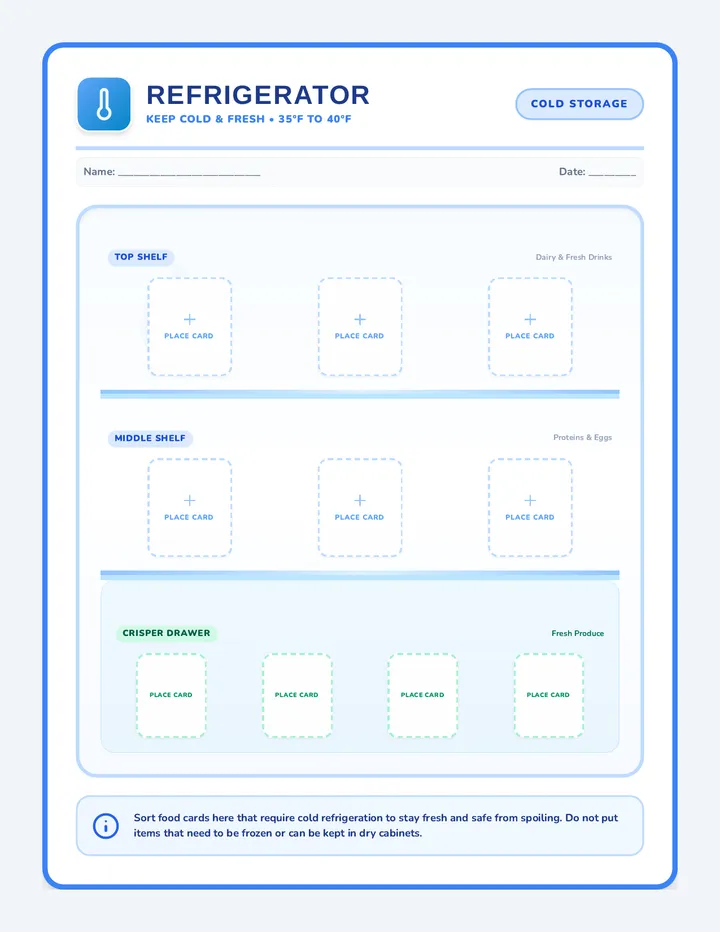
Show Slide 2. Ask: "If you saw 5 signs at once, what would you do first?" Encourage the idea that you can't do everything at once. You must pick the critical safety step.
15m
Modeling: Look-Identify-Act
Use Slide 3 to model the three-step focus. Point to a classroom sign (e.g., EXIT). Model: "I LOOK at the sign. I IDENTIFY the step: Move toward door. I ACT: I take one step toward the door."
10m
Guided Practice: Speed Drill
Use Slide 5. Flash an icon and give students 3 seconds to shout the ONE ACTION. If they use more than 3 words (e.g., "The sign says wear a hat"), correct them to "PUT ON HAT." Conciseness is key for memory.
15m
Assessment: Scenario Scan
Distribute worksheets. For the "Conveyor Belt Crisis," facilitate a discussion after completion. Why is "Push red button" more important than "Tell boss"? (Immediate safety vs. secondary protocol).
Discussion Facilitation
"If a sign has words AND a picture, which one do you look at first for speed?"
"What happens to your brain when you try to follow three signs at the same time?"
"Which color sign usually means 'Immediate Danger'?" (Review: Red/Yellow)
Audio Armor Slides Audio Armor
Filtering Noise. Following Commands.
The Noise Problem
Factories, warehouses, and kitchens are loud.
"Your working memory has a limited capacity. Noise 'eats up' that space, leaving less room for the direction."
Common Distractions
Beeping forklifts
Clanging metal
Other people talking
Building Your Filter
MUTE
Identify the 'Static' (background noise) and consciously decide to ignore it.
SCAN
Listen for your name or the "Trigger Phrase" (e.g., 'Attention Team').
CAPTURE
Extract ONLY the verb and the noun. (Example: "Stop Conveyor")
Simulation Protocol
1
Industrial noise will play at 60% volume.
2
Listen for ONE verbal direction.
3
Execute immediately without asking "What?"
4
Record your success on your Noise Filter Log.
FOCUS GOAL: Filter the Static, Catch the Action.
Noise Filter Log Noise Filter Log
Simulation Activity Record
Operator ID
✔ Success: Followed immediately
~ Delayed: Followed after 3+ seconds
X Failure: Incorrect or No Action
Trial The Verb Caught The Noun Caught Status (✔ / ~ / X) 01 02 03 04 05 06 07 08
Self-Analysis
1. Which type of noise made it hardest to hear the direction?
2. What did you do with your eyes while you were listening?
Precision Listening
Zero Error Policy
Sound Barrier Teacher Guide Instructional Script
Sound Barrier Guide
Lesson 2: Verbal Commands in High-Noise Settings
Audio Environment Setup
Noise Sources (Play on Loop):
Industrial Machinery White Noise
Forklift Backup Beeps (Intermittent)
Loud Background Chatter (Radio or Cafeteria)
Volume Settings:
Background Noise: 60-70 dB
Verbal Command: 75 dB (Just above the noise)
Distance: Stand 10 feet from students
Master Command List
Use these specific one-step directions during the simulation trials:
1. "CLOSE FOLDER"
2. "STAND UP"
3. "TAP DESK"
4. "RAISE HAND"
5. "OPEN BOOK"
6. "PICK UP PEN"
7. "TURN LEFT"
8. "TOUCH ELBOW"
Facilitator Strategy
The "Working Memory" Tip
If a student fails, don't repeat the command at a higher volume. Instead, have them close their eyes and try again. Reducing visual input often helps the brain process auditory input.
Feedback Loop
Between trials, ask: "What did the noise sound like? What did the direction sound like?" Helping them distinguish 'meaningful signal' from 'random noise' is the core skill.
Observation Note: Watch for students who look at their peers for cues. This is a common coping strategy. Encourage them to trust their own 'filter' by having students sit back-to-back if needed.
Stop Listen Do Slides STOP LISTEN DO
The Gold Standard Protocol for Workplace Safety
Verified Safety System v3.0
Why Wait?
Most accidents happen when we act while receiving a direction.
The Brain Trap:
"I'm already moving toward the shelf, so I only heard the first half of what you said..."
Movement distracts the brain from listening.
The Protocol
01
STOP
Freeze your body. Put down any tools. Make eye contact with the speaker.
02
LISTEN
Capture the single-step direction. Repeat it internally in your head.
03
DO
Execute the one step immediately. Stop again and wait for the next command.
Training Exercise
Workplace 'Red Light, Green Light'
Instead of running, you will be Sorting Inventory. When you hear a command, you must follow the protocol perfectly to earn your "Safety Badge."
No Fidgeting Immediate Freeze Perfect Execution
Protocol Pro Checklist Protocol Pro Checklist
Performance Evaluation
OPERATOR:
OBSERVER:
Safety Badge Requirement
Must demonstrate 100% adherence to the Stop-Listen-Do protocol across three separate workplace scenarios to pass certification.
Scenario 1: The Inventory Sort
1. STOP: Body froze immediately? No fidgeting?
YES
NO
2. LISTEN: Made eye contact? Waited for the end?
YES
NO
3. DO: Performed exactly one step correctly?
YES
NO
Scenario 2: The Cleanup Order
1. STOP: Body froze immediately? No fidgeting?
YES
NO
2. LISTEN: Made eye contact? Waited for the end?
YES
NO
3. DO: Performed exactly one step correctly?
YES
NO
Observer Feedback
Identify one moment where the operator hesitated or moved too early:
Final Certification Status:
Certified Safety Pro
Needs More Training
Official
Safety
Audit
Drill Sergeant Teacher Guide Simulation Guide Safety Protocol Drill
Drill Sergeant Guide
Lesson 3: The Stop-Listen-Do Protocol
Protocol Deep Dive
Working Memory Constraint
Students with working memory issues often begin the task while the teacher is still speaking. This 'pre-loading' of the action takes up cognitive space, causing them to miss the critical end of the direction (e.g., "Put the boxes away, but leave the red one here").
The Fix: Physical Lock
By requiring a total body freeze (hands empty, feet still), we force the brain to dedicate 100% of its processing power to the auditory input.
Simulation Instructions
1
Assign students to "Sorting Stations" with mixed items (e.g., colored blocks, different sized papers).
2
Allow students to sort freely. This is "Green Light."
3
Blow a whistle or call "STOP!" This is "Red Light." Students must freeze instantly in place.
4
Give ONE single-step direction (e.g., "Put all blue items in the top left corner").
5
Observe for any movement during the instruction. If anyone moves, the whole team resets.
Challenge Commands
The "Not Yet" Trap: Give a long sentence that ends with "but don't do anything yet." Check for impulsive actors.
The Distractor: Give a direction while looking at a different student. Check for eye contact maintenance.
Teacher Pro-Tip:
If students struggle, introduce a "Repeating Step." After you give the command, they must all whisper it back to themselves while still frozen, then act.
Assembly Line Slides LINE LINK LOYALTY
One Task. One Focus. One Team.
Efficiency 100%
Error Free Zone
The Power of ONE
Why do assembly lines work?
You don't have to remember the whole plan.
You only focus on your specific link in the chain.
You trust your teammates to do their ONE thing right.
A
B
C
The Chain is only as strong as its weakest link.
Line Rules
01
Stay in Your Lane
Do not help your neighbor. If you leave your step, the line breaks.
02
Single-Step Mastery
Do your step perfectly every time. Speed comes after accuracy.
03
Pass the Pulse
Only pass the work when you are 100% finished with your step.
04
Silence = Speed
Minimize talking. Focus your ears on the 'Whistle' for pauses.
The Assembly Mission
Project: Employee Welcome Kits
1. Folder Prep
2. Note Add
3. Pen Insert
4. Seal & Stamp
Goal: 50 Kits. Zero Mistakes. 5 Minutes.
Station Step Cards Station Step Cards
Print and Cut • Station ID
STATION 01
THE
OPENER
Pick up ONE empty folder.
Open both flaps fully.
Single Step Focus:
"I only open. I never insert."
STATION 02
THE
INSERTER
Slide paper into LEFT flap.
Check for straight alignment.
Single Step Focus:
"I only slide. I never seal."
STATION 03
THE
PENMAN
Clip pen to RIGHT flap.
Close folder tightly.
Single Step Focus:
"I only clip. I never stamp."
STATION 04
THE
SEALER
Apply sticker to center.
Place in 'FINISHED' bin.
Single Step Focus:
"I only seal. I never look back."
Quality Control Check: Each card must be visible at all times during the shift.
UNIT-IV // SIM-ALPHA
Line Manager Teacher Guide Supervisor Manual
Line Manager Guide
Lesson 4: Sequential Assembly Line Simulation
Objective
To demonstrate that complex outcomes (50 finished kits) are achieved more effectively when individuals suppress the urge to oversee the whole process and instead master a single, repeatable step.
Required Materials
50 File Folders (empty)
50 Sheets of Paper (Welcome Letter)
50 Pens / Clips
1 Roll of Stickers (Seals)
Station Step Cards (Printed)
Space Setup
[Station 1] → [Station 2] → [Station 3] → [Station 4]
Arrange desks in a straight line or U-shape. Each student should be close enough to pass work without standing up.
Round Management
R1
Chaos Mode (Individual Effort)
Give each student a stack of all materials. Challenge them to build 10 kits each. They will likely be disorganized, take up too much desk space, and lose focus on the single-step rhythm. Expected Result: High error rate, slow pace.
R2
Sync Mode (Assembly Line)
Place students at specific stations. Distribute the Station Step Cards. Challenge them to build 50 kits as a team. Use a stopwatch. Expected Result: Rapid speed, low stress, high accuracy.
Working Memory Debrief
"In Round 1, how many steps did you have to keep in your head at once?" (A: All 4-5 steps)
"In Round 2, which was easier: doing one step perfectly or doing five steps okay?"
"Why is it hard to trust the person behind you? How does that trust help your brain focus?"
Crisis Command Slides CRISIS COMMAND
Step-By-Step Survival
The Panic Trap
In an emergency, your brain releases adrenaline.
Memory Wipeout:
Adrenaline makes your 'Working Memory' shut down. You forget long lists of instructions instantly.
The Fix: Don't think about the whole plan. Only think about Step 1.
Panic = Overwhelmed
Protocol = Action
Isolation Method
Instead of memorizing "The Fire Drill", memorize these Individual Commands:
01
FREEZE
Stop all movement immediately.
02
LOOK
Find the nearest exit or leader.
03
WALK
Move at a steady pace. Do not run.
04
WAIT
Stop at the rally point. Silence.
The Smoke Challenge
No Vision
Simulation: Blindfolded Voice Drill
To simulate smoke/darkness, you will be blindfolded. You must listen for SINGLE-STEP COMMANDS from the leader to evacuate safely.
Mission: Trust the Voice. Move one step at a time.
Emergency Step Flashcards Emergency Step Flashcards
Procedural Memory Aid • Set A
Cut along the dotted lines. Fold the card in half. Front side has the Step Number , back side has the Single Command . Practice until recall is instant.
Fire Drill STEP 1
FREEZE
Stop moving immediately.
Fire Drill STEP 2
STAND
Stand behind your chair.
Fire Drill STEP 3
EXIT
Walk toward the nearest exit.
Fire Drill STEP 4
WAIT
Stand in silence at the rally point.
Lockdown STEP 1
LOCK
Close and lock the door.
Lockdown STEP 2
LIGHTS
Turn off all room lights.
Memory Is Safety
Final Response Assessment Final Response Assessment
Unit: Workplace Safety Protocols | Sequence Completion
Operator:
Score:
Section 1: The Visual Trigger
You see this symbol on a door handle. What is the single action your body takes?
Section 2: The Sound Filter
Imagine a loud machine is beeping nearby. A manager shouts:
"John, stop the belt and then grab the blue bin!"
A. What is the FIRST step you take?
B. What is the SECOND step you take?
Section 3: Emergency Logic
Explain the "Stop-Listen-Do" protocol in your own words. Why do we freeze our bodies before we act?
Crucial Insight
"Safety is not about knowing everything. Safety is about doing the one thing that is needed right now."
Compliance Verified
DOC_ID: SAFETY_FINAL_2026