Kanban Basics Slides Mastering the Board
Visualizing your workflow to stop feeling overwhelmed and start getting things done.
The Executive Brain Jam
Imagine trying to hold 10 tennis balls at once. What happens?
"You drop them all."
Your brain's "Working Memory" is the same. It can only hold a few tasks before it starts dropping the balls.
Memory Overload
Externalizing Memory
The secret to big projects is getting the tasks out of your head and onto a board.
See It
Stop wondering what comes next. It's right there.
Move It
Physically moving a task gives your brain a win.
Finish It
Clear the 'Doing' column to feel less stressed.
The Kanban Board
TO DO
Read Chapter 1
Draft Introduction
DOING
Research Topic
MAX 2 TASKS HERE!
DONE
Pick Project Topic
The Board Rules
1
One task per sticky note.
Break big chunks into small, movable pieces. Instead of "Write Paper," use "Write Intro," "Paragraph 1," etc.
2
The "Doing" column is a restricted zone.
Never have more than 2-3 items in "Doing" at once. Multitasking is a myth—it just makes you slower.
3
Move notes physically.
The act of sliding a note to "DONE" gives your brain a dopamine hit. Use that fuel for the next task.
Your Turn
We are going to build your Personal Kanban Board for your current project. Ready to clear your mind?
Grab Your Stickies
Claim Your Space
Personal Kanban Board Activity Mission Control: Personal Kanban
Visualizing Your Project Workflow
Name:
Date:
Phase 1: The Brain Dump
List every single thing you need to do for your project. Don't worry about order yet. If it's a big task (like "Research"), break it into small pieces (like "Find 3 websites").
1. ________________________________________________
2. ________________________________________________
3. ________________________________________________
4. ________________________________________________
5. ________________________________________________
6. ________________________________________________
7. ________________________________________________
8. ________________________________________________
9. ________________________________________________
10. _______________________________________________
Phase 2: Build Your Board
Create 3 columns on your workspace (use tape or markers). Place your tasks on sticky notes and categorize them below.
BACKLOG (TO DO)
Place tasks you haven't started yet here.
IN PROGRESS
WIP Limit: 2
What are you working on RIGHT NOW?
COMPLETED
The graveyard of finished tasks.
!
Rule: You cannot move a new task into "IN PROGRESS" until one moves out to "COMPLETED". No exceptions!
Small Steps
Visual Win
Kanban Simulation Teacher Guide LESSON 1 Facilitation Guide
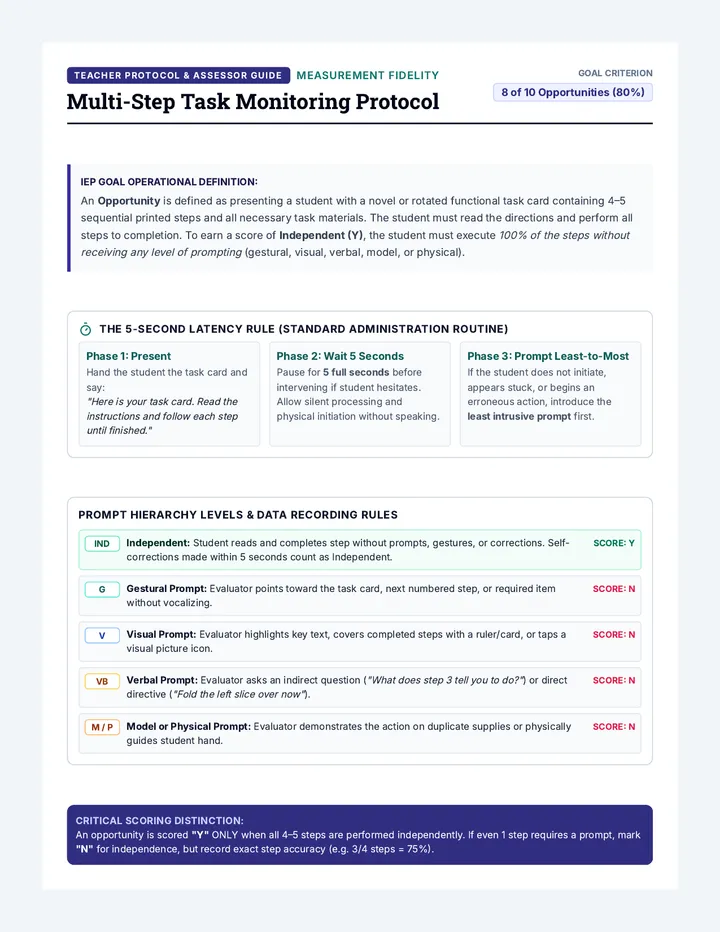
The Tennis Ball Simulation
Demonstrating Cognitive Load & The Need for External Systems
Learning Objective
Students will experience physical task overload to understand how "Working Memory" fails, motivating the use of a Kanban board to externalize tasks.
Materials Needed
10-12 Tennis balls (or beanbags)
3 Buckets or marked zones
Post-it notes (3 colors)
Painter's tape
The Simulation
1
Part A: The Brain Overload
Ask for a volunteer. Hand them one ball ("This is choosing a topic"). Then another ("This is bibliography"). Continue rapidly adding balls until they drop them.
Discussion Prompt: "When did you start to feel stressed? Why did you drop the first ball when I gave you the seventh?"
2
Part B: The Kanban System
Set up 3 buckets: To Do, Doing, Done . Have the student place all 10 balls in "To Do". They may only hold 2 balls at a time (WIP Limit) and move them to "Done".
Notice the difference in stress levels and organization.
Key Teaching Points
Executive Memory
Our brains aren't storage lockers; they are processors. Using a board saves 'RAM'.
WIP Limits
"Work in Progress" limits (max 2) prevent the 'tennis ball drop' and help with focus.
Mastering the Board • Lesson 1 Teacher Guide
Daily Standup Slides The Daily Pulse
Keeping Your Project Heart Beating
The Pit Crew Brief
In a high-speed race, a pit crew doesn't guess what to do. They have a fast, clear check-in.
Where are we right now?
What's holding us back?
What's the next 30 seconds?
12.4 SECONDS
Precision = Success
The "Daily Stand-Up"
1
Yesterday
What did I actually finish? (Move it to DONE)
2
Today
What is my main goal for this session? (Move it to DOING)
3
Blockers
What is stopping me? Is it a person, a tech issue, or a feeling?
Why Stand Up?
Speed
It should take 2 minutes. Quick checks prevent big failures later.
Orientation
It re-centers your focus. You don't have to remember where you left off.
"If you don't track your progress, you're just busy. If you track it, you're finishing."
The Daily Mission
Open your Mission Control Log . Answer these 3 things before you touch any other work:
1. One task I finished since last check-in.
2. The "One Big Thing" I must do today.
3. One thing that might stop me.
Mission Control Log Handout Mission Control Log
Daily Progress Tracker
Name:
Week Of:
Complete your Daily Pulse check-in at the start of every session. Be honest and brief—no more than 2 minutes. Update your Kanban board AFTER you fill this out.
M MONDAY
Status:
Yesterday's Win
Today's Mission
Potential Blockers
T TUESDAY
Status:
Yesterday's Win
Today's Mission
Potential Blockers
W WEDNESDAY
Status:
Yesterday's Win
Today's Mission
Potential Blockers
T THURSDAY
Status:
Yesterday's Win
Today's Mission
Potential Blockers
FRIDAY RECAP
Biggest Obstacle Overcome
Estimated Velocity (Tasks Finished)
Finished __________ tasks
Tip: If you're stuck on the same mission for 2 days, break it into 2 smaller missions!
Routine Mastery Teacher Guide LESSON 2 Teacher Reference
The Daily Pulse Routine
Building Consistency through the 'Self-Standup'
The "Why"
"Executive function is about managing the transition between states."
The Daily Pulse creates a transition ritual. It moves the student from 'passive observer' to 'active manager' of their own workload.
The First 5 Minutes: Protocol
1
The Visual Cue
When students enter, the 'Mission Control' slide should be up. Do not allow them to start project work until the log is open.
2
The 2-Minute Timer
Use a physical or digital timer. Speed is essential to emphasize that this is a check-in, not a writing assignment.
3
Board Update
Students MUST move a sticky note during the pulse. If they have nothing to move, they must break a larger task into something smaller.
Troubleshooting the Routine
Problem: "I didn't do anything."
Reframing: "Okay, your 'blocker' today is motivation or energy. Put 'Break task into 2-min steps' as your mission today."
Problem: Vague goals.
Correction: If a student writes "Work on project," ask: "What specific part will you move to DONE by the bell?"
Differentiation
For students with ADHD: Use a physical bell to signal the start/end of the Pulse. Color-code the Mission Log entries by feeling (Green = confident, Red = overwhelmed).For students with processing delay: Provide a 'Word Bank' of common blockers (Tech issues, Research confusion, Fatigue, Loud room).
Routine Mastery • Lesson 2 Teacher Guide
Pivot Plan Slides The Pivot Plan
When the Plan Meets Reality
Emergency Protocol
CRISIS CARD
The WiFi Blackout
"It's 8:00 PM. Your research paper is due tomorrow. Your home internet goes down and won't be back until morning."
Task:
Propose 3 ways to still get a 'B' or higher.
Plans are useful, but pivoting is a superpower.
A Pivot is a purposeful change in strategy without changing the ultimate goal.
The Pivot Menu
Cut Scope
Remove the "nice to haves." Focus only on the core requirements of the rubric.
Good for: Time crunch
Re-Prioritize
Do the hardest/most valuable task first. Push easy tasks to the very end.
Good for: Low energy
Communicate
Ask for an extension before the deadline. Offer a 'progress update' as proof of work.
Good for: Unseen obstacles
Spotting the "Drift"
How do you know when to pivot? Watch for these Red Flags:
Task is taking 2x longer than you thought.
You've started but haven't made a single "Done" move in 2 days.
You're "doing" but you don't actually know what the end result looks like.
You're avoiding the project entirely.
Rescue Mission
We're going to analyze a real student's project timeline that's falling apart. Your job: Pivot them to victory.
Start Case Study
Project Rescue Case Study Worksheet Project Rescue Case Study
Analyzing the Drift & Designing the Pivot
Student Team:
The Scenario: "The History Infographic"
Leo has a major project due in 4 days . He needs to create a large infographic about the Industrial Revolution including: 10 key dates, 5 hand-drawn illustrations, a 500-word summary, and a bibliography.
Leo's Current Board
10 key dates
Drawing Illustration #1
Illustration #2, #3, #4, #5
Write Summary
Bibliography
The Problem
Leo spent 3 hours on the first illustration. He is a perfectionist. At this rate, he will need 12 more hours just for drawings, leaving no time for the summary (which is worth 50% of the grade).
1. Identify the Red Flags
Why is this project in danger? List two specific observations.
2. Propose a Pivot: Strategy A (Cut Scope)
If Leo cuts the illustrations to just 2 very good drawings instead of 5, what does he gain? Is this a smart move based on the grading criteria?
3. Propose a Pivot: Strategy B (Re-Prioritize)
What task should Leo move to "DOING" immediately to ensure he doesn't fail, even if the project isn't "perfect"?
4. The "Email the Teacher" Pivot
Write a 2-sentence email from Leo to his teacher explaining his obstacle and proposing a solution (extension or modified scope).
Subject: Update on History Infographic Project...
Dear Mr. Smith,
Pivot Plan Teacher Guide LESSON 3 Discussion Guide
The Pivot Point Discussion
Guiding Students from "Failure" to "Recovery"
The Hook: Crisis Scenarios
Present these quickly to small groups. Give them only 60 seconds to find a pivot.
Crisis 1: The Lost File
You saved your project to a USB, and now it won't open. It's due in 2 hours.
Crisis 2: The Sickness
You're home sick with a fever, and your group depends on your part today.
Facilitating the Case Study
Concept: The "Perfectionism Trap"
Many students in Special Education struggle with 'perfectionism' as a form of task avoidance. In Leo's case, he is spending time on illustrations because the summary is harder/scarier.
Ask: "Is Leo working hard? Yes. Is he working on the right thing for his grade? No."
Strategy: Cutting Scope
Help students understand that 'done is better than perfect.' If the rubric says 5 drawings but drawing is slowing him down, getting 2 great drawings and a finished summary is better than 5 drawings and an F on the summary.
Strategy: Early Communication
Modeling the email pivot is crucial. Most students think they can't ask for help until the day of. Emphasize that 3 days early = "Professional Request," but 1 hour late = "Excuse."
Debrief Questions
"Why do we feel 'guilty' about pivoting? Does a pivot mean we failed?"
"Which strategy feels the hardest to do: Cutting scope or asking for help?"
"Think of your current project. What is your 'Illustrations'? The thing you're spending too much time on?"
The Pivot Plan • Lesson 3 Discussion Guide
Pomodoro Power Slides The Focus Factory
Building the Ultimate Work Session
The Distraction Audit
How many times does your brain "leave the room" in 5 minutes?
Common Thieves of Time:
A notification ping
Daydreaming about lunch
Hearing a conversation nearby
Opening a "quick" extra tab
The 5-Min Challenge
We're going to try to work for 5 minutes. Your only job is to tally every time you get distracted.
05:00
The Pomodoro Secret
1
PICK ONE
Choose 1 single task from your board.
2
WORK 25
Work with total focus for 25 minutes.
3
BREAK 5
Get up, move, drink water. NO SCREENS.
4
REPEAT
After 4 sessions, take a longer break (20m).
"Your brain is like a muscle. It can't lift heavy weights for an hour straight. It needs sets and reps."
Environment Engineering
Don't rely on willpower. Rely on your setup.
Phone in another room or in a bag.
Use lo-fi beats or white noise.
Clear your physical desk of everything but the task.
The Sanctuary
Focus Session #1
Set your environment. Pick your task. In 2 minutes, we start the first 25-minute Pomodoro.
Setup Time
Ready?
Focus Zone Tracker Worksheet Focus Zone Tracker
Session Log & Distraction Audit
Name:
Phase 1: 5-Minute Distraction Audit
While working for 5 minutes, put a tally mark every time your brain tries to leave the task (a thought about food, looking at your phone, hearing a noise, etc.).
Total Tallies
Biggest Distractor?
One way to block it:
Phase 2: Pomodoro Sessions
1
Mission for this 25m:
____________________________________________________________
Focus Score
Break Type
2
Mission for this 25m:
____________________________________________________________
Focus Score
Break Type
3
Mission for this 25m:
____________________________________________________________
Focus Score
Break Type
Session Reflection
Did the 25/5 rhythm help you move more stickies than usual?
YES
NO
Focus Factory Teacher Guide LESSON 4 Facilitation Guide
The Focus Session
Leading a Live Pomodoro Workshop
The Hook: Distraction Audit
Before starting the work block, run a 5-minute 'audit'.
"For the next 5 minutes, work on your project. Every single time your brain wanders—to a snack, a noise, or a text—put a tally mark. No judgment. We just want to see how busy your 'Distraction Monkey' is."
Goal: Building metacognitive awareness of internal vs. external distractions.
Pomodoro Protocol
1. Setup (3 mins)
Phones in backpacks/lockers.
Lo-fi music started (keep it lyric-free).
ONE sticky note moved to 'DOING'.
2. The Work Block (25 mins)
Minimize movement. If a student finishes a task, they move the note and pick the next ONE. No whole-class interruptions during this time.
The Break (5 mins) - The "No Screen" Rule
Students often try to go to their phones during breaks. Stop this. Screen time does not rest the brain; it adds cognitive load.
STRETCH
DRINK WATER
DOODLE
Adaptations
Shorten the block: For students with extreme focus difficulties, start with 10/3 or 15/5 instead of 25/5.Visual Timers: Use a red "Time Timer" (digital or physical) that visually shows the time disappearing.
Focus Factory • Lesson 4 Teacher Guide
Mission Debrief Slides The Mission Debrief
Closing the Loop for Future Victory
Advice to Past Self
"If you could send a 10-word text to yourself on Day 1 of this project, what would it say?"
To: Past Me
"___________________________________"
Metacognition is just a fancy word for learning from yourself.
The Post-Mortem
Wins
What went exactly as planned? What did you do right?
Drifts
Where did the timeline slide? What caused the "Red Flags"?
Adjust
What is ONE system change you'll make for the next project?
Understanding Velocity
Velocity is how many tasks you can actually finish in one work session.
"I thought I could do 5 tasks per day, but my logs show I usually do 2. My velocity is 2."
Next time, you will plan for 2, not 5. This stops you from falling behind before you even start.
D
O
N
E
Reality Check
Project Complete
It's time for your Mission Debrief . Be honest with yourself—your future self will thank you.
Open Post-Mortem
Mission Post-Mortem Form Mission Post-Mortem
Debriefing the Project Execution
Project Name:
Final Date:
The Wins
What system worked best for you?
Kanban Board (Visual tracking)
Daily Pulse (Check-in routine)
Pomodoro (Focus blocks)
My Favorite "DONE" Move:
Describe the task you felt best about finishing:
The Drift
Look back at your logs. Where did you lose the most time? (Circle all that apply)
Environment
Perfectionism
Lack of Clarity
Phone/Apps
Estimation Error
Stress/Burnout
The "Pivot" Moment:
Did you have to pivot? What did you change to get to the finish line?
The Reality Check (Velocity)
Planned Velocity
I originally thought I could finish _____ tasks per work session.
Actual Velocity
Looking at my Done column, I usually finished _____ tasks per session.
One Rule for my Future Self:
Example: "I will never start a project without breaking the first task into 5-minute chunks."
"Next time, I will __________________________________________________________________"
Visual Workflow Mastery Lesson 5 Reflection Form
Velocity Check Teacher Guide LESSON 5 Teacher Reference
Analyzing Velocity
Turning Hindsight into Foresight
The Goal
Students in Special Education often struggle with "Planning Fallacy"—the chronic underestimation of how long a task takes. The goal of this debrief is to replace optimistic guesses with empirical data.
Facilitating the Velocity Check
Have students look at their Mission Control Log from Lesson 2. Ask them to count the total number of 'Done' tasks over the last 5 sessions.
The Formula
Total Tasks Finished / Total Sessions = Velocity
Example: 10 tasks / 5 sessions = 2 tasks per session.
Key Teaching Point: "If your velocity is 2, and you have a project with 20 tasks, you need 10 sessions. You cannot do it in 2 sessions. This is how you stop procrastinating."
Identifying Drift
When students discuss where they lost time, focus on system failures , not character failures .
Character Failure (Avoid this)
"I was lazy." "I'm bad at math." "I just didn't do it."
System Failure (Target this)
"I didn't break the task down enough." "My phone was visible." "I didn't have the rubric."
The "Advice to Past Self" Closure
"Have students write their advice on a sticky note and place it on their locker or the inside of their project folder. This acts as a 'Future Self Intervention' for the next big assignment."
The Mission Debrief • Lesson 5 Teacher Guide