Recharge Radar Workbook
Personal Regulation Guide
Recharge Radar
Track your power stats to conquer the afternoon block schedule.
Leel: HS / Tech-Style
Pilot Name ___________________________
Afternoon Class ___________________________
Target Block Time ___________________________
1. The Battery Spectrum (Where are you right now?)
Full Charge 80-100%
Mind is locked in. Ready to tackle hard tasks, solve problems, or listen to long guides.
How it feels: No physical tension, calm breathing, ideas flowing easily.
Steady State 40-79%
Slightly distracted. Best for routine work, quiet editing, or structured drawing breaks.
How it feels: Fidgety, eyes drift to walls, drawing ideas starting to pop up.
Low Power Under 40%
Brain fog. Urge to tune out, draw instantly, or watch videos is extremely high.
How it feels: Heavy eyes, frustrated, zero patience for teacher directions.
2. My Afternoon Drift Map
Long classes can drain us fast. Let's trace when you typically feel the "low power" warning kick in.
| Class Stage | Usual Battery Level | Main "Energy Thief" |
|---|
| First 15 Mins | | |
| Opening check-in / Warm-up | | |
| High Steady Low | | |
| ___________________________ |
| Middle 40 Mins
Direct instruction & lectures |
High Steady Low
| ___________________________ |
| Last 30 Mins
Independent / Work time |
High Steady Low
| ___________________________ |
Self-Radar Challenge:
When you feel yourself entering the Low Power Zone, drawing or checking a video seems like the only option. But we can catch it early. What is your #1 physical warning sign? (Check all that apply):
Tapping pen / foot rapidly Heavy, sleepy eyes Flipping pages to doodle blank spots Getting annoyed by teacher's voice
Action Playbook
Self-Advocacy Signal
Getting your battery recharged without causing a scene.
Part 2
3. Micro-Scripts (The Advocate's Voice)
Teachers appreciate proactive warnings. Instead of avoiding or shutting down, practice writing out these customized signals to send via card, note, or quiet whisper.
Option A: The Private Desk-Card
Place your "Battery Signal Card" on your desk. Point to it when the teacher walks past. It says:
"Hi. My energy battery is at ______% right now. I need to activate a ______ minute scheduled break to draw or rest. I will restart my task at ______ : ______."
Option B: Verbal Advocate Script
Walk up to the teacher's desk during individual work time and say:
"Hey Mr./Ms. _______________, I am losing focus on this long block. I completed steps ______ and ______. I'd like to use my 5-minute sketch reset now, and I'll return to finish the rest when my timer goes off."
4. Personal Reset Blueprint
Design your ideal break blueprint below. What does a successful 5-minute reset look like that lets you start work again afterward?
Sketch Your Default Reset Action
Write or draw: e.g., drawing a rapid caricature, head on desk, stretching my shoulders.
My Post-Break Transition Plan
What action will you take IMMEDIATELY when the reset timer rings? (e.g., "Open laptop and read paragraph 2").
Quick Reminder
Taking a structured, planned 5-minute break is a strength. Shutting down or walking off leads to teacher stress. Work the plan, protect your drawing time!
Creative Focus Contract Pack
Collaborative Agreement
Creative Focus Contract
Balancing teacher expectations with personal creative independence.
Contract Pack
Student Artist ___________________________
Coordinating Teacher ___________________________
1. The Creative Compromise
Both the student and teacher acknowledge that sustained attention for an entire afternoon block is exhausting. To ensure success, we agree to the following terms regarding academic focus and creative rest:
The Pacing Protocol
The student will actively participate in class assignments or direct instruction for 25-minute intervals. The teacher will not demand full attention beyond this interval without a scheduled break.
The Creative Reward
Upon completing a 25-minute focus chunk, the student earns a 5-minute Reset Break. During this break, the student is fully permitted to draw in their sketchbook or use pre-approved digital design tools.
Hardware Placement Rules
During academic focus intervals, personal devices (phones/tablets) will remain in the "Charging Dock" (designated desk box/backpack) to prevent passive scrolling and high-fatigue distractions.
2. Reset Parameters
Permitted Activities:
- Drawing original art in paper sketchbooks.
- Scribbling/doodling anime characters.
- Watching pre-approved design tutorials.
- Listening to instrumental music (one earbud).
Restricted Activities:
- Browsing social media feeds or comment streams.
- Drawing content with gore or violence.
- Watching random entertainment streams.
- Leaving the classroom without permission.
"I agree to follow this plan and advocate respectfully when my battery drops."
Student Artist Signature & Date
"I agree to protect this student's scheduled breaks and support their creative self-regulation."
Teacher Signature & Date
Regulation Metrics
Afternoon Block Log
Daily tracker for checking off interval success and earning large creative bonuses.
Part 2
How to log: Put a checkmark (✓) or stamp in each block interval if you stayed focused for the full 25 minutes. If a break was taken appropriately, shade in the "Break Used" battery. At the end of class, total up your points to build weekly creative power!
Day Interval 1
(25 min focus) Break 1
(5 min draw) Interval 2
(25 min focus) Break 2
(5 min draw)
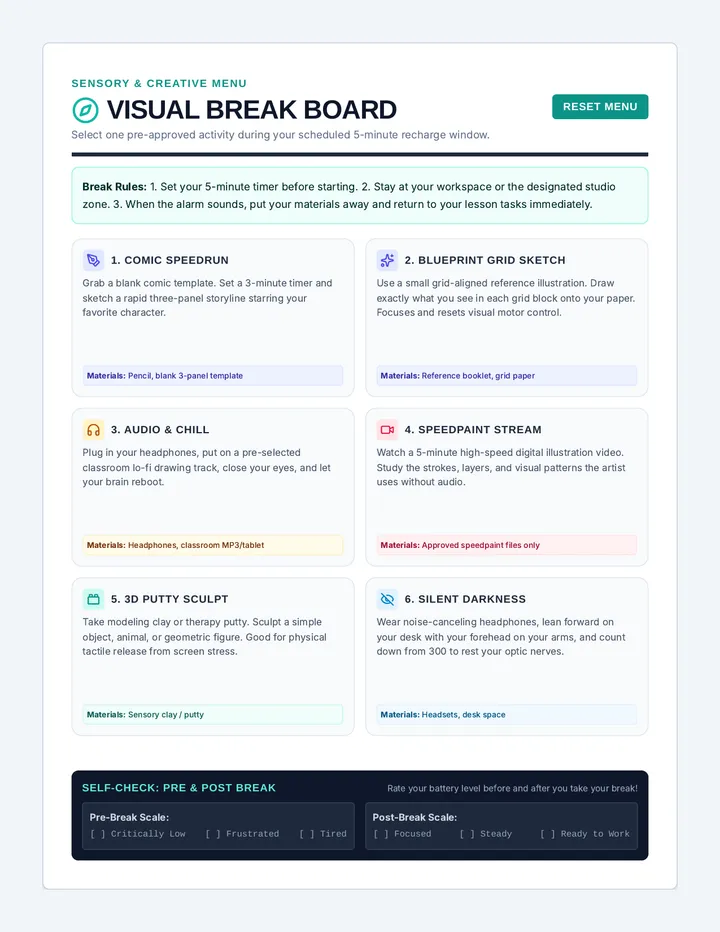
Visual Break Choice Board
Sensory & Creative Menu
Visual Break Board
Select one pre-approved activity during your scheduled 5-minute recharge window.
Reset Menu
Break Rules: 1. Set your 5-minute timer before starting. 2. Stay at your workspace or the designated studio zone. 3. When the alarm sounds, put your materials away and return to your lesson tasks immediately.
1. Comic Speedrun
Grab a blank comic template. Set a 3-minute timer and sketch a rapid three-panel storyline starring your favorite character.
Materials: Pencil, blank 3-panel template
2. Blueprint Grid Sketch
Use a small grid-aligned reference illustration. Draw exactly what you see in each grid block onto your paper. Focuses and resets visual motor control.
Materials: Reference booklet, grid paper
3. Audio & Chill
Plug in your headphones, put on a pre-selected classroom lo-fi drawing track, close your eyes, and let your brain reboot.
Materials: Headphones, classroom MP3/tablet
4. Speedpaint Stream
Watch a 5-minute high-speed digital illustration video. Study the strokes, layers, and visual patterns the artist uses without audio.
Materials: Approved speedpaint files only
5. 3D Putty Sculpt
Take modeling clay or therapy putty. Sculpt a simple object, animal, or geometric figure. Good for physical tactile release from screen stress.
Materials: Sensory clay / putty
6. Silent Darkness
Wear noise-canceling headphones, lean forward on your desk with your forehead on your arms, and count down from 300 to rest your optic nerves.
Materials: Headsets, desk space
Self-Check: Pre & Post Break Rate your battery level before and after you take your break!
Pre-Break Scale:
[ ] Critically Low [ ] Frustrated [ ] Tired
Post-Break Scale:
[ ] Focused [ ] Steady [ ] Ready to Work