Personalized Executive Function Coaching Lesson Plan Personalized Executive Function Coaching
Lesson Plan • Tier 3 Individual Support
50 Minutes
10th Grade Individual
The Purpose
Developing strong executive function skills is crucial for academic success, personal independence, and future endeavors. This lesson provides targeted support to help students build essential life skills through a personalized, non-punitive approach that focuses on brain science and practical tools.
Preparation & Setup
Estimated Time: 15 Minutes
Review the Brain Command Center Slides to familiarize yourself with the content.
Print copies of the Custom Planning Activity and Workspace Project Guide .
Ensure a comfortable and private space for the individual coaching session.
Required Materials
Brain Command Center Slides
Custom Planning System Activity
Workspace Design Project Guide
Learning Objective
"Students will identify their current executive function strengths and challenges, learn tailored strategies for planning and organization, and begin developing a personalized system to improve their self-regulation and task initiation."
Instructional Sequence
1
Introduction & Goal Setting
10 MIN
Welcome: Greet the student. Explain that this session is a partnership to build tools that work for *their* specific brain, not a lecture on what they're doing "wrong."What are Executive Functions? Use the slide deck to introduce the control tower analogy. Emphasize that these are skills, not personality traits.Self-Assessment: Help the student identify 1-2 friction points (e.g., "The black hole backpack" or "The Sunday night panic"). Set a specific goal for the hour.
2
Deep Dive into Planning & Organization
15 MIN
Methodology: Discuss digital vs. analog. Some students need the tactile feel of a physical planner; others need the notifications of a phone.Activity: Begin the My Custom Planning System Activity . Don't rush to fill it all; focus on the "Explore" section to find what sparks interest.Discussion: "If you had to pick one tool to try for just three days, which would it be?"
3
Task Initiation & Workspace Design
15 MIN
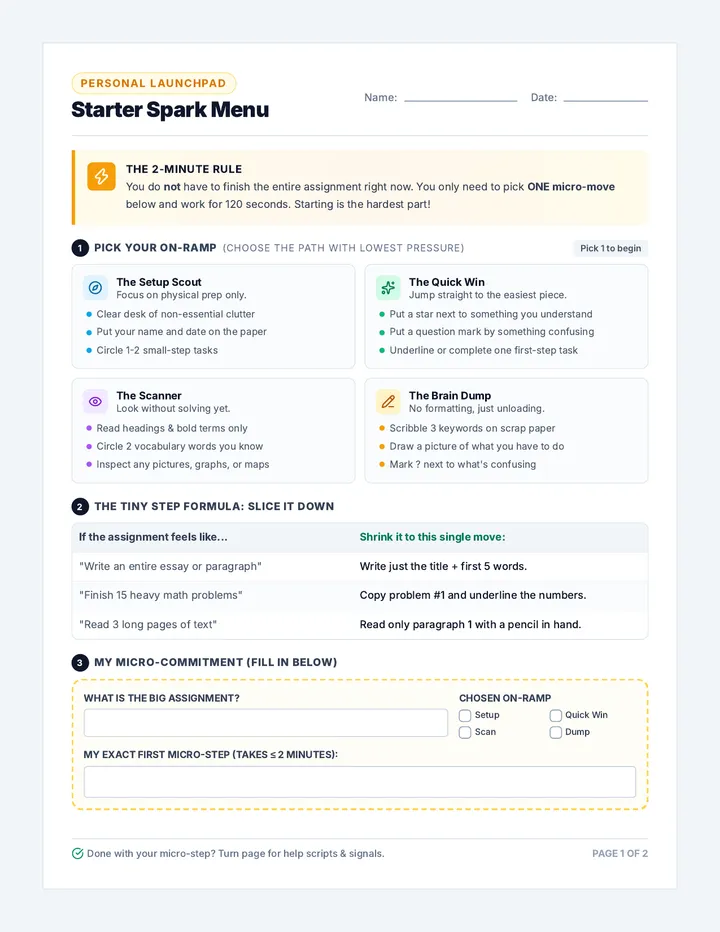
Starting Friction: Discuss the "Wall of Awful" (the emotional barrier to starting). Introduce the 5-Minute Rule and breaking tasks down.Environment: Present the Building My Ideal Workspace Guide . Discuss how physical clutter equals mental clutter.Brainstorm: Have the student sketch a quick rough draft of their "Power Spot" (workspace).
4
Wrap-Up & Next Steps
10 MIN
Action Plan: Define 1 concrete step for this week. (e.g., "I will put all my deadlines in Google Calendar" or "I will clear my desk tonight").Check-in: Schedule the follow-up. Executive function coaching requires high-frequency, low-intensity follow-up to build habits. Your Brain's Command Center Slides Student Success Series
Your Brain's
Command Center
Mastering the executive functions that turn goals into reality.
The EF Toolkit
The Managers in Your Head
Executive Functions are like the control tower for your life. They help you:
Plan Ahead
Stay Organized
Start Tasks
Reality Check:
"Nobody is born with a perfect command center. These are skills we build through practice and finding the right tools."
The Art of Planning
Why Plan?
Reduces stress and "Sunday Night Panic."
Breaks giant projects into easy steps.
Makes sure you don't forget the fun stuff!
Your Planning Toolkit:
01 Digital: Google Cal, Notion, Reminders
02 Analog: Paper Planners, Post-its, Lists
03 Strategy: Backward Mapping (start from the due date!)
Which one sounds like you?
Organization Superpowers
A Home for Everything
If it doesn't have a specific spot, it becomes clutter. Choose a 'home' for every charger, pencil, and paper.
Color-Coding
Use color to group subjects. Red for Math, Blue for English. Your brain recognizes color faster than words.
Declutter Habit
Take 2 minutes at the end of every school day to toss old papers and reset your desk. Fresh start!
Digital Organization: Clean up those desktop icons and download folders!
The Challenge of Starting
Why is starting so hard?
The task feels too big.
We don't know where to begin.
We're afraid of doing it wrong.
The "Quick-Start" Menu:
The 5-Minute Rule
Tell yourself you'll work for just 5 minutes. If you want to stop then, you can. (Usually, you won't!)
The Pomodoro Boost
Work intensely for 25 minutes, then take a 5-minute phone break. Repeat.
Your Power Workspace
Your environment triggers your habits.
Focus over Comfort
Distraction-Free Zone
Today's Mission:
Identify YOUR personal goals.
Start building YOUR system.
Design YOUR ideal space.
LET'S GET STARTED!
Custom Planning System Activity Sheet MY CUSTOM PLANNING SYSTEM
Building an approach that works for *your* brain.
Student
Date
Goal: Discover and design tools that truly work for YOU
1
Reflect & Brainstorm
01. Current Planning Habits
How do you currently keep track of assignments, deadlines, and personal appointments? (Be honest!)
02. What works well?
What aspects of your current system do you actually like?
03. What's challenging?
What makes planning or organizing difficult for you?
04. The Dream System
If you could design your perfect system, what features would it have? (e.g. visual, digital, color-coded, phone alerts)
2
Explore & Experiment
A. Planning Tools
Tool / Method What I like What's hard Try it? Digital Calendar
|
|
| Physical Planner |
|
|
|
| Simple To-Do List |
|
|
|
| Bullet Journal |
|
|
|
B. Organizational Strategies
Strategy Physical Space Use Digital File Use "Home" for everything
|
| Color-Coding |
|
|
| Regular Decluttering |
|
|
3
My Personalized Action Plan
What 1-2 strategies are you committed to trying this week?
How will you integrate them into your routine?
Workspace Design Project Guide Design Challenge
BUILDING MY IDEAL
WORKSPACE GUIDE
Design a space that works for you, reduces friction, and boosts your productivity.
Project Goal
To design and implement a workspace that supports your focus and task initiation. This is your "Power Spot" for getting things done.
1
Workspace Vision Board
Visually represent your ideal setup. Consider layout, lighting, storage, and personal touches that make you feel motivated.
Deliverable:
Create a vision board (collage) or a detailed sketch of your space. Highlight how it minimizes distractions.
2
Inventory & Declutter Plan
Assess what you have now. What stays? What goes? What needs a "home"?
Keep
Donate/Discard
Relocate
Deliverable:
A categorised item list and a step-by-step plan for the physical transformation.
3
Action Plan & Reflection
Define concrete steps and reflect on how this will impact your learning.
Deliverable:
3-5 concrete action steps (e.g., "Buy desk lamp").
A short paragraph reflecting on the potential impact on your focus and task initiation.
Assessment Criteria
Completeness
All three components are thoroughly addressed and submitted.
Thoughtfulness
Evidence of personal reflection and consideration of your specific needs.
Feasibility
Steps are realistic, actionable, and achievable within a 1-2 week timeline.
Clarity
Ideas are presented clearly, whether through drawing, writing, or photos.
"Your environment is the invisible hand that shapes your human behavior."