Friction Hunters Lesson Plan Educator Facilitation Guide
Friction Hunters Lesson Plan
Grade 10 • Applied Design
3–5 Studio Sessions (180–240 min total)
Framework
Human-Centered Design (d.school)
Delivery Mode
Independent Learner Sprint
Core Deliverable
Functional Low-Fi Prototype
Assessment
4-Domain Mastery Rubric
Unit Mission & Core Focus
Students shift from passive consumers of workflows to active systems engineers. By detecting micro-frictions (annoyances, bottleneck routines, physical or digital obstacles) in their own lives and interviewing a real user, students define latent user needs and assemble a tangible prototype under rigorous constraints.
Essential Questions
Why do people tolerate broken routines instead of fixing them?
How does empathetic interviewing uncover unstated root problems?
What makes a prototype "functional" without being high-fidelity?
Targeted Competencies & Standards
1. Friction Diagnostics (HS-ETS1-1)
Analyze complex real-world daily systems to specify constraints, root causes, and user bottlenecks.
2. Empathy Elicitation (CCSS.ELA.SL.10.1)
Conduct non-leading user interviews to discover emotional pain points and implicit workarounds.
3. Iterative Prototyping (HS-ETS1-3)
Design, construct, test, and refine a low-fidelity model that provokes immediate user testing.
Studio Workflow: Phase 1 & 2 Execution
Phase 1: Friction Auditing & Shadowing (Day 1 • 45 min) Observe & Map
Educator Prompt: Introduce the concept of "Invisible Friction." Students audit a 24-hour cycle (morning transit, study space desk clutter, backpack organization, charging cables, kitchen workflows). They document 3 distinct friction moments using the Emotion vs. Efficiency Matrix .
Scaffolding: Warn students against proposing solutions yet. If a student says "I need an app to remind me," coach them back to the symptom: "What specifically fails in your attention routine?"
Phase 2: Empathy Inquiry & Peer/Family Interview (Day 2 • 45 min) Listen & Uncover
Educator Prompt: Students select one friction candidate affecting a sibling, parent, or peer. They execute a 15-minute semi-structured empathy interview using the "Show Me / Tell Me Stories" method rather than asking yes/no questions.
Key Script: "Tell me about the last time that happened..." or "Watch them perform the task and note where their body stiffens or sighing occurs."
The Innovation Studio • Human-Centered Design Facilitation Guide Page 1 of 2
Studio Workflow: Phases 3 to 5 & Studio Tactics
Sprint Protocol // Guide Part 2
Phase 3: POV Synthesis & How-Might-We (HMW) Framing (Day 3 • 30 min) Reframe
Synthesize interview transcripts into an explicit POV formula: [User Name] needs a way to [Action/Goal] because surprisingly [Surprising Underlying Insight] . Learners write 3 divergent "How Might We" prompts that open up design pathways without dictating the mechanism.
Phase 4: The 60-Minute Rapid Prototyping Sprint (Day 3-4 • 60 min) Build to Think
Enforce rapid low-fidelity physical or structural builds. Materials: cardboard, foam, rubber bands, clips, tape, cardstock, wire, or interactive wireframe mocks. Rule: No finished perfectionism . The prototype must test ONE critical functional assumption with the user within 24 hours.
Phase 5: User Stress-Test & 2-Minute Studio Pitch (Day 5 • 45 min) Iterate & Share
The user attempts to use the prototype while thinking aloud. Students collect "I Like...", "I Wish...", and "What If..." notes. In the studio showcase, students present: 1) The original friction, 2) The user surprise, 3) The prototype, and 4) What failed and how they iterated.
Recommended Sprint Materials Box
Equip independent workstations or home kits with everyday structural goods:
• Corrugated cardboard • Duct / masking tape • Binder clips & bands • Pipe cleaners / wire • Velcro strips / magnets • 3x5 index cards
Common Traps & Interventions
Trap: "I'll just make an app" Trap: Leading interview questions Trap: Cosmetic over Functional
Differentiation & Extension Pathways
Structured Support (Accessible Entry): Provide a curated menu of 5 workflow zones (e.g., student charging station, backpack heavy load distribution, morning routine key/phone drop, desk notebook organizer) and pre-written interview stems.
Advanced Studio Challenge: Require quantitative ergonomics or time-motion benchmark testing (e.g., measuring seconds saved per task cycle) and a multi-user blind stress test.
Evaluation Package: Empathy Blueprint Worksheet + Prototype Sprint Canvas + 4-Tier Rubric.
Classroom Ready
The Innovation Studio • Human-Centered Design Facilitation Guide Page 2 of 2
Friction Studio Slides The Innovation Studio
Tenth-Grade Design Sprint
Human-Centered Design for Daily Friction
Friction Hunters: Re-Engineering Everyday Life
Identify the hidden bottlenecks in daily routines, uncover real user needs, and engineer a functional prototype in 60 minutes.
Sprint 01 • Empathy & Prototyping Build to Think // Learn by Testing
What is "Daily Friction"?
01 // Problem Discovery
The Invisible Tax
Friction is any recurring hassle, delay, physical awkwardness, or cognitive overload people simply tolerate because "that's just how it is."
"People get so used to workarounds that they forget the workflow is broken."
Time Sinks
Searching 5 minutes every morning for misplaced keys or student badges.
Physical Chaos
Overstuffed backpacks crushing assignments; tangled charging nests.
Mental Overhead
Constantly switching across 4 apps just to track homework deadlines.
Key Mindset: Don't ignore annoyances. Hunt them. Observation > Assumption
The Human-Centered Sprint Cycle
02 // The Framework
01
Audit
Track daily friction points in your own schedule.
Spot Pain
02
Empathize
Interview a peer or family member deeply.
Listen Close
03
Reframe
Craft a sharp Point of View and HMW question.
Define Need
04
Prototype
Build a fast physical or visual model in 60 min.
Build to Think
05
Stress Test
Put the prototype in the user's hands & learn.
Iterate Fast
Design is not linear—each test gives you data to refine. Adapted from Stanford d.school
Rule 1 of Empathy: Don't Ask What They Want
03 // Field Research
Avoid Leading Questions
✗ "Wouldn't you like an app that sorts your desk?" (Suggests your solution)
✗ "Do you get stressed in the morning?" (Yields a hollow yes/no)
✗ "What should I invent for you?" (Users cannot engineer latent needs)
Ask for Stories & Behavior
✓ "Tell me about the last time you rushed to get ready."
✓ "Show me how you currently pack your bag before you leave."
✓ "Why did you do that step first? What felt hardest?"
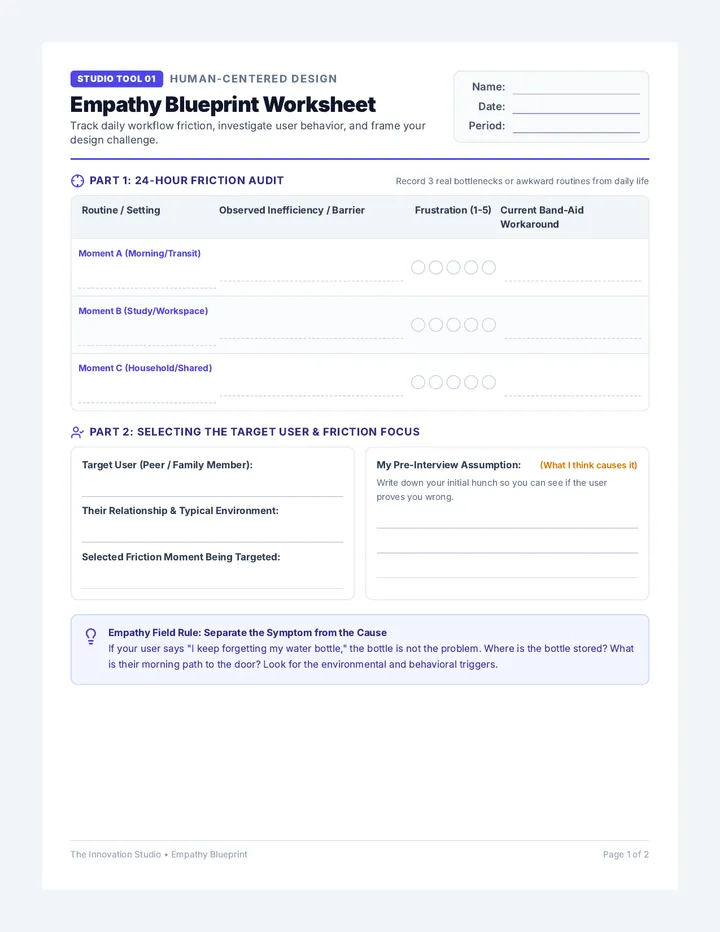
Empathy Blueprint Worksheet Studio Tool 01 Human-Centered Design
Empathy Blueprint Worksheet
Track daily workflow friction, investigate user behavior, and frame your design challenge.
Name:
Date:
Period:
Part 1: 24-Hour Friction Audit
Record 3 real bottlenecks or awkward routines from daily life
Routine / Setting
Observed Inefficiency / Barrier
Frustration (1-5)
Current Band-Aid Workaround
Moment A (Morning/Transit)
Moment B (Study/Workspace)
Moment C (Household/Shared)
Part 2: Selecting the Target User & Friction Focus
Target User (Peer / Family Member):
Their Relationship & Typical Environment:
Selected Friction Moment Being Targeted:
My Pre-Interview Assumption: (What I think causes it)
Write down your initial hunch so you can see if the user proves you wrong.
Empathy Field Rule: Separate the Symptom from the Cause
If your user says "I keep forgetting my water bottle," the bottle is not the problem. Where is the bottle stored? What is their morning path to the door? Look for the environmental and behavioral triggers.
The Innovation Studio • Empathy Blueprint Page 1 of 2
Studio Tool 01
Part 3: Field Interview Protocol & Synthesis
Empathy Blueprint // Page 2
Field Interview Notes (15-Minute Direct Inquiry)
Conduct live with user • Document verbatim quotes
Prompt 1: "Walk me through the last time you experienced [friction]. What happened?" Story & Timeline
Prompt 2: "Show me exactly how you work around it right now. What feels clumsy?" Physical / Behavioral Observation
Prompt 3: Unspoken Emotion & Surprises (What surprised you about their reaction?) Latent Needs
Part 4: Point-of-View (POV) Problem Statement
Fill out the three-part design synthesis formula based strictly on your interview evidence:
[User Description]
Who specifically is this for?
NEEDS A WAY TO...
What is their essential goal?
BECAUSE SURPRISINGLY...
What unexpected root cause emerged?
Part 5: "How Might We" (HMW) Brainstorming Launchpads
Write 2 divergent HMW questions that open up different mechanical or spatial avenues for rapid prototyping.
HMW Option A (Focus on Speed / Physical Access):
HMW Option B (Focus on Cognitive Clarity / Habit Cue):
The Innovation Studio • Empathy Blueprint Page 2 of 2
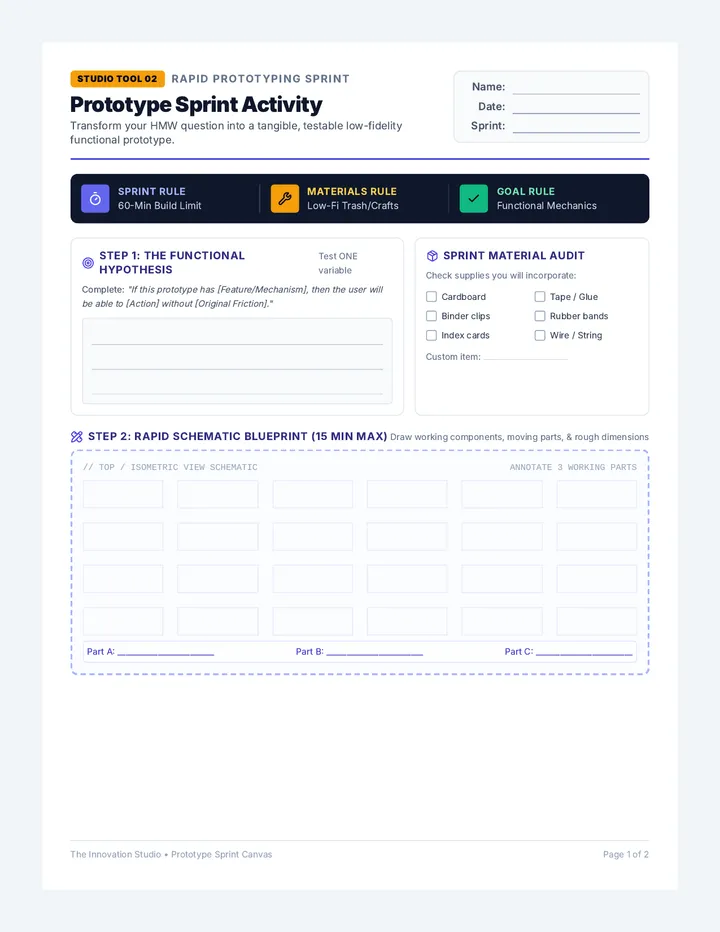
Prototype Sprint Activity Studio Tool 02 Rapid Prototyping Sprint
Prototype Sprint Activity
Transform your HMW question into a tangible, testable low-fidelity functional prototype.
Name:
Date:
Sprint:
Sprint Rule 60-Min Build Limit
Materials Rule Low-Fi Trash/Crafts
Goal Rule Functional Mechanics
Step 1: The Functional Hypothesis
Test ONE variable
Complete: "If this prototype has [Feature/Mechanism], then the user will be able to [Action] without [Original Friction]."
Sprint Material Audit
Check supplies you will incorporate:
Cardboard Tape / Glue Binder clips Rubber bands Index cards Wire / String
Custom item:
Step 2: Rapid Schematic Blueprint (15 Min Max)
Draw working components, moving parts, & rough dimensions
// TOP / ISOMETRIC VIEW SCHEMATIC ANNOTATE 3 WORKING PARTS
Part A: ________________________ Part B: ________________________ Part C: ________________________
The Innovation Studio • Prototype Sprint Canvas Page 1 of 2
Studio Tool 02
Step 3: Live User Stress-Test & Feedback Matrix
Prototype Sprint // Page 2
The "Don't Help Them" Testing Rule:
Hand your prototype to your user and state the task (e.g., "Try grabbing your headphone cord using this." ). Do not explain how it works! Watch where their fingers go. If they get confused, don't correct them—document the confusion.
User's First Natural Reaction / Motion:
User Friction Reduction Rating: 1 = Worse, 5 = Flawless
1 2 3 4 5
User Feedback Capture Matrix
"I LIKE..."
What felt intuitive or satisfying?
"I WISH..."
What snapped, slipped, or frustrated?
"WHAT IF..."
New features or extensions suggested:
Step 4: Sprint 2 Redesign & Iteration Plan
Primary Flaw / Mechanical Bottleneck Discovered:
Engineered Fix for Prototype Version 2.0:
What to Remove or Simplify:
What to Reinforce or Automate:
The Innovation Studio • Prototype Sprint Canvas Page 2 of 2
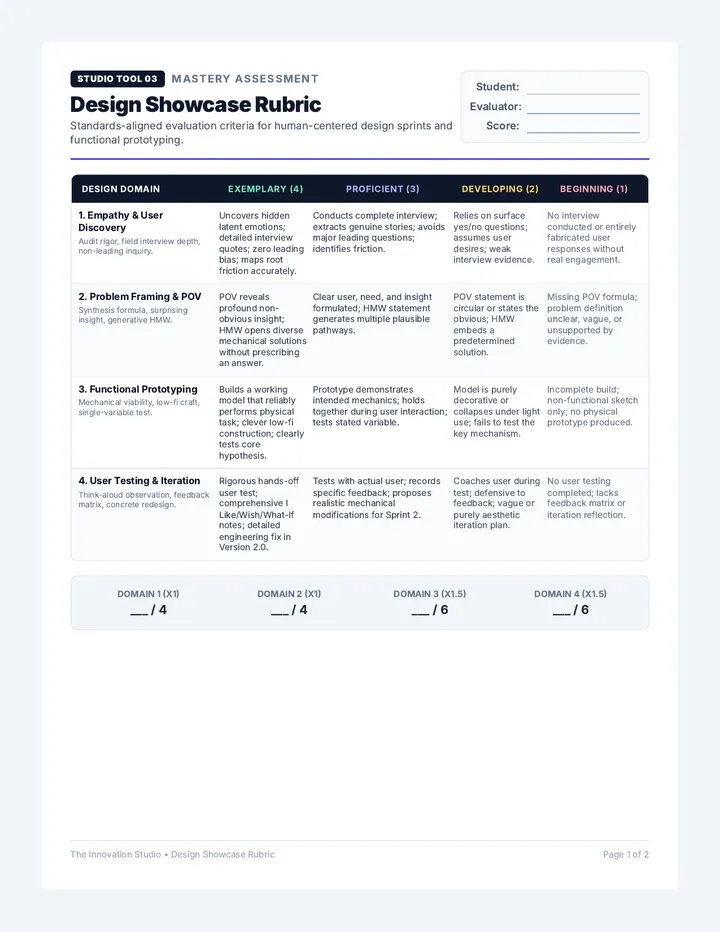
Design Showcase Rubric Studio Tool 03 Mastery Assessment
Design Showcase Rubric
Standards-aligned evaluation criteria for human-centered design sprints and functional prototyping.
Student:
Evaluator:
Score:
Design Domain
Exemplary (4)
Proficient (3)
Developing (2)
Beginning (1)
1. Empathy & User Discovery Audit rigor, field interview depth, non-leading inquiry.
Uncovers hidden latent emotions; detailed interview quotes; zero leading bias; maps root friction accurately.
Conducts complete interview; extracts genuine stories; avoids major leading questions; identifies friction.
Relies on surface yes/no questions; assumes user desires; weak interview evidence.
No interview conducted or entirely fabricated user responses without real engagement.
2. Problem Framing & POV Synthesis formula, surprising insight, generative HMW.
POV reveals profound non-obvious insight; HMW opens diverse mechanical solutions without prescribing an answer.
Clear user, need, and insight formulated; HMW statement generates multiple plausible pathways.
POV statement is circular or states the obvious; HMW embeds a predetermined solution.
Missing POV formula; problem definition unclear, vague, or unsupported by evidence.
3. Functional Prototyping Mechanical viability, low-fi craft, single-variable test.
Builds a working model that reliably performs physical task; clever low-fi construction; clearly tests core hypothesis.
Prototype demonstrates intended mechanics; holds together during user interaction; tests stated variable.
Model is purely decorative or collapses under light use; fails to test the key mechanism.
Incomplete build; non-functional sketch only; no physical prototype produced.
4. User Testing & Iteration Think-aloud observation, feedback matrix, concrete redesign.
Rigorous hands-off user test; comprehensive I Like/Wish/What-If notes; detailed engineering fix in Version 2.0.
Tests with actual user; records specific feedback; proposes realistic mechanical modifications for Sprint 2.
Coaches user during test; defensive to feedback; vague or purely aesthetic iteration plan.
No user testing completed; lacks feedback matrix or iteration reflection.
Domain 1 (x1) ___ / 4
Domain 2 (x1) ___ / 4
Domain 3 (x1.5) ___ / 6
Domain 4 (x1.5) ___ / 6
The Innovation Studio • Design Showcase Rubric Page 1 of 2
Studio Tool 03
Part 2: 2-Minute Studio Pitch & Metacognitive Log