Terminal Output:
1 2 3 4 5
Before Loop: score = 0
Round 1 (i = 0): score = 1
Round 2 (i = 1): score = 2
Rounds 3-5: score grows to 5
Crucial Pattern: We start the score at 0 before the loop begins so it can keep counting up!
🔁 Every time the indented code runs, score += 1 adds 1 to the existing total.
Code Along
Slide 6 / 14
1
Create a new code cell for Wednesday's practice.
2
Watch the numbers count up from 1 to 5.
★
Change range(5) to range(10). What is the final number printed?
counting_loop.py Colab
score = 0

for i in range(5):
    score += 1
    print("Current score:", score)
💡 Each pass through the loop, the variable preserves its value from the previous pass! Shift + Enter to run
Indentation Matters
print() Belong?Slide 7 / 14
Print Inside (Indented)
score = 0
for i in range(3):
    score += 1
    print(score)
Prints every single round: 1, 2, 3 (Running update)
Print Outside (Unindented)
score = 0
for i in range(3):
    score += 1

print(score)
Prints only ONCE at the end: 3 (Final score)
🏆 For our game, we'll want to print round scores inside and the final champion outside!
Two Players
Slide 8 / 14
Two Separate Counters
# Set both scores to 0 before match
player_score = 0
computer_score = 0

for i in range(5):
    # Play round and give point...
In Rock, Paper, Scissors, both players start at zero. A win awards a point to only one player.
If player wins: player_score += 1
If computer wins: computer_score += 1
What if it's a tie round? Neither counter changes!
🎮 Two independent variables allow Python to track head-to-head competition!
Decisions & Points
Slide 9 / 14
Conditional Score Update
winner = input("Who won? ")

if winner == "player":
    player_score += 1
elif winner == "computer":
    computer_score += 1
else:
    print("Tie round!")
You already know how to check who won a round using if and elif.
Now, instead of just printing "You win!", we also award a point to the winner's counter.
⚡ This is the exact piece of code that will plug inside your RPS loop on Thursday!
🎯 When a round finishes, Python evaluates the outcome and increments the proper score.
Code Along
Slide 10 / 14
mock_match.py Google Colab
player_score = 0
computer_score = 0

for i in range(3):
    winner = input("Winner (p/c)? ")
    if winner == "p":
        player_score += 1
    else:
        computer_score += 1

print("Final:", player_score, "to", computer_score)
Colab will ask you 3 times who won. Type p or c each round.
Notice how the program remembers all 3 rounds and outputs the correct final score at the end!
🔍 Notice the last line is unindented — it runs only after all 3 rounds are finished!
⚡ You just built the core score-tracking engine for a multi-round game!
Declaring a Champion
Slide 11 / 14
Final Win Condition (Outside Loop)
# After all 5 rounds finish:
if player_score > computer_score:
    print("🏆 You won the match!")
elif computer_score > player_score:
    print("🤖 Computer won the match!")
else:
    print("🤝 The match was a tie!")
Because this code is NOT indented under the loop, Python waits until all 5 rounds have completed before running it.
It simply compares the two totals with > and crowns the overall champion!
🎉 This completes the full flow of our 5-round match architecture!
💡 Notice: The score logic is completely separate from the round gameplay itself.
Bug Hunt
Slide 12 / 14
Spot the Devastating Bug
for i in range(5):
    score = 0
    score += 1
    print(score)
• What will this code print during each of the 5 repetitions?
• Why does score never reach 5?
• How do you fix it with one simple change?
⚠️ This is the #1 mistake students make with score counters in loops!
🔎 Discuss with your elbow partner — trace the value of score on pass 1, 2, and 3! No spoilers!
Practice Time
Slide 13 / 14
1
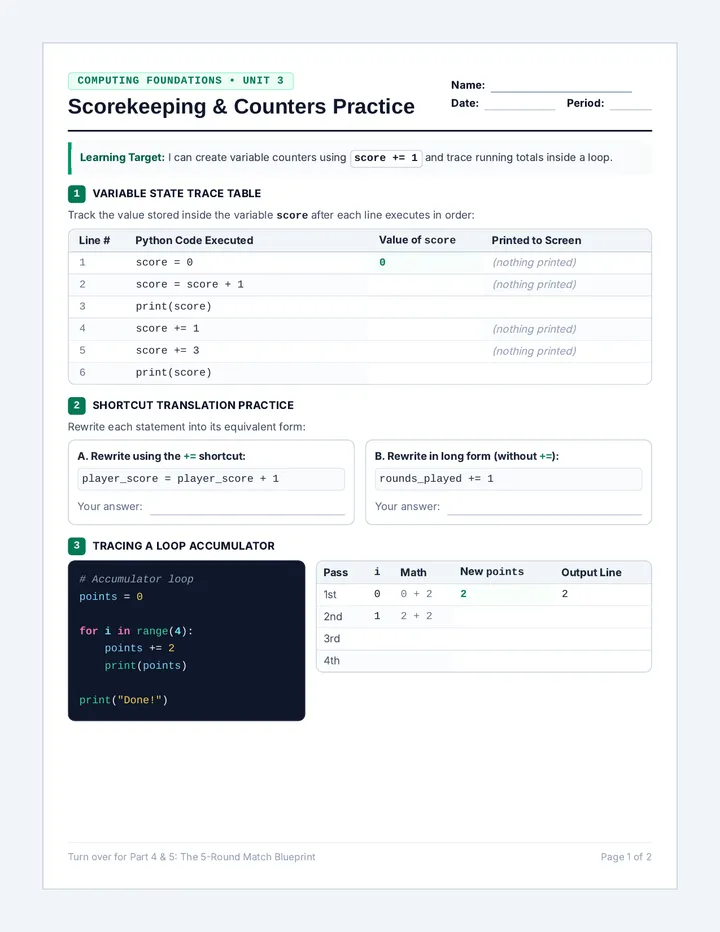
Create a variable points = 0. Add 1 three times using += 1 and print the result.
2
Put points += 1 inside a 5-round loop. Print only the final score outside the loop.
3
Ask the user who won 3 rounds. Award a point to player_score or computer_score.
4
Add an if / elif / else block after the loop to announce who won the match!
🚀 Complete on your practice sheet or in Colab! Ask questions if your counter isn't saving!
Check Out
Slide 14 / 14
1
What is the difference between score = score + 1 and score += 1?
2
Why must score = 0 be placed outside and before the loop?
3
Where does the code that declares the overall match champion belong: inside the loop or outside the loop? Why?
Tomorrow is the Block Day! You now have every single building block needed to turn your 1-round Rock, Paper, Scissors program into an epic 5-round tournament game!
✏️ Submit your responses on your exit slip before heading out! See you tomorrow!
4
for round in range(5):
score = 0
score += 1
print(score)
A. What will this print on the 5 output lines?
B. Why does score never reach 5? What happens every pass?
C. How do you fix this bug? (Write the 1-line rule):
5
Fill in the blanks below to complete the full scorekeeping logic you will plug into Rock, Paper, Scissors tomorrow:
# Step 1: Initialize counters BEFORE the loop starts
player_score = ___
computer_score = ___
# Step 2: Loop exactly 5 rounds
for i in range(___):
print("Starting Round", i + 1)
# Step 3: Inside loop - update counters based on round winner
if winner == "player":
player_score ______
elif winner == "computer":
computer_score ______
# Step 4: OUTSIDE loop - determine and announce the overall winner
if player_score > computer_score:
print("You won the match!")
elif ________________________:
print("The computer won the match!")
else:
print("The match was a tie!")
1. If two players tie a round in Rock, Paper, Scissors, what should happen to the scores?
2. Can an overall 5-round match end in a tie if every round has a winner? Why or why not?
Computing Foundations • Repetition & Logic Sequence Page 2 of 2