Automata Arcade Lesson Plan Automata Arcade
Educator Instructional Guide • Grades 9–11 CS
Unit: Discrete Math & Logic
Duration: 75–90 Minutes
Instructional Focus
Students deconstruct complex interactive behaviors into deterministic Finite State Machines (FSMs). Using arcade mechanics (e.g., ghost AI in Pac-Man, pinball scoring modes) and embedded appliances, students model system states, trigger events, and output actions before compiling visual transition diagrams into standard conditional program flowcharts.
Standards
CSTA 3A-AP-15: Justify choice of control structures.CSTA 3A-AP-17: Decompose problems into components.NGSS HS-ETS1-2: Design engineering solutions.
Measurable Learning Objectives
1. Decompose States
Identify discrete machine states, inputs/events, and transition conditions without conflating ongoing states with momentary events.
2. Map State Topologies
Construct formal State Transition Diagrams (circles, directional directed edges, and input/output guard syntax).
3. Synthesize Flowcharts
Translate multi-state transition tables into ISO standard flowchart blocks utilizing nested branch/switch conditionals.
Core Architectural Vocabulary
State (\(S\)): Static operating condition or memory mode of a system.
Transition (\(\delta\)): Regulated shift between states triggered by explicit input.
Event / Input (\(\Sigma\)): External sensor trigger, coin drop, or button press.
Guard Condition: Boolean logic requirement validating whether transition executes.
Lesson Sequence: Phase 1 & 2
15 Min Hook & Anchor
The Coin-Op Glitch Simulation
Display the introductory slides featuring a coin-operated cabinet. Ask: "What happens if a player mashes 'Start' before inserting coins? What if they insert a coin while game over screen runs?" Guide students to realize software cannot simply react blindly; it must hold memory of its current condition . Introduce the 4-part FSM anatomy.
20 Min Direct Modeling
Live Modeling: The Turnstile & Pac-Man Ghost AI
Demonstrate the classic subway turnstile (Locked vs. Unlocked), then level up to Pac-Man's Inky/Blinky (Chase, Scatter, Frightened, Eaten). Live-draw the state transition diagram with students using bubble-and-arrow notation. Emphasize why edge labels must state [Input / Resulting Action].
Automata Arcade • CS Discrete Systems Curriculum Page 1 of 2
Facilitation Strategies & Synthesis
Lesson Pacing & Assessment Matrix
Lesson Sequence: Phase 3, 4 & 5
30 Min Active Lab
Blueprint Challenge Workstations
Students pair up on the State Machine Blueprint Activity . They select or are assigned an authentic system: (A) Retro Pinball Tilt & Multiball Engine, (B) Dual-Cycle Smart Microwave Appliance, or (C) 2D Fighting Game Combo/Hitstun Controller. Circulate with the "FSM Debug Checklist."
15 Min Logic Bridge
Diagram-to-Flowchart Conversion Protocol
Explicitly show how a 3-state system translates directly into structured programming: State variable tracking (currentState), conditional switch/case checks, input event polling, and state reassignments. Students draft their flowchart representation.
10 Min Debrief
Edge Case Gallery & Exit Ticket
Pairs swap blueprints and attempt to "break" each other's machines by injecting unexpected inputs (e.g., unplugging power mid-cycle, button spamming). Complete formative exit ticket prompt on unreachable dead-end states.
Critical Student Misconceptions & Intervention
1. State vs. Event Confusion
Error: Students create a state called "Press Button".Correction: A state is an enduring condition (adjective/verb-ing like WAITING, COOKING), while an event is an instantaneous trigger (noun+verb like coin_inserted).
2. Unhandled Inputs & Black Holes
Error: Diagram does not specify what happens if an invalid key is pressed in a state.Correction: Reinforce "Self-Loops": an ignored input transitions the system right back to the current state with no side effects.
Targeted Support (Scaffolding)
Provide pre-drawn state bubble outlines with labeled inputs already defined.
Use the physical 2-state turnstile or pedestrian light before tackling multi-cycle games.
Color-code states (blue circles), inputs (green text), and outputs (orange rectangles).
Extension & Mastery (Advanced)
Distinguish Moore Machines (outputs depend only on state) vs. Mealy Machines (outputs depend on input + state).
Introduce hierarchical / nested states (e.g., Paused state while preserving sub-level timer).
Challenge students to implement pseudocode with an explicit enum State structure.
Automata Arcade • Educator Guide Page 2 of 2
Automata Arcade Presentation Slides Computer Science Studio
Discrete Logic • FSMs
AUTOMATA ARCADE
Mapping games and smart appliances through Finite State Machines & structured conditional flowcharts.
Grades 9–11 Software Engineering INSERT COIN TO INITIALIZE [01 / 06]
Anatomy of an FSM
System Model
S
Discrete States
The system can only be in one state at any given moment (e.g., Idle, Active, Suspended, Game Over).
Σ
Inputs & Events
Triggers from the outside world: sensor activations, coin drops, timer expirations, or player button presses.
δ
State Transitions
The exact rules moving the machine from state \(A\) to state \(B\) based on current conditions and inputs.
ω
Actions & Outputs
Behaviors produced when entering a state, staying in a state, or executing a transition edge.
RULE: A machine CANNOT exist in two states simultaneously. [02 / 06]
Arcade Case Study: Coin-Op Cabinet
Deconstruction
S0
ATTRACT MODE
Looping demo animation, high score roll, flashes "INSERT COIN".
Event: coin_inserted
Transition →
S1
CREDIT READY
Accepts P1/P2 Start button press; blinks "PRESS START".
Notice the Guard: Mashing "Start" during ATTRACT MODE produces a self-loop (ignored input).
[03 / 06]
Classic AI: Ghost Behaviors
State Topologies
STATE 1
CHASE
Pathfinds aggressively toward player target tile coordinates.
Trigger: Timer switch
STATE 2
SCATTER
Disengages pursuit and retreats toward designated corner home tile.
Trigger: Cycle timeout
STATE 3
FRIGHTENED
Turns dark blue, moves at half speed, wanders pseudorandomly.
Trigger: Power Pellet
STATE 4
EATEN
Only eyes remain; speeds straight back to monster pen to revive.
Trigger: Player touch
Complex game AI is simply a network of well-defined states and transition rules. [04 / 06]
Translating FSMs to Flowcharts
Logic Pipeline
State Diagram View
High-level visual topology: Circles represent persistent system states, arrows indicate input events and resulting output actions.
State Machine Blueprint Activity State Machine Blueprint Activity
Discrete Systems & Logic Design • Hands-On Lab
SPEC-DOC-REV 3.2
Engineer Name(s):
Date:
Class Period:
Step 1: Select Your Mission System
Check one track to engineer
Track A: Retro Pinball
States: Idle, In Play, Tilt Warning, Multiball Frenzy, Drain/Bonus Reset.
Track B: Smart Microwave
States: Door Open, Standby, Timer Set, Magnetron Cooking, Paused, Alert Chime.
Track C: 2D Fighter Engine
States: Neutral Stance, Attack Startup, Active Hitbox, Recovery Lag, Hitstun.
Initial State (\(S_0\)):
Complete State Set (\(S = \{s_1, s_2, ...\}\)):
Step 2: State Transition Table (\(\delta: S \times \Sigma \to S\))
Record all valid system transitions
Define how events trigger transitions and what hardware action or display output executes during the shift.
Current State (\(S_n\)) Input / Event (\(\Sigma\)) Guard Condition (If any) Next State (\(S_{n+1}\)) Output Action (\(\omega\))
Automata Arcade • Blueprint Activity Packet Page 1 of 3
Step 3: State Transition Diagram (Visual FSM Topology)
Formal Graph Representation
Circle: State name inside
Double Ring: Initial State (\(S_0\))
Labeled Arrow: Input [Guard] / Action
Diagram Canvas: Draw states, directed transition arrows, and self-loops Include at least 4 discrete states and 1 self-loop
START NODE: (S0)
SYSTEM ARCHITECTURE MAP
1. Self-Loop Analysis: Which input(s) return to the exact same state without altering machine variables?
2. Deadlock/Trap Check: Can this machine ever reach a state where NO further transitions can exit? Explain why/why not.
Automata Arcade • Blueprint Activity Packet Page 2 of 3
Step 4: Algorithmic Flowchart Translation
ISO Program Logic
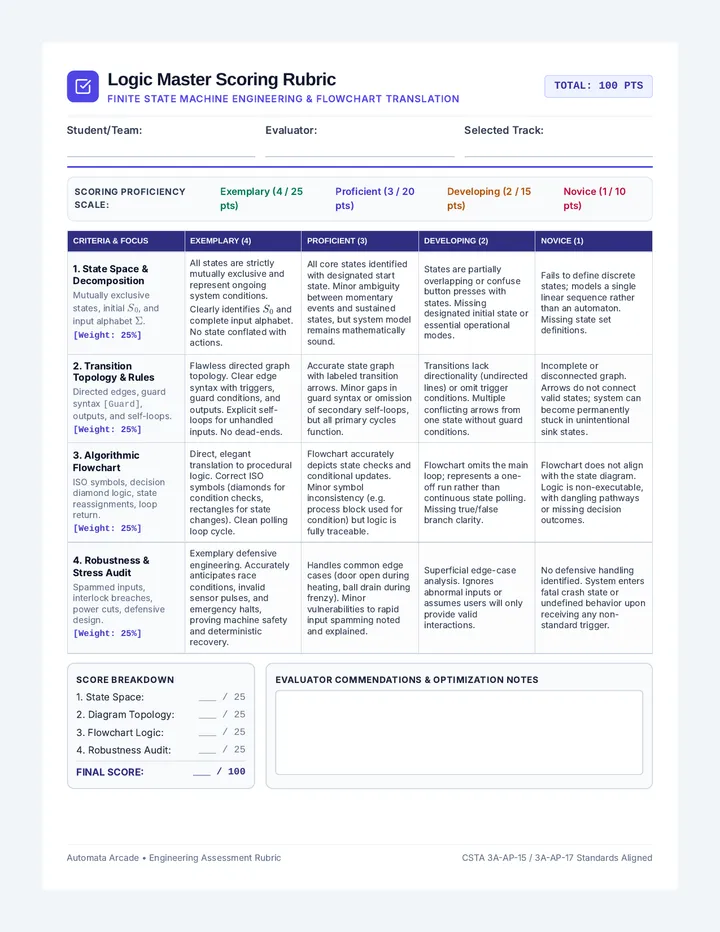
Logic Master Scoring Rubric Logic Master Scoring Rubric
Finite State Machine Engineering & Flowchart Translation
TOTAL: 100 PTS
Student/Team:
Evaluator:
Selected Track:
Scoring Proficiency Scale:
Exemplary (4 / 25 pts) Proficient (3 / 20 pts) Developing (2 / 15 pts) Novice (1 / 10 pts)
Criteria & Focus Exemplary (4) Proficient (3) Developing (2) Novice (1) 1. State Space & Decomposition Mutually exclusive states, initial \(S_0\), and input alphabet \(\Sigma\). [Weight: 25%]All states are strictly mutually exclusive and represent ongoing system conditions. Clearly identifies \(S_0\) and complete input alphabet. No state conflated with actions. All core states identified with designated start state. Minor ambiguity between momentary events and sustained states, but system model remains mathematically sound. States are partially overlapping or confuse button presses with states. Missing designated initial state or essential operational modes. Fails to define discrete states; models a single linear sequence rather than an automaton. Missing state set definitions. 2. Transition Topology & Rules Directed edges, guard syntax [Guard], outputs, and self-loops. [Weight: 25%]Flawless directed graph topology. Clear edge syntax with triggers, guard conditions, and outputs. Explicit self-loops for unhandled inputs. No dead-ends. Accurate state graph with labeled transition arrows. Minor gaps in guard syntax or omission of secondary self-loops, but all primary cycles function. Transitions lack directionality (undirected lines) or omit trigger conditions. Multiple conflicting arrows from one state without guard conditions. Incomplete or disconnected graph. Arrows do not connect valid states; system can become permanently stuck in unintentional sink states. 3. Algorithmic Flowchart ISO symbols, decision diamond logic, state reassignments, loop return. [Weight: 25%]Direct, elegant translation to procedural logic. Correct ISO symbols (diamonds for condition checks, rectangles for state changes). Clean polling loop cycle. Flowchart accurately depicts state checks and conditional updates. Minor symbol inconsistency (e.g. process block used for condition) but logic is fully traceable. Flowchart omits the main loop; represents a one-off run rather than continuous state polling. Missing true/false branch clarity. Flowchart does not align with the state diagram. Logic is non-executable, with dangling pathways or missing decision outcomes.
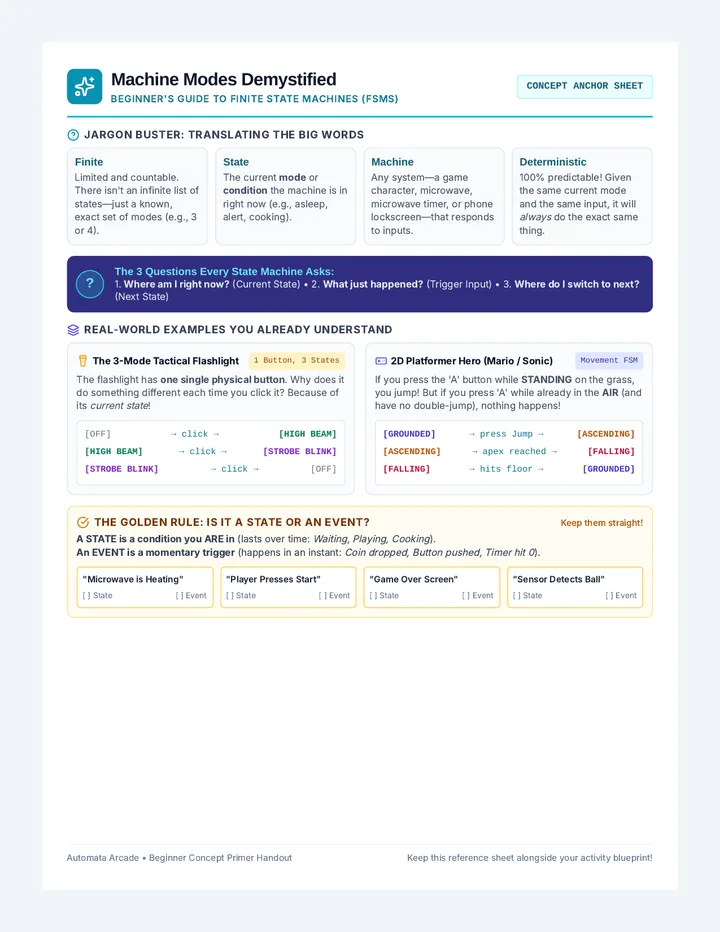
Machine Modes Primer Handout Machine Modes Demystified
Beginner's Guide to Finite State Machines (FSMs)
CONCEPT ANCHOR SHEET
Jargon Buster: Translating the Big Words
Finite
Limited and countable. There isn't an infinite list of states—just a known, exact set of modes (e.g., 3 or 4).
State
The current mode or condition the machine is in right now (e.g., asleep, alert, cooking).
Machine
Any system—a game character, microwave, microwave timer, or phone lockscreen—that responds to inputs.
Deterministic
100% predictable! Given the same current mode and the same input, it will always do the exact same thing.
?
The 3 Questions Every State Machine Asks:
1. Where am I right now? (Current State) • 2. What just happened? (Trigger Input) • 3. Where do I switch to next? (Next State)
Real-World Examples You Already Understand
The 3-Mode Tactical Flashlight 1 Button, 3 States
The flashlight has one single physical button . Why does it do something different each time you click it? Because of its current state !
[OFF] → click → [HIGH BEAM]
[HIGH BEAM] → click → [STROBE BLINK]
[STROBE BLINK] → click → [OFF]
2D Platformer Hero (Mario / Sonic) Movement FSM
If you press the 'A' button while STANDING on the grass, you jump! But if you press 'A' while already in the AIR (and have no double-jump), nothing happens!
[GROUNDED] → press Jump → [ASCENDING]
[ASCENDING] → apex reached → [FALLING]
[FALLING] → hits floor → [GROUNDED]
The Golden Rule: Is it a State or an Event?
Keep them straight!
A STATE is a condition you ARE in (lasts over time: Waiting, Playing, Cooking ).An EVENT is a momentary trigger (happens in an instant: Coin dropped, Button pushed, Timer hit 0 ).
"Microwave is Heating"
[ ] State [ ] Event
"Player Presses Start"
[ ] State [ ] Event
"Game Over Screen"
[ ] State [ ] Event
"Sensor Detects Ball"
[ ] State [ ] Event
Automata Arcade • Beginner Concept Primer Handout Keep this reference sheet alongside your activity blueprint!