AI Game Builders Teacher Guide Teacher Facilitation Guide • Grades 4–12
Build Your First Game Using AI: Vibe Coding
Estimated Duration: 70 Minutes • imagi + Lovable Integration
Core Concept
AI Literacy
AI Literacy Focus: Understanding How Generative AI Works
Students learn that AI doesn't “think” or understand context like humans do—it predicts code based on patterns. Students develop critical evaluation skills: spotting hallucinations, identifying omissions, and maintaining human agency through iterative prompt revision.
Before Class Checklist (15–20 Mins Prep) CLICK HERE for video and direction Sheet
imagi Classroom: Log in at edu.imagilabs.com and verify your classroom.
Add Students: Populate roster with student login credentials.
Activate Lovable: Toggle ON the Lovable AI tool in classroom settings.
Credit Allocation: Assign ~10–15 credits per student (1 build = 1–2 credits).
Instructional Sequence & Pacing
Step 1 (10m) What is Vibe?
Step 2 (10m) Teacher Demo
Step 3 (20m) Student Build
Step 4 (15m) Fix & Polish
Step 5 (15m) Showcase & Exit
1 Step 1: What is Vibe Coding & AI Literacy? (10 Minutes)
Slides 1–4
Key Definition: Vibe coding is directing AI through human language. AI writes the syntax, but the human remains in command as the system architect and critical evaluator.
Core AI Literacy Point: Hallucinations & Security Risks
AI makes mistakes, can introduce security flaws, and fills in gaps whenever instructions are vague. High prompt precision and rigorous testing are essential literacy habits.
Show Intro video (4m), discuss slides, and ask: “Why doesn't 'make a fun game' work as an AI prompt?”
2 Step 2: Teacher Demo — Apple Harvest (10 Minutes)
Slides 5–6
Open edu.imagilabs.com , launch Lovable, and paste the exact prompt below. Read each sentence aloud and discuss which constraint it controls:
“Create a simple catching game that works in a laptop web browser. The game is called Apple Harvest. The player moves a woven basket across the bottom of the screen using the left and right arrow keys. Red and green apples fall from the top. Each object caught earns one point. Missed objects disappear when they reach the bottom. Include a Start button, short instructions, a visible score, and a 30-second countdown. When time runs out, stop the game and show the final score and a Play Again button that resets the score and timer. Use green, red, and sky blue with an apple orchard theme. Make the objects fall slowly enough for a beginner. Keep the whole game visible on one screen. Do not add extra features yet.”
The Iteration Demo: Play live for 10 seconds. Ask: “What is ONE change to make?” Submit that change to demonstrate the loop: Prompt → Test → Refine .
AI Game Builders • Facilitator Handbook Page 1 of 2
Student Practice, Critical Iteration & Assessment
Steps 3 to 5 • Facilitation & AI Literacy Checkpoints
AI Literacy Focus
3 Step 3: Student Build — Catch Even Numbers (20 Minutes)
Slides 6–7
1. AI Literacy Planning: Before typing, students complete the Game Prompt Blueprint Worksheet . They deliberately map out rules to constrain AI assumptions (good evens vs bad odds).
2. Generation & Patience: Students log into edu.imagilabs.com , launch Lovable, and submit their prompt. Emphasize that models compile code over 1–3 minutes.
3. Critical Evaluation: Students play-test their game and audit AI output: did the AI follow all constraints? Students note 3 specific reality checks before submitting further prompts.
4 Step 4: Fix It & Make It Your Own (15 Minutes)
Slides 8–9
AI Literacy Debug Technique: “Expected vs. Reality”
“I expected [what should happen, e.g., catching an odd number to subtract 1 point], but actually [what happened, e.g., points did not change]. Please fix this scoring logic.”
Credit & Token Awareness: Teach resource management. Enforce the 4-Prompt Strategy: Prompt 1 (Build), Prompt 2 (Debug logic), Prompt 3 (Customize), Prompt 4 (Final polish).
5 Step 5: Share & Exit Ticket (15 Minutes)
Slide 10
Have 2–3 students share their games and explain what the AI got right vs. what had to be corrected. This solidifies student understanding of human oversight.
Students complete the Vibe Coding Exit Ticket , demonstrating AI literacy by articulating how prompt precision shapes software generation.
AI Literacy Troubleshooting & Misconceptions
“AI can read my mind!” AI has no intent; it relies strictly on tokens. Unspecified rules will always be filled by default AI assumptions.
“It broke everything else!” AI regenerates code blocks. Guide students to state: “Keep existing features intact, only change [item].”
AI Game Builders • Facilitator Handbook Page 2 of 2
AI Game Builders Slides Core Concept: AI Literacy • Grades 4–12 01 / 10
Build Your First Game
Using AI & Vibe Coding
Develop essential AI literacy by directing generative models with clear prompts, identifying errors, and testing code critically.
AI Literacy in Action • AI Writes the Code • Humans Lead & Evaluate
Step 1: AI Literacy Foundation
02 / 10
What is "Vibe Coding"?
You explain the game's mechanics, rules, and vibe in plain English.
1
The Human's Job
Design the rules, give clear instructions, and critically test the game to find what needs fixing.
2
The AI's Job
Translate your text into HTML, CSS, and JavaScript. AI is a tool, but it relies on your instructions.
💡 AI Literacy Skill: An AI cannot read your mind—it only knows what you explicitly tell it!
AI Literacy: Model Limitations
03 / 10
AI Makes Mistakes (A Lot of Them!)
AI models have no common sense. If you leave anything out, the model will invent answers.
⚠️ Hallucinations
Omit the speed, and AI might make items fall at warp speed or freeze entirely on screen.
🛡️ Security Flaws
AI code can contain bugs and security flaws. Humans must always inspect and test AI outputs.
🎯 Precision Rule
The more specific your prompt, the less opportunity the AI has to make false assumptions.
“AI Literacy means knowing what AI can do—and actively verifying its work!”
The AI Interaction Loop
04 / 10
The 3-Step Vibe Cycle
Iterative design is how AI creators build real software.
1
Prompt
Write your detailed blueprint and send it to the AI.
2
Test & Check
Critically audit the game. Did AI follow rules? Spot bugs!
3
Refine
Give the AI focused feedback to correct mistakes.
🔁 Repeat this loop: Prompt → Test → Refine!
Step 2: Live Demo
05 / 10
Teacher Demo: Apple Harvest
Watch how each sentence constrains the AI to prevent unwanted guesswork:
Name & Type: “Create a simple catching game called Apple Harvest that works in a laptop web browser.”
Controls: “The player moves a woven basket across the bottom using left and right arrow keys.”
Objects & Rules: “Red and green apples fall from the top. Each catch earns 1 point. Missed apples disappear.”
UI & Timer: “Include a Start button, short instructions, visible score, and a 30-second countdown.”
Constraints: “Use green, red, sky blue orchard theme. Fall slowly for beginners. Keep all on one screen.”
Notice: Nothing is left to guesswork. The controls, speed, theme, and timer are all defined!
Step 2: Controlled Iteration
06 / 10
The Magic of "One Change"
Our game is built, but it's just version 1.0. Let's make ONE focused adjustment together!
Option A: New Item
“Add golden apples that fall twice as fast and award 5 bonus points.”
Option B: Hazard
“Add rotten brown apples that subtract 2 points if caught.”
Option C: Setting
“Change the theme to space: catch falling stars with a flying spaceship.”
⚡ AI Literacy Rule: Change one variable at a time so you can accurately isolate cause and effect!
Step 3: Student Mission (20 Mins)
07 / 10
Your Turn: Catch Even Numbers!
You are going to build a math-action game where quick thinking wins points.
Game Requirements
✔ Targets: Numbers 2, 4, 6, 8, 10, etc. fall down (+1 pt)
✖ Hazards: Odd numbers (1, 3, 5, 7, 9) reduce score or lives
🎮 Catcher: Basket, robot, or net controlled by arrow keys
⏱ End Condition: 30 or 45 second timer + Play Again screen
Step-by-Step Instructions
1. Fill out your Prompt Blueprint Worksheet first.2. Log in at edu.imagilabs.com → Open Lovable.3. Paste your prompt and wait patiently while it builds.4. Test your game! Audit what AI followed and what it missed.
⏳ AI code generation takes 1–3 minutes. Do not refresh your browser!
Step 4: AI Debugging Technique
08 / 10
The “Expected vs. Reality” Method
When an AI makes an error, don't say “it doesn't work!” Give explicit comparison data:
EXPECTED
“I expected odd numbers to subtract 1 point when caught...”
REALITY
“...but right now they are giving +1 point just like even numbers.”
THE ASK
“Please fix odd numbers so they subtract 1 point and flash red.”
🎯 When you contrast expected vs. actual behavior, AI pinpoints and resolves code bugs quickly!
Step 4: Resource Literacy
09 / 10
Spend Your AI Credits Wisely
AI compute uses real resources and credits. Don't spam prompts—plan your 4 rounds:
Prompt 1
Initial Build
Your full master prompt from your worksheet.
Foundation
Prompt 2
The Bug Fix
Fix logic, scoring, speed, or controls.
Debugging
Prompt 3
Custom Vibe
Colors, fonts, sound effects, or background art.
Styling
Prompt 4
Final Polish
Add a victory sound, high score, or spare backup.
Polish
⚠️ AI Literacy Habit: Consolidate your thoughts into one structured prompt rather than multiple fragmented messages!
Step 5: Wrap Up & Reflection
10 / 10
Showcase & AI Literacy Reflection
Let's see your games in action! Complete your exit ticket before you leave.
Choose ONE question for your Exit Ticket:
A
What is vibe coding in your own words? (Explain it to someone who has never heard of it)
B
What did you have to think about the most to prevent the AI from making mistakes?
C
What are you most proud of about your new game?
Turn in your completed Exit Ticket slip 🎉 You have built a game and demonstrated real AI Literacy!
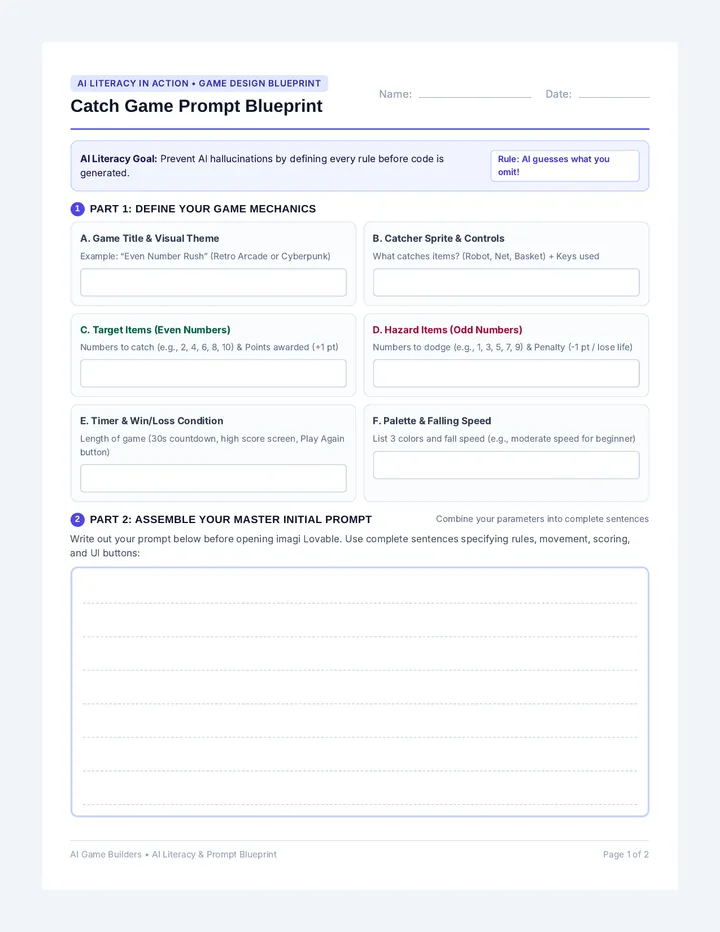
Game Prompt Blueprint Worksheet AI Literacy in Action • Game Design Blueprint
Catch Game Prompt Blueprint
Name:
Date:
AI Literacy Goal: Prevent AI hallucinations by defining every rule before code is generated. Rule: AI guesses what you omit!
1 Part 1: Define Your Game Mechanics
A. Game Title & Visual Theme
Example: “Even Number Rush” (Retro Arcade or Cyberpunk)
B. Catcher Sprite & Controls
What catches items? (Robot, Net, Basket) + Keys used
C. Target Items (Even Numbers)
Numbers to catch (e.g., 2, 4, 6, 8, 10) & Points awarded (+1 pt)
D. Hazard Items (Odd Numbers)
Numbers to dodge (e.g., 1, 3, 5, 7, 9) & Penalty (-1 pt / lose life)
E. Timer & Win/Loss Condition
Length of game (30s countdown, high score screen, Play Again button)
F. Palette & Falling Speed
List 3 colors and fall speed (e.g., moderate speed for beginner)
2 Part 2: Assemble Your Master Initial Prompt
Combine your parameters into complete sentences
Write out your prompt below before opening imagi Lovable. Use complete sentences specifying rules, movement, scoring, and UI buttons:
AI Game Builders • AI Literacy & Prompt Blueprint Page 1 of 2
Critical Evaluation & Iteration Tracker
Audit AI generated code and debug systematically (Credit Budget: 4 Prompts)
Credit Budget: 4 Prompts
3 Part 3: Critical Audit (Post-Build Observations)
Play 1 full round. Did the AI understand all instructions? Write down 3 observations:
1. Bug / Unwanted:
2. Rule / Logic:
3. Visual Style:
4 Part 4: Vibe Coding Iteration Tracker
Prompt 2 Bug Fix: “Expected vs. Reality” Technique Debug Round
What I EXPECTED to happen:
What ACTUALLY happened in reality:
My exact correction prompt to AI:
Prompt 3 Customize Colors & Game Features Styling Round
What visual or gameplay features did you add? (sound, theme, bonus item)
Prompt 4 Final Polish / Spare Prompt Final Round
Final tweak (or write “Satisfied with version 3”):
AI Output Verification Check:
Evens give +1 pt Odds subtract/penalize Timer ends game Restart button works
AI Game Builders • AI Literacy & Prompt Blueprint Page 2 of 2
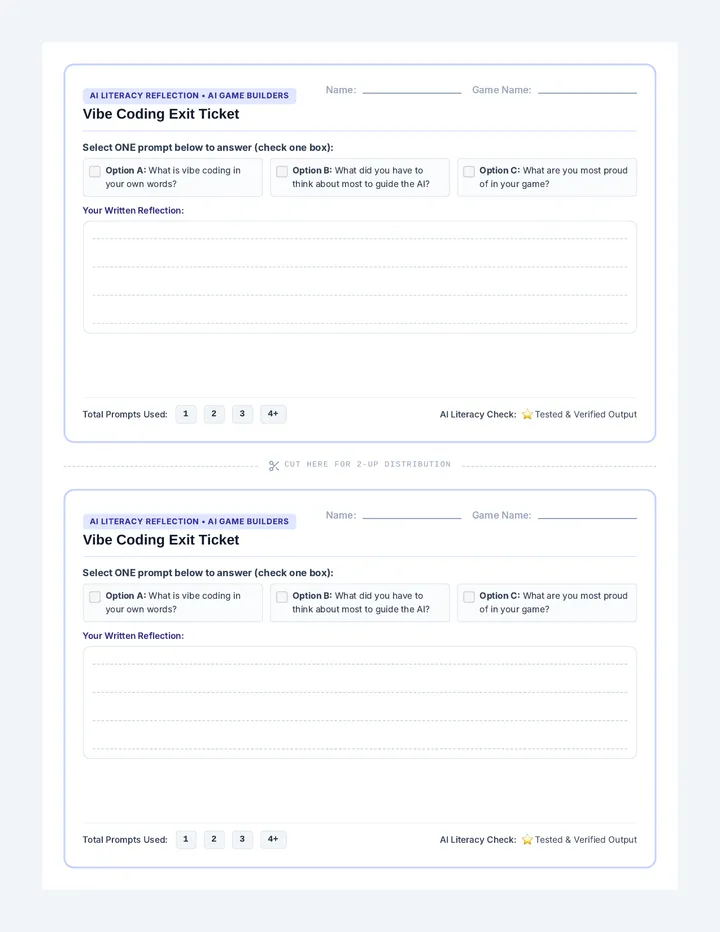
Vibe Coding Exit Ticket AI Literacy Reflection • AI Game Builders
Vibe Coding Exit Ticket
Name:
Game Name:
Select ONE prompt below to answer (check one box):
Option A: What is vibe coding in your own words? Option B: What did you have to think about most to guide the AI? Option C: What are you most proud of in your game?
Your Written Reflection:
Total Prompts Used: 1 2 3 4+
AI Literacy Check: ⭐ Tested & Verified Output
Cut Here for 2-Up Distribution
AI Literacy Reflection • AI Game Builders
Vibe Coding Exit Ticket
Name:
Game Name:
Select ONE prompt below to answer (check one box):
Option A: What is vibe coding in your own words? Option B: What did you have to think about most to guide the AI? Option C: What are you most proud of in your game?
Your Written Reflection:
Total Prompts Used: 1 2 3 4+
AI Literacy Check: ⭐ Tested & Verified Output