Scratch Cat Coding SlidesGrade 6 Coding Unit 4, Lesson 2 Block Programming Intro to Scratch Meet Scratch Cat, build step-by-step sequences, and learn how to squash bugs in your code! Sprites Sequences Debugging 🐱 Scratch Cat Welcome to your coding journey! Meet Scratch Cat! Visual Coding What is Scratch? A coding language that uses visuals to let you code games and digital stories. What is a Sprite? A computer-generated character or graphic—like Scratch Cat—that you can code to move and act! 🐱 Real cats don’t like doing tricks—but Scratch Cat follows every command in your code! Universal Coding Rules Big Idea Traffic Rules A red light always means stop, and a green light always means go—no matter where you are! Coding Rules Even though there are many programming languages, core commands and “rules” stay the same across tools! Let’s learn two universal coding concepts: Sequences & Debugging! What is a Sequence? Concept #1 Sequence: Steps or instructions carried out in a specific order. 🥪 Coding is like making a PB&J sandwich—order matters! 1 Get bread from pantry 2 Get peanut butter 3 Get jelly 4 Get a knife 5 Spread PB on bread Scratch Sequence #1 Try Reading the Code when green flag clicked move 10 steps turn 90 degrees What Happens? 🐱 🐱 Scratch Cat moves 10 steps forward, then turns right 90°! Scratch Sequence #2 Where Is Cat Going? when green flag clicked go to random position turn 180 degrees What Happens? ? ? ? 🐱 Scratch Cat jumps to a random spot on screen, then turns 180° (upside down)! What is Debugging? Concept #2 Find & Fix! Debugging is finding and removing mistakes—called “bugs”—in an algorithm. Pro Tip: Test your code as you build! Fixing bugs along the way is much easier than waiting until the end. Debug Challenge: Dog & Bone Spot the Bug! 🦴 🐶 Will this algorithm get the dog to the bone? → → → ↑ ↑ ← Trace each arrow step by step from the bottom-left square! Bug Found & Fixed! Debugged 🦴 ↑ ← ↑ 🐶 → → ↑ The Bug: There were three right arrows instead of two—sending the dog off the mat! Corrected Algorithm (5 steps): → → ↑ ↑ ← Coder’s Recap 🐱 Sprites Characters like Scratch Cat that follow your visual code commands. Sequences Steps carried out in a specific order, just like following a recipe. Debugging Finding and fixing mistakes—test every small change as you build! Ready to get Scratch Cat moving?
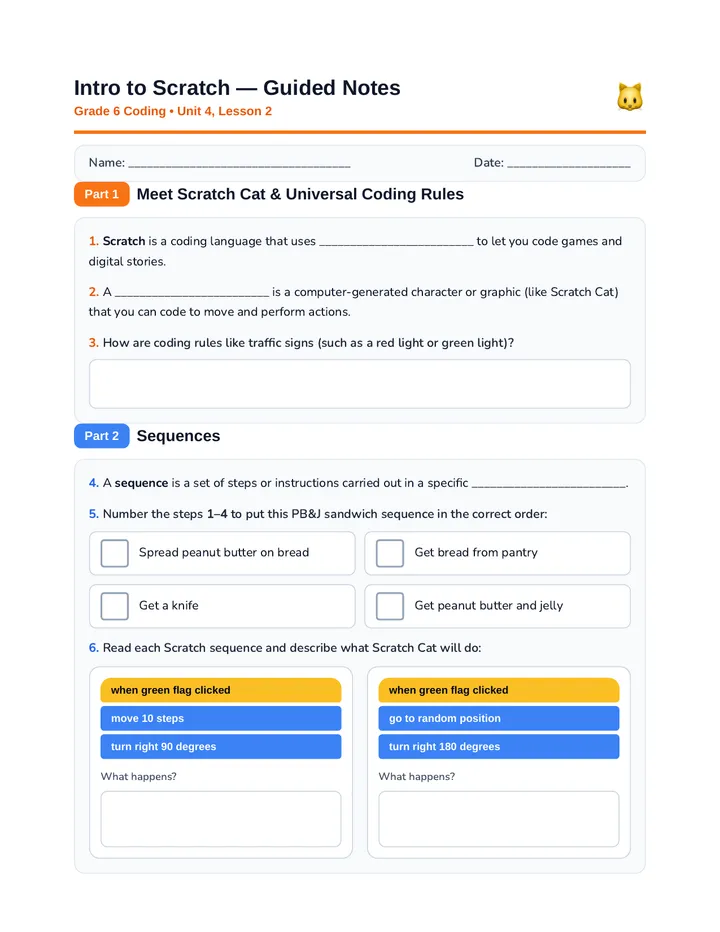
Scratch Cat Guided NotesIntro to Scratch — Guided Notes Grade 6 Coding • Unit 4, Lesson 2 🐱 Name: ____________________________________ Date: ____________________ Part 1 Meet Scratch Cat & Universal Coding Rules Scratch is a coding language that uses _________________________ to let you code games and digital stories. A _________________________ is a computer-generated character or graphic (like Scratch Cat) that you can code to move and perform actions. How are coding rules like traffic signs (such as a red light or green light)? Part 2 Sequences A sequence is a set of steps or instructions carried out in a specific _________________________. Number the steps 1–4 to put this PB&J sandwich sequence in the correct order: Spread peanut butter on bread Get bread from pantry Get a knife Get peanut butter and jelly Read each Scratch sequence and describe what Scratch Cat will do: when green flag clicked move 10 steps turn right 90 degrees What happens? when green flag clicked go to random position turn right 180 degrees What happens? Intro to Scratch — Guided Notes (Page 2) Grade 6 Coding • Unit 4, Lesson 2 Name: ___________________________ Part 3 Debugging Algorithms Debugging is the process of finding and removing mistakes—called _________________________—in an algorithm. Why is it important to test your code as you build instead of waiting until the end? 9. Debug Challenge: Help the Dog Reach the Bone! 3×3 Grid 🦴 🐶 Current Algorithm (contains a bug): → → → ↑ ↑ ← Trace the arrows starting from the dog in the bottom-left square. a) Which arrow is the bug, and what does it make the dog do? b) Draw the corrected 5-arrow algorithm in the boxes below: Coder’s Reflection: What is one thing you want to code Scratch Cat to do first?
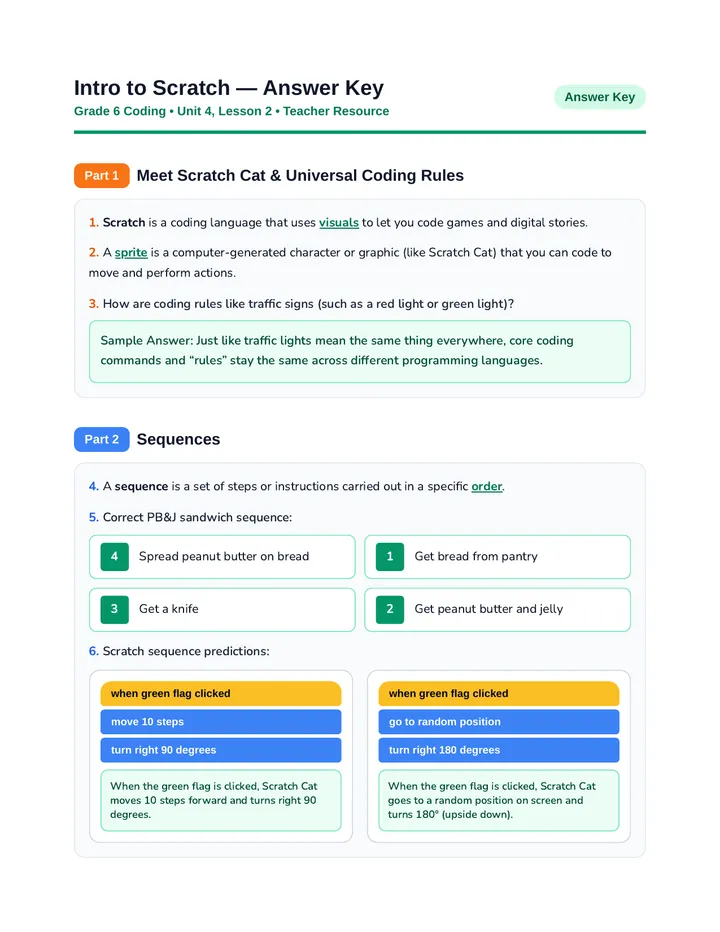
Scratch Basics Answer KeyIntro to Scratch — Answer Key Grade 6 Coding • Unit 4, Lesson 2 • Teacher Resource Answer Key Part 1 Meet Scratch Cat & Universal Coding Rules Scratch is a coding language that uses visuals to let you code games and digital stories. A sprite is a computer-generated character or graphic (like Scratch Cat) that you can code to move and perform actions. How are coding rules like traffic signs (such as a red light or green light)? Sample Answer: Just like traffic lights mean the same thing everywhere, core coding commands and “rules” stay the same across different programming languages. Part 2 Sequences A sequence is a set of steps or instructions carried out in a specific order. Correct PB&J sandwich sequence: 4 Spread peanut butter on bread 1 Get bread from pantry 3 Get a knife 2 Get peanut butter and jelly Scratch sequence predictions: when green flag clicked move 10 steps turn right 90 degrees When the green flag is clicked, Scratch Cat moves 10 steps forward and turns right 90 degrees. when green flag clicked go to random position turn right 180 degrees When the green flag is clicked, Scratch Cat goes to a random position on screen and turns 180° (upside down). Intro to Scratch — Answer Key (Page 2) Grade 6 Coding • Unit 4, Lesson 2 • Teacher Resource Answer Key Part 3 Debugging Algorithms Debugging is the process of finding and removing mistakes—called bugs—in an algorithm. Why is it important to test your code as you build instead of waiting until the end? Sample Answer: Testing as you go helps you spot and fix mistakes right away, instead of having to hunt through a huge program for all the errors at the end. 9. Debug Challenge Solution: Dog & Bone 🦴 ↑ ← ↑ 🐶 → → ↑ a) Which arrow is the bug? The third right arrow (→) is the bug. There should only be two right arrows—following a third right arrow takes the dog off the mat! b) Corrected 5-arrow algorithm: → → ↑ ↑ ← Coder’s Reflection (Sample Answer): Answers will vary. Students may mention coding Scratch Cat to walk across the stage, spin in a circle, jump to random spots, or tell a short story.
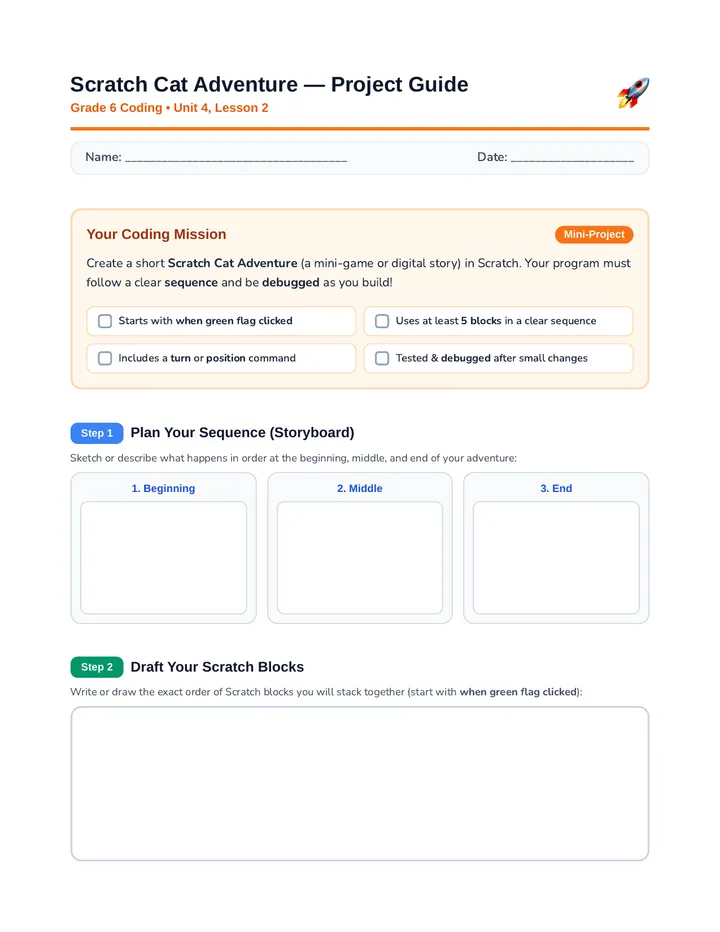
Scratch Cat Adventure ProjectScratch Cat Adventure — Project Guide Grade 6 Coding • Unit 4, Lesson 2 🚀 Name: ____________________________________ Date: ____________________ Your Coding Mission Mini-Project Create a short Scratch Cat Adventure (a mini-game or digital story) in Scratch. Your program must follow a clear sequence and be debugged as you build! Starts with when green flag clicked Uses at least 5 blocks in a clear sequence Includes a turn or position command Tested & debugged after small changes Step 1 Plan Your Sequence (Storyboard) Sketch or describe what happens in order at the beginning, middle, and end of your adventure: 1. Beginning 2. Middle 3. End Step 2 Draft Your Scratch Blocks Write or draw the exact order of Scratch blocks you will stack together (start with when green flag clicked): Scratch Cat Adventure — Debug Log & Rubric Grade 6 Coding • Unit 4, Lesson 2 Name: ___________________________ Step 3 Test & Debug Log Test your code as you build! Record two bugs or changes you tested and how you fixed them: What I Tested The Bug I Found How I Fixed It Step 4 Project Rubric Total: _____ / 12 pts Criteria 3 pts — Coder Pro 2 pts — Growing Coder 1 pt — Getting Started Sprite & Event Starts cleanly with green flag; sprite is clearly coded. Sprite is present, but event block is missing or unclear. Sprite does not respond when program runs. Sequence Order 5+ blocks stacked in a clear, logical order that works. 3–4 blocks used, or order has minor mix-ups. Fewer than 3 blocks or sequence does not run. Debugging Tested as built; 2 bugs/fixes clearly logged. 1 bug/fix logged or testing was incomplete. No debugging recorded or major bugs remain. Creativity Fun, original story or movement; matches plan. Works well, with simple or basic movement. Incomplete or does not match storyboard plan. Peer Check-In: Have a partner test your Scratch project! Partner: ______________________ One thing that worked well & one suggestion: