Debugging Functions Slides Computing Foundations
Unit Review Prep
Debugging Functions
Find It. Explain It. Fix It.
Learning Targets
I can trace what happens when a function is called.
I can identify common errors in function definitions and function calls.
I can explain the difference between print() and return.
I can test and modify code so that it behaves as intended.
Debugging is not guessing. Slide 1 / 23
The Mindset
Debugging Is a Programming Skill
Debugging means finding and fixing problems in code. A program can fail in different ways:
Syntax Error
Python cannot understand the code.
Runtime Error
The program starts but crashes while running.
Logic Error
The program runs, but does the wrong thing.
“It runs” does not always mean “it works.”
Your Toolkit
Our Debugging Checklist
Step 1
What is the code SUPPOSED to do?
Step 2
What information goes INTO the function?
Step 3
What happens INSIDE the function?
Step 4
What should the function RETURN ?
Step 5
Where does the behavior go wrong ?
Use these 5 questions every time you read or debug a function.
Debugging Example 1
Missing Colon
Broken Code
def greet(name)
print(f"Hello, {name}!")
• What kind of error is this?
• What needs to change?
Fixed Code
def greet(name):
print(f"Hello, {name}!")
Syntax Error: Function definitions always need a colon (:) at the end of the def line.
Checklist: Check syntax before running Example 1 of 10
Debugging Example 2
Indentation
Broken Code
def greet(name):
print(f"Hello, {name}!")
What is wrong?
Fixed Code
def greet(name):
print(f"Hello, {name}!")
The code belonging to the function must be indented .
Just like if statements and loops, Python uses indentation to show which instructions belong together.
Debugging Example 3
Defined but Never Called
Broken Code
def cheer():
print("You can do it!")
cheer
Why doesn't the message appear?
Fixed Call
def cheer():
print("You can do it!")
cheer()
Defining a function creates it.
Calling a function (with ()) runs it.
Logic Error: No crash, but nothing happens Example 3 of 10
Debugging Example 4
Missing Argument
Broken Code
def greet(name):
print(f"Hello, {name}!")
greet()
What problem will occur?
Fixed Call
greet("Jordan")
Runtime Error (TypeError)
The function requires information for the parameter name.
Checklist Step 2: What information goes INTO the function? Example 4 of 10
Debugging Example 5
Too Many Arguments
def greet(name):
print(f"Hello, {name}!")
greet("Jordan", "Alex")
What is wrong?
The function has one parameter (name), but receives two arguments .
The number of required arguments should match the number of parameters.
Runtime Error: TypeError when called Example 5 of 10
Debugging Example 6
print() Instead of returnBroken Code
def double(number):
print(number * 2)
answer = double(4)
print(answer)
What will happen?
It displays 8, but does not send 8 back. So answer stores None.
Fixed Code
def double(number):
return number * 2
print()
Shows information to the HUMAN .
return
Sends information back to the PROGRAM .
Debugging Example 7
Code After return
def coin_flip():
result = random.choice(["heads", "tails"])
return result
print(result)
Will print(result) ever run?
No.
Once Python reaches return, the function ends immediately .
Anything after that return in the same path will not run.
Checklist Step 3 & 4: Trace execution order Example 7 of 10
Debugging Example 8
Comparing but Not Returning
Broken Code
def check_guess(guess):
guess == "bonus"
What does this function actually return?
None — nothing was returned!
Fixed Code & Trace
def check_guess(guess):
return guess == "bonus"
is_correct = check_guess("bonus")
What gets stored in is_correct? True
Checklist Step 4: What should the function RETURN? Example 8 of 10
Step-by-Step Trace
Trace a Working Function
def add(a, b):
total = a + b
return total
answer = add(3, 4)
print(answer)
1.3 goes into a
2.4 goes into b
3.a + b becomes 7
4.return sends 7 back
5.answer stores 7
6.print(answer) displays 7
Tracing working code helps us debug broken code.
Big Picture
Function Call Flow
Main Program
Function Call
Arguments
Parameters
Function Instructions
return
Returned Value Stored or Used
Follow this path every time you trace a function call.
Debugging Example 9
Strings vs Numbers
Code
def add_values(a, b):
return a + b
answer = add_values("1", "2")
print(answer)
What prints? 12
The arguments "1" and "2" are strings .
The + operator joins strings instead of adding numbers.
This is not a syntax error. It is the behavior created by the data types we supplied.
Checklist Step 2: Check data types going INTO the function Example 9 of 10
Debugging Example 10
Wrong Comparison Symbol
Broken Code
def check_answer(answer):
if answer = "yes":
return True
else:
return False
Why won't this program run?
Fixed Condition
if answer == "yes":
= assigns a value to a variable.
== compares values for a Boolean condition (True / False).
Syntax Error: Python catches = inside an if condition Example 10 of 10
Predict & Trace
Find the Bug Before Running It
def square(number):
result = number * number
answer = square(5)
print(answer)
1. What is the function supposed to do?
2. What value should answer receive?
3. Why doesn't it?
4. What line should be added?
Expected fix: return result
Trace with the checklist before clicking Run.
Debugging Challenge
Function and Loop
def increase(score):
score += 1
return score
player_score = 0
for i in range(3):
increase(player_score)
print(player_score)
Why does player_score still print 0?
What happened?
The function returns the updated value, but the main program never stores it .
Fixed Loop Line
player_score = increase(player_score)
If you don't store or use a returned value, it is lost.
Guided Practice
Apply the Debugging Checklist
Broken Function
def coin_flip(choice):
result = random.choice(["heads", "tails"])
if result == choice:
    True
else:
    False
1. What should it do? 2. What goes in?
3. What should come out? 4. What is missing?
Fixed Function
def coin_flip(choice):
result = random.choice(["heads", "tails"])
if result == choice:
    return True
else:
    return False
Both branches need return to send the Boolean back.
Your Turn
Independent Debugging Practice
Identify: Error Type • What's Wrong • Fix
Example A
def welcome()
print("Welcome!")
Example B
def double(number):
print(number * 2)
answer = double(5)
Example C
def greet(name):
print(name)
greet()
Example D
def check(value):
return value > 10
print("Done")
Example E
def multiply(a, b):
return a * b
answer = multiply(3)
Quiz Prep
Code Reading vs. Code Writing
The quiz may ask you to:
Identify valid code
Predict what code will do
Recognize an error
Explain why code behaves incorrectly
Choose a fix
You do NOT always have to write an entire program from scratch.
Reading code is an important programming skill.
Read carefully, trace line by line, and check your assumptions.
Why This Matters
What Programming Requires
Programming requires us to:
Read code
Understand what it is supposed to do
Test whether it behaves correctly
Find problems
Modify the code when needed
Debugging is part of programming, not something that happens only when someone “messes up.”
Unit Review
Final Programming Toolbox
Data
int • float • str • bool
Input & Output
input()
Selection
if • elif • else
Iteration
for • while
Functions
def • call • parameters
Problem Solving
trace • test
Good programmers do not just write code. They read, test, debug, and improve it.
Check for Understanding
Exit Ticket
1. What is the difference between print() and return?
2. What happens if a function requires one parameter but is called with no argument?
3. Why will code after return usually not run?
4. What is wrong with: if answer = "yes":
5. What does this function return when called with check(15)?
def check(number):
return number > 10
6. What is one debugging strategy you can use when code does not behave as expected?
Debugging Repair Shop Slides Computing Foundations
Quiz Review Lesson
Debugging as Review
Find It. Explain It. Fix It.
Learning Targets
I can identify why a piece of Python code does not work as intended.
I can explain whether a problem is caused by syntax, data type, logic, or function use.
I can make a small change that repairs broken code.
I can trace working code and predict its output.
What Does Debugging Mean?
Debugging is finding and fixing problems in code.
Today is not about learning new Python.
It is about proving that we can READ and UNDERSTAND the Python we already know.
“If you can explain why code is broken, you probably understand how the code is supposed to work.”
Three Questions for Every Bug
Before changing anything, ask:
1
What is this code SUPPOSED to do?
2
What is it ACTUALLY doing?
3
What is the smallest change that would fix it?
Use these three questions on every ticket during today’s activity.
Quick Review: Syntax vs. Logic
Syntax Problem
Python cannot understand the code.
if score = 80:
Breaks Python’s grammar rules.
Logic Problem
Python understands the code, but it does not behave as intended.
if score < 80:
print("You did great!")
Runs without crashing, but gives the wrong result.
Both can make a program “wrong,” but in different ways.
Debug Together: Data Type Problem
Example 1
Broken Code
age = input("How old are you? ")
print(age + 1)
Why will this cause an error?
Diagnosis
input() gives us a string.
We cannot directly add the integer 1 to a string.
Fix
age = int(input("How old are you? "))
print(age + 1)
Quiz Tip: Need a decimal (like 7.5)? Use float(input(...)) instead of int()!
Debug Together: Wrong Comparison Symbol
Example 2
Broken Code
score = 90
if score = 90:
print("Great job!")
What is wrong?
Key Rule
= assigns a value to a variable.
== compares two values.
Fix
if score == 90:
Debug Together: Function Is Not Called
Example 3
Broken Code
def cheer():
print("Go team!")
cheer
Why doesn’t the message print?
Key Rule
Defining a function creates it.
Calling a function with () runs it.
Fix
cheer()
Debug Together: Missing Argument
Example 4
Broken Code
def welcome(name):
print("Hello " + name)
welcome()
What is the problem?
Diagnosis
The function has one parameter (name), but no argument was provided.
Fix
welcome("Alex")
Debug Together: print() vs. return
Example 5
Code
def double(num):
print(num * 2)
answer = double(6)
1. What does the function display?
2. What gets stored in answer?
Key Rule
print() displays the value on screen.
return sends the value back to the program.
Possible Repair
def double(num):
return num * 2
Debug Together: Conditional Logic
Example 6
Broken Code
age = 70
if age < 12:
print("Child")
elif age < 65:
print("Senior")
else:
print("Adult")
Order rule: if → elif → else (never put elif after else!)
Intended Rules:
• Under 12 = Child
• 65 or older = Senior
• Everyone else = Adult
Diagnosis: The second condition is backwards!
Fix
elif age >= 65:
Quiz-Trap Lightning Round
Quick Check
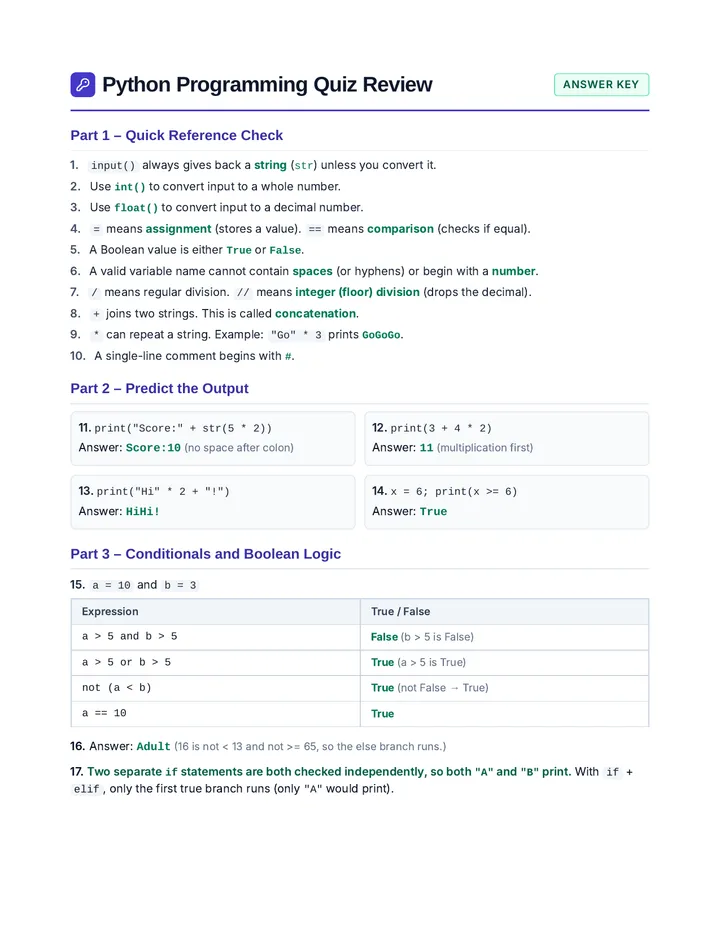
1. Division & Order of Ops
15 / 5 → 3.0 (float)
17 // 5 → 3 (whole number)
2 + 3 * 4 → 14 (multiply first)
2. Strings & Comments
"Go" * 2 + "!" → GoGo!
# print("Hi") → ignored
Python skips anything after #.
3. Boolean Values
True / False (capital, no quotes)
"True" is a string; true is an error.
4. Logical Operators
and: BOTH sides must be True
or: AT LEAST ONE side is True
not: flips True ↔ False
Activity: Debugging Repair Shop
You are programmers at a code repair shop. For each ticket, write:
1. Diagnosis
What is wrong (or is the code working)?
2. Repair
What should be changed (or what does it print)?
3. Explanation
Why does the change fix the problem?
Work independently or with one partner.
Don’t just copy code—explain it!
Repair Ticket 1: Variable Name
Ticket #01
high score = 95
print(high score)
On your Repair Sheet:
1. Diagnosis: What is wrong with this code?
2. Repair: Rewrite the code so it works.
3. Explanation: Why does your change fix it?
Repair Ticket 2: Number or String?
Ticket #02
zip_code = 46107
print("Zip code: " + zip_code)
Diagnose, Repair, and Explain:
• Why does Python throw an error here?
• Hint: There is more than one valid way to fix this!
Repair Ticket 3: Condition
Ticket #03
temperature = 72
if temperature > 80:
print("Hot")
elif temperature > 60:
print("Nice")
else:
print("Cold")
What does it print?
Careful: Debugging also means recognizing when code is already correct!
Repair Ticket 4: Function Call
Ticket #04
def order(item, qty):
print(str(qty) + " " + item + "(s)")
order("latte")
Diagnose, Repair, and Explain:
Look closely at the function’s parameters and the function call.
Repair Ticket 5: Function Definition
Ticket #05
def double(num)
print(num * 2)
double(6)
Diagnose, Repair, and Explain:
Check every character of the function header.
Repair Ticket 6: String and Number
Ticket #06
level = 3
print("Level " + level)
Diagnose, Repair, and Explain:
Why is your change necessary for Python to combine these values?
Repair Ticket 7: Boolean Logic
Ticket #07
a = 12
b = 3
if a > 10 and b > 5:
print("Both conditions are true.")
Will the message print? Why or why not?
Evaluate both sides of and. What if it used or instead?
Repair Ticket 8: Function Output
Ticket #08
def welcome(name):
print("Hello " + name)
welcome("Jordan")
Is this broken? If not, what does it print?
Also identify: function name, parameter, argument, and output.
Repair Ticket 9: if vs. elif
Ticket #09
x = 2
if x > 0:
print(0)
if x > 1:
print(1)
if x > 2:
print(2)
What prints?
Notice that these are separate if statements, not an if/elif chain.
Explain how Python checks each one.
Repair Ticket 10: Write the Fix
Ticket #10
def double(num):
print(num * 2)
The program needs to STORE the doubled value instead of just displaying it.
What should change in the function, and how would you store the result for double(6)?
Repair Shop Debrief
Which types of bugs did we see today?
Invalid variable names
Strings vs. numbers
Missing conversion
= vs. ==
Incorrect Boolean conditions
Missing colon
Function not called
Missing argument
print() vs. return
These are not random mistakes. They reveal whether we understand what each part of Python actually does.
What Should You Be Able to Do Before the Quiz?
Identify int, float, str, bool
Recognize a function definition & call
Recognize valid variable names
Identify parameters and arguments
Convert input (int() / float())
Predict simple function output
Predict / vs // & string * / +
Write a small function & call it
Evaluate and, or, not & # comments
Identify and repair basic errors
Trace if/elif/else and separate if statements
Exit Ticket
1. What is wrong?
score = input("Score: ")
print(score + 5)
2. What does this print?
def cheer():
print("Go!")
cheer()
cheer()
3. Identify parameter & argument:
def welcome(name):
print("Hello " + name)
welcome("Sam")
4. Reflection
What is one debugging strategy you used today?
Repair Shop Activity Sheet Computing Foundations
Debugging Repair Shop
Name: _______________________ Date: __________
Three Questions for Every Bug
What is this code SUPPOSED to do?
What is it ACTUALLY doing?
What is the smallest change to fix it?
Repair Ticket 1: Variable Name Ticket #01
high score = 95
print(high score)
1. Diagnosis (What is wrong?)
2. Repair (Fixed code)
3. Explanation (Why does this fix it?)
Repair Ticket 2: Number or String? Ticket #02
zip_code = 46107
print("Zip code: " + zip_code)
1. Diagnosis (What is wrong?)
2. Repair (Fixed code)
3. Explanation (Why does this fix it?)
Repair Ticket 3: Condition Ticket #03
temperature = 72
if temperature > 80:
print("Hot")
elif temperature > 60:
print("Nice")
else:
print("Cold")
Is this code broken? What does it print?
Explanation (Trace how Python chooses the output)
Repair Ticket 4: Function Call Ticket #04
def order(item, qty):
print(str(qty) + " " + item + "(s)")
order("latte")
1. Diagnosis (What is wrong?)
2. Repair (Fixed code)
3. Explanation (Why does this fix it?)
Repair Ticket 5: Function Definition Ticket #05
def double(num)
print(num * 2)
double(6)
1. Diagnosis (What is wrong?)
2. Repair (Fixed code)
3. Explanation (Why does this fix it?)
Repair Ticket 6: String and Number Ticket #06
level = 3
print("Level " + level)
1. Diagnosis (What is wrong?)
2. Repair (Fixed code)
3. Explanation (Why is this necessary?)
Repair Ticket 7: Boolean Logic Ticket #07
a = 12
b = 3
if a > 10 and b > 5:
print("Both conditions are true.")
Will the message print? What if it used or instead?
Explanation (Evaluate both sides of "and")
Repair Ticket 8: Function Output Ticket #08
def welcome(name):
print("Hello " + name)
welcome("Jordan")
Is this broken? What does it print?
Function Name & Parameter
Argument
Output
Repair Ticket 9: if vs. elif Ticket #09
x = 2
if x > 0:
print(0)
if x > 1:
print(1)
if x > 2:
print(2)
What prints?
Explanation (How is this different from an if/elif chain?)
Repair Ticket 10: Write the Fix Ticket #10
Prompt: The program needs to STORE the doubled value instead of just displaying it. What should change?
def double(num):
print(num * 2)
1. Diagnosis (Why doesn't the original function let you store the value?)
2. Repair (Fixed function + storing double(6))
3. Explanation (Why does this fix it?)
Quiz-Trap Quick Check Bonus Review
A. To store a decimal like 7.5 for math: hours = ________(input("Hours: "))
B. Predict: 15 / 5 = _______ | 17 // 5 = _______ | 2 + 3 * 4 = _______
C. Predict: print("Go" * 2 + "!") = ____________ | # print("Hi") prints: ____________
D. Circle the valid Python Boolean value: A) "True" B) true C) True D) TRUE
Debugging as Review
Exit Ticket
Name: _______________________ Date: __________
1. What is wrong with this code?
score = input("Score: ")
print(score + 5)
2. What does this print?
def cheer():
print("Go!")
cheer()
cheer()
3. Identify the parameter and argument:
def welcome(name):
print("Hello " + name)
welcome("Sam")
Parameter:
Argument:
4. What is one debugging strategy you used today?
Repair Shop Answer Key Teacher Guide & Answer Key
Debugging as Review
45-Minute Lesson
Central Lesson Message
“If you can explain what the code is supposed to do, identify what went wrong, and repair it, you understand the programming concept.”
45-Minute Pacing Guide
Time
Segment
Teacher & Student Focus
0–10 min
Guided Debugging Review (Slides 1–11)
Briefly review Syntax vs. Logic, walk through the 6 Debug Together examples, and run the 1-minute Quiz-Trap Lightning Round.
10–15 min
Activity Setup (Slide 12)
Introduce the Debugging Repair Shop. Emphasize writing Diagnosis, Repair, AND Explanation (not just copying code).
15–35 min
Repair Tickets 1–10 (Slides 13–22)
Students work independently or with one partner on Tickets 1–10 and the Quiz-Trap Quick Check.
35–40 min
Whole-Class Debrief (Slide 23)
Review the trickiest tickets (especially Tickets 3, 7, 9, and 10) and categorize the bug types seen today.
40–45 min
Checklist & Exit Ticket (Slides 24–25)
Review quiz-readiness skills and collect the 4-question Exit Ticket.
Debug Together Key (Slides 5–10)
Ex 1 (Slide 5): Data Type Problem
Why: input() returns a string; cannot add 1 to a string.
Fix: int(input(...)) (or float(input(...)) for decimals)
Ex 2 (Slide 6): Comparison Symbol
Why: = assigns a value; == compares values.
Fix: if score == 90:
Ex 3 (Slide 7): Function Not Called
Why: Missing (). Defining creates it; calling runs it.
Fix: cheer()
Ex 4 (Slide 8): Missing Argument
Why: Function has 1 parameter (name) but 0 arguments given.
Fix: welcome("Alex")
Ex 5 (Slide 9): print() vs. return
Trace: Displays 12; answer stores None.
Fix: Replace print(num * 2) with return num * 2
Ex 6 (Slide 10): Conditional Logic
Why: age < 65 prints Senior for ages 12–64.
Fix: elif age >= 65: (never elif after else)
Repair Shop Answer Key: Tickets 1–6
Page 2 of 3
Ticket 1: Variable Name (Syntax)
Diagnosis: Variable names cannot contain spaces (high score).
Repair: high_score = 95 and print(high_score)
Explanation: Python treats a space as separating two different words, so an underscore connects them into one valid variable name.
Ticket 2: Number or String? (Data Type)
Diagnosis: zip_code is an integer, and Python cannot concatenate a string and an integer with +.
Repair: zip_code = "46107" OR print("Zip code: " + str(zip_code))
Explanation: Both values must be strings to join them with +. (Accept either valid repair if explained.)
Ticket 3: Condition (Not Broken — Code Tracing)
Diagnosis: This code is NOT broken.
Output: Nice
Explanation: 72 > 80 is False, so Python checks elif 72 > 60, which is True. It prints Nice and skips else.
Ticket 4: Function Call (Function Use)
Diagnosis: order has two parameters (item, qty), but only one argument ("latte") was passed.
Repair: order("latte", 2) (any valid integer/quantity for the second argument)
Explanation: Every required parameter in the function definition must receive an argument when the function is called.
Ticket 5: Function Definition (Syntax)
Diagnosis: Missing colon (:) at the end of the def line.
Repair: def double(num):
Explanation: Python requires a colon at the end of a function header before the indented body.
Ticket 6: String and Number (Data Type)
Diagnosis: level is an int (3) and cannot be concatenated directly to the string "Level ".
Repair: print("Level " + str(level))
Explanation: str(level) converts the integer 3 into the string "3" so + can join the two strings.
Answer Key: Tickets 7–10, Quiz-Trap & Exit Ticket
Page 3 of 3
Ticket 7: Boolean Logic (Code Tracing)
Will it print? No, nothing prints. (With or, yes, it would print because a > 10 is True.)
Explanation: a > 10 (12 > 10) is True, but b > 5 (3 > 5) is False. With and, both sides must be True.
Ticket 8: Function Output (Not Broken — Function Review)
Broken? No. Output: Hello Jordan
Parts: Function name: welcome | Parameter: name | Argument: "Jordan"
Ticket 9: if vs. elif (Code Tracing)
Output: Prints 0 and 1 (on separate lines).
Explanation: Separate if statements are each checked independently. Both 2 > 0 and 2 > 1 are True; 2 > 2 is False.
Ticket 10: Write the Fix (print() vs. return)
Diagnosis: print() only displays the result; it does not send the value back to be stored (None would be stored).
Repair: def double(num): return num * 2 and answer = double(6)
Quiz-Trap Quick Check Key
A. float | B. 3.0, 3, 14 | C. GoGo!, Nothing (it is a comment) | D. C) True
Exit Ticket Answer Key
input() returns a string, so score + 5 fails (cannot add string and int). Fix with int(input("Score: ")).
Prints Go! twice (on two lines) because cheer() is called twice.
Parameter: name | Argument: "Sam"
Any valid strategy (e.g., asking the Three Questions, checking data types, tracing line by line, checking colons/parentheses).