Network Secrets Slides CAFETERIA CHAOS
The Dangers of Open Networks
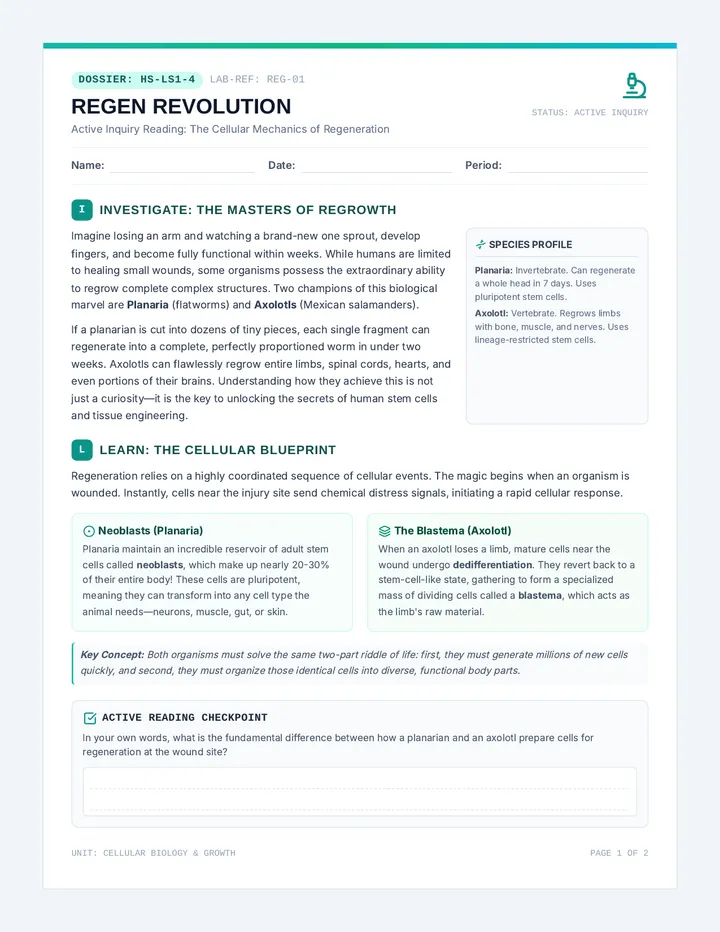
The Cafeteria Problem
"If you shouted your password across the cafeteria, who would hear it?"
Everything is a Packet
The Data
Your message, photo, or password.
The Header
Where it's from and where it's going.
The Order
The sequence number (Part 1 of 5).
If the packet isn't "locked" (encrypted), anyone can read it!
Packet Sniffing
The Definition
The act of intercepting and logging traffic that passes over a digital network.
The Danger
Hackers use "sniffers" on public Wi-Fi to steal passwords and personal info from unencrypted packets.
Man-in-the-Middle (MitM)
You
The Attacker
Website
The attacker sits between you and the destination, secretly reading or even changing the information you send.
Your Defense Strategy
Encryption is the Key
Packet Sniffer Activity Packet Sniffer Activity
Cyber Security Lab // Lesson 01
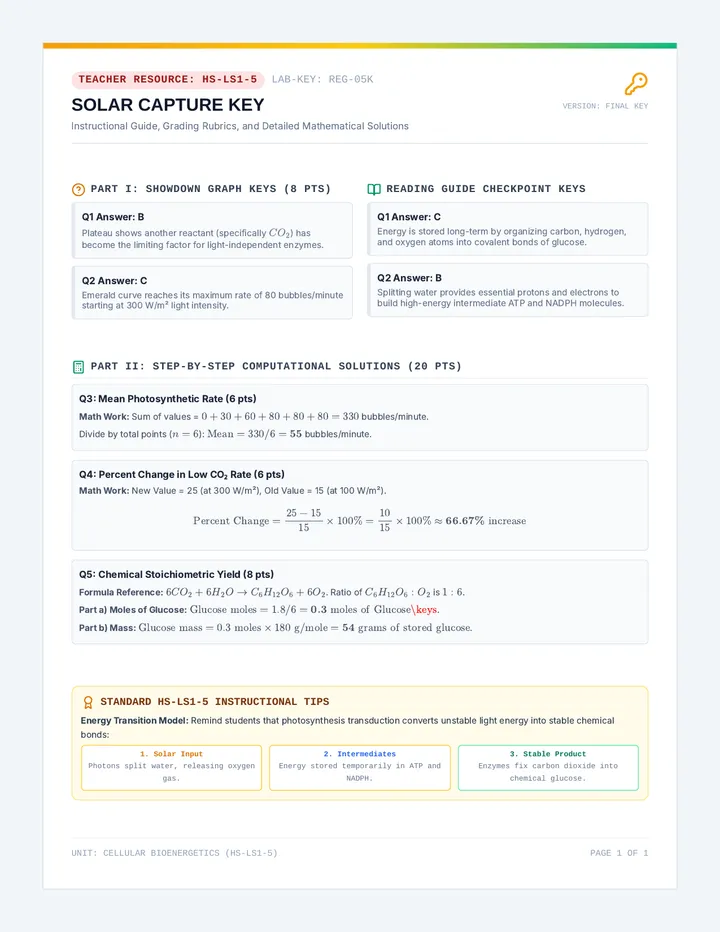
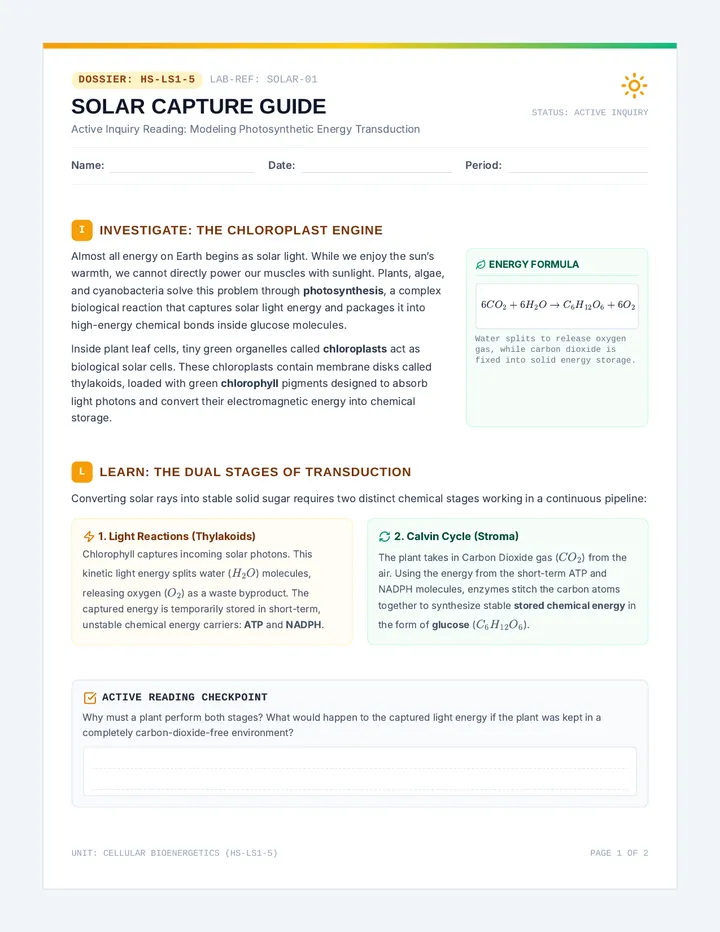
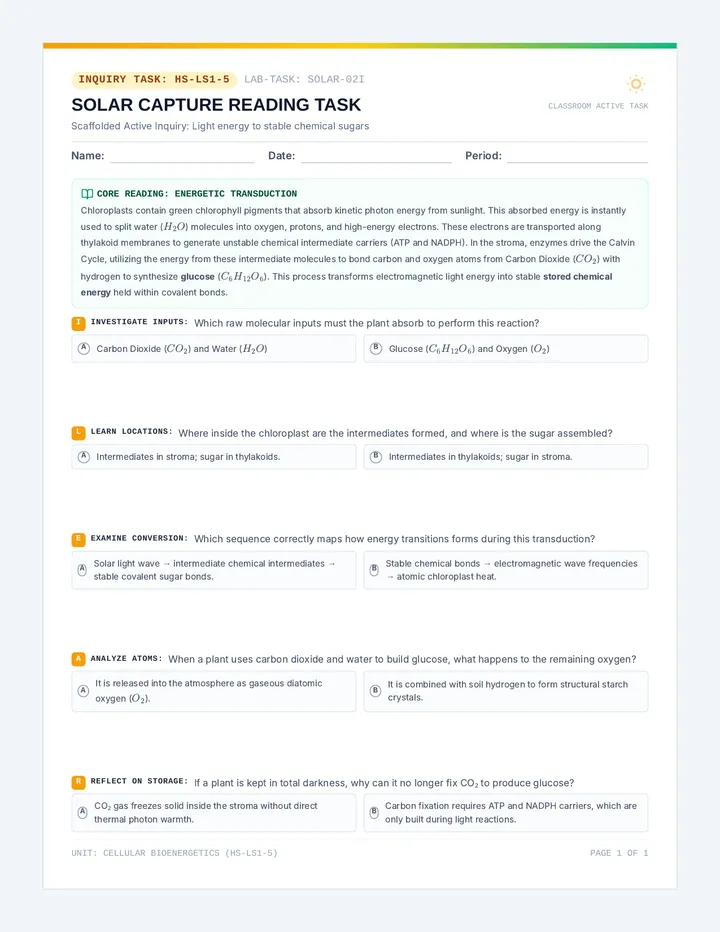
Agent Name:
Date:
Mission Objective
You are a "Packet Sniffer" on an open network. Your goal is to intercept "unencrypted" messages being passed between users and extract sensitive information like passwords, secret codes, and personal data.
Interception Log
As messages (packets) are passed across the room, record what you can see without unfolding or opening "secure" envelopes.
Packet # Source / Destination Intercepted Data (The Message) 01
|
| 02 |
|
|
| 03 |
|
|
| 04 |
|
|
Security Analysis
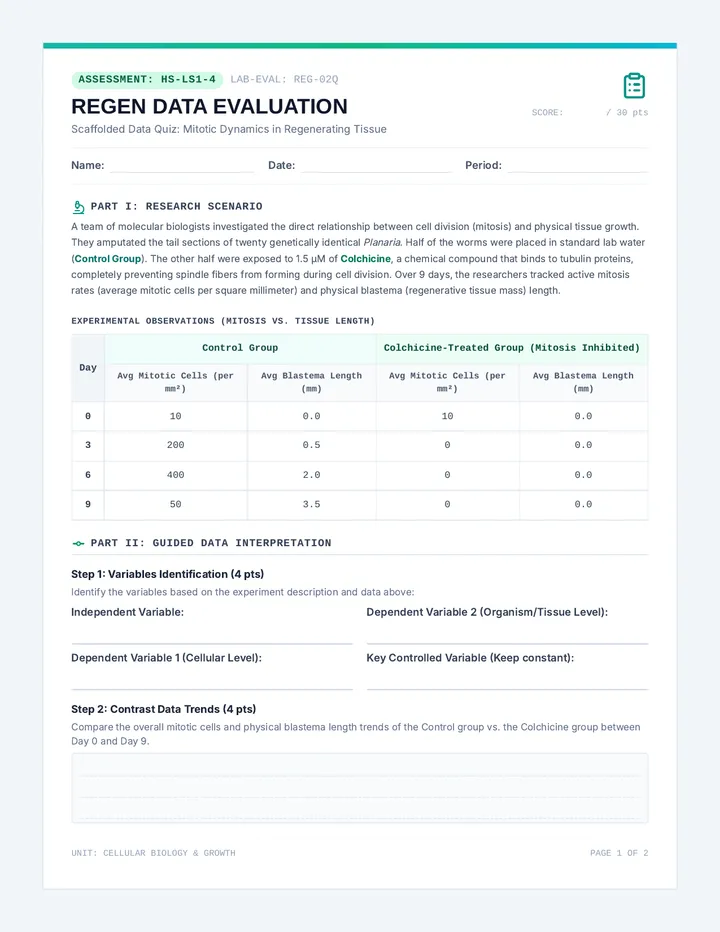
1. Which messages were the easiest to read? Why?
2. If you were a "hacker" (packet sniffer) in this room, which piece of information was the most valuable to you?
3. Some messages might have been in sealed envelopes or written in code. How did that change your ability to "sniff" the packet?
The Digital Connection
In a real network, a "packet sniffer" software doesn't just read messages. It can look for specific patterns like 16-digit numbers (credit cards) or words like "password" or "login".
4. Based on this activity, list three things that people often do on public Wi-Fi (like at a cafe or airport) that might be dangerous if a packet sniffer is active.
A.
B.
C.
Cafeteria Chaos Teacher Guide Cafeteria Chaos
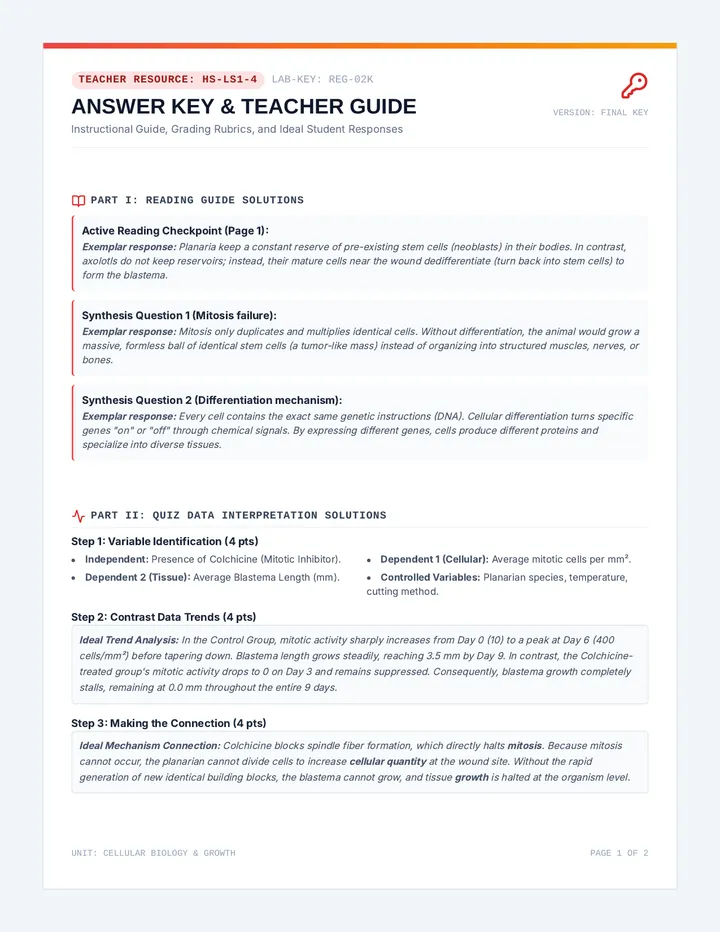
Teacher Facilitation Guide
Lesson 01
Duration
45-50 Minutes
Format
Hands-on Simulation
Key Terms
Packet, Sniffer, MitM
Preparation Checklist
Small slips of paper (2-3 per student)
A few small envelopes (to represent "secure" connections)
Student activity sheets (one per student)
Slides ready for presentation
Simulation Procedure
1
The Setup
Divide the class into three roles: **Users**, **Routers**, and **Sniffers**. Users are on opposite sides of the room. Routers stand in between. Sniffers sit near the Routers but aren't supposed to "touch" the packets, just observe them as they pass.
2
The Messaging
Users write simple messages: "My favorite color is blue" or "Password: pizza123". They fold the paper once (no tape) and hand it to a Router. Routers must pass it to the next Router until it reaches the destination User.
3
The Sniffing
As the Routers pass messages, the **Sniffers** try to read what is written on the folded paper without touching it. They record what they see on their log. *Tip: Tell Routers to pass slowly to simulate "lag" and give sniffers a chance.*
4
The Secure Variant
Midway through, give some Users envelopes. Tell them this represents **HTTPS**. The Sniffers will find it impossible to read the data inside, even if they can see who the "From/To" names are.
Discussion & Debrief
Question:
What happens if a Router is "evil" and decides to change the message before passing it on?
Connect this to the "Man-in-the-Middle" concept where data integrity is compromised.
Question:
Why doesn't everyone just use envelopes (encryption) all the time?
Explain that encryption takes processing power and time (though computers are getting very fast at it).
Cipher Secrets Slides ANCIENT CODES
Introduction to Cryptography
A B C D E F G H I J K L M N O P Q R S T U V W X Y Z
The Crypto Glossary
Plaintext
The original, readable message (e.g., "Hello").
Ciphertext
The scrambled, unreadable message (e.g., "Ifmmp").
Encryption
The process of turning plaintext into ciphertext.
Key
The specific information or "recipe" needed to scramble the data.
Julius Caesar's Secret
Over 2,000 years ago, Julius Caesar sent secret battle plans by shifting every letter in the alphabet by a certain number.
Example: Shift of 1
A B
"HELLO" becomes "IFMMP"
Algorithms vs. Keys
The Algorithm
The "How" - the steps to scramble the message.
FOR each letter IN message:
SHIFT letter by KEY
The Key
The variable part that makes the code unique.
+3
Symmetric Encryption
Alice
THE SAME KEY
is used to both LOCK and UNLOCK
Bob
The Caesar Cipher is **symmetric**. Both the sender and receiver need the exact same key to communicate.
Caesar Code Worksheet Caesar Code Worksheet
Cyber Security Lab // Lesson 02
Agent Name:
Date:
The Algorithm
To encrypt a message using a Caesar Cipher, shift each letter of the alphabet forward by the **Key**. If you reach the end of the alphabet, wrap around to the beginning (A).
1
Part 1: The Scramble (Encryption)
KEY: +3
Plaintext: A T T A C K
Example: A becomes D (+3 shift)
KEY: +5
Plaintext: S E C R E T
2
Part 2: The Solve (Decryption)
To decrypt, shift the letters **backward** by the Key.
KEY: +2
Ciphertext: U C H G
KEY: +4
Ciphertext: G S T T I S
Agent Reflection
If you are a hacker and you don't know the **Key**, but you know the **Algorithm** is a Caesar Cipher, how could you figure out the message? Explain your strategy.
Cipher Wheel Template Cipher Wheel Template
Analog Cryptography Tool
Assembly Instructions
Carefully cut out both circles (the **Outer Wheel** and the **Inner Wheel**).
Place the Inner Wheel directly on top of the Outer Wheel.
Push a brass fastener (brad) through the center dots of both wheels.
To use: Align "A" on the inner wheel with the shift key on the outer wheel.
How it works
The **Outer Wheel** represents your **Plaintext** (the original message).
The **Inner Wheel** represents your **Ciphertext** (the secret message).
By rotating the inner wheel, you can instantly see the encrypted version of any letter!
Inner Wheel (Cut this out second)
A B C D E
Inner
Outer Wheel (Cut this out first)
A
B
C
D
E
F
G
H
I
J
K
L
M
N
O
P
Q
R
S
T
U
V
W
X
Y
Z
Inner Wheel Placement Area
Asymmetric Armor Slides ASYMMETRIC ARMOR
The Power of Public Keys
The Key Exchange Problem
Remember Caesar? In symmetric encryption, both people need the same key .
"How can I send you the key safely if our network is already being watched by hackers?"
Sending a key over an open network is dangerous!
The Box and Two Keys
1. The Public Key
Can only LOCK the box. Everyone has a copy of this key!
2. The Private Key
Can only UNLOCK the box. Only you have this key!
Asymmetric Logic
1
Bob sends Alice his Public Key (anyone can see it).
2
Alice uses Bob's Public Key to LOCK her message.
3
Bob uses his Private Key to unlock the message. No one else can!
The Internet's Backbone
Asymmetric encryption (like RSA ) is what makes modern browsing safe.
Locked Box Logic Sheet Locked Box Logic
Cyber Security Lab // Lesson 03
Agent Name:
Date:
The Scenario
"Alice wants to send a secret message to Bob. They have never met, and their network is being watched by a hacker. How can they communicate safely?"
STEP 1
Bob sends his Public Key to Alice.
Security Check:
If a hacker intercepts this key, can they use it to read Bob's messages?
Yes
No
STEP 2
Alice puts her message in a box and uses Bob's Public Key to LOCK it.
Why this key?
STEP 3
Alice sends the LOCKED box to Bob.
The hacker can see the locked box, but they don't have the key to open it.
STEP 4
Bob uses his Private Key to unlock it.
Wait!
Could Alice have opened this box after she locked it?
Yes
No
Public vs. Private Summary
Key Type Who has it? What does it do? Public Key
|
| Private Key |
|
|
Public Key Simulation Cards Public Key Simulation Cards
Hands-On Cryptography Activity
Teacher Instructions:
Print one set per student pair. Have students cut out their specific cards. Bob will keep his Private Key secret, while his Public Key is "published" on his desk for Alice to use. This simulates how asymmetric encryption works without needing any software.
CONFIDENTIAL // TOP SECRET
BOB'S PRIVATE KEY
USE ONLY TO UNLOCK INCOMING PACKETS. DO NOT SHARE OR SHOW TO ALICE.
PUBLIC ACCESS // SHARE FREELY
BOB'S PUBLIC KEY
ALICE: USE THIS KEY TO LOCK YOUR MESSAGE. ENCRYPTED DATA CAN ONLY BE OPENED BY BOB.
DATA PACKET // UNLOCKED
Write Secret Message Below:
[ Write message here... ]
To: Bob // From: Alice
ENCRYPTED // PROTECTED
Place this shield over Alice's message after "locking" it with Bob's Public Key.
Requires Bob's Private Key to Open
Cyber Security Lab Simulation Series // Handout 3B
Secure Surfing Slides SECURE SURFING
HTTPS & Digital Certificates
HTTP vs. HTTPS
HTTP
Unsecured
Like a postcard. Anyone who handles it can read the message.
HTTPS
Secured (S = Secure)
Like a sealed, armored envelope. Only the recipient can open it.
Transport Layer Security (TLS)
TLS is the secret protocol that handles the "handshake" between your computer and the website.
Authentication
Are you who you say you are?
Encryption
Keep the data secret.
Integrity
Make sure no one changed the data.
Digital Certificates
How do you know you're actually at Google.com and not a fake site?
The Certificate Authority (CA)
Trusted third parties that verify the identity of websites and issue "digital IDs".
Verified Identity
The Anatomy of a URL
https :// www.yourschool.org
The Padlock
Clicking this shows who issued the certificate and if the connection is encrypted.
The 'S'
Always look for the 's' before entering personal info or passwords!
Security Inspector Checklist Security Inspector
Cyber Security Lab // Lesson 04
Agent Name:
Date:
Inspection Mission
Your task is to inspect three different websites. You will look for visual clues that indicate whether the connection is secure and whether the site's identity has been verified.
1
https://www.wikipedia.org
Checklist:
Does the URL start with **https**?
Is there a **padlock** icon visible?
Click the padlock: Who issued the certificate?
Observation Notes:
2
http://neverssl.com
Checklist:
Does the URL start with **https**?
Is there a **padlock** icon visible?
Does your browser show a "Not Secure" warning?
Observation Notes:
Inspector Analysis
1. If a website does NOT have HTTPS, what are two pieces of information you should NEVER type into that site? Why?
2. Why does a "Digital Certificate" need to be issued by a third party (like a Certificate Authority) instead of the website just making its own?
The False Security Trap
Be careful! Just because a site has a "Green Lock" (HTTPS) doesn't mean it's a good or honest website. It just means the connection between you and the site is private. A hacker can still create a website with HTTPS to try and trick you!
3. Based on the alert above, what is one other thing you should check (besides the lock) to make sure a website is safe to use?
Certificate Check Exit Ticket Exit Ticket
Certificate Check
Agent Identity:
1. What does the "S" in HTTPS stand for?
Secret
Socket
Secure
Speed
2. True or False: If a website has a green padlock, it is 100% guaranteed to be a safe, honest website.
TRUE
FALSE
3. In your own words, what is the role of a "Certificate Authority"?
Digital Citizenship Series VERIFICATION_STATUS: PENDING
Gatekeeper Defense Slides NETWORK GATEKEEPERS
Introduction to Firewalls
The Network Bouncer
Imagine a bouncer at a club who checks every person's ID before letting them in.
A Firewall:
Monitors and controls incoming and outgoing network traffic based on predetermined security rules .
Status: Filtering
What the Firewall Sees
IP Address
The source or destination address (Like a home address).
Port Number
The specific service being used (Like a door in the house).
Data Type
What kind of file or message is inside the packet?
If/Then Logic
A firewall follows strict rules created by the network administrator.
IF packet is from "TrustSchool.edu":
THEN ALLOW
IF packet contains "Malware.exe":
THEN DENY
Config_File.sys
1. Allow Port 80 (Web)
2. Allow Port 443 (HTTPS)
3. Deny Port 21 (File Sharing)
4. Deny IP 192.168.0.5
Defending the Perimeter
Network Boundary Protection
Packet Bouncer Game Packet Bouncer Game
Cyber Security Lab // Lesson 05
Admin Name:
Date:
Firewall Config Rules
Follow these rules in order. Apply the first rule that matches.
RULE 01: IF Port = 80 THEN ALLOW (Web Traffic)
RULE 02: IF IP Starts with 10.1 THEN ALLOW (Internal Network)
RULE 03: IF Port = 22 THEN DENY (Remote Access - Dangerous!)
RULE 04: IF File = "Games.exe" THEN DENY (No Games!)
DEFAULT RULE: IF NO RULES MATCH THEN DENY (Implicit Deny)
Incoming Traffic Log
Packet ID Source IP Port Data Description Verdict Matching Rule # P-101 10.1.5.22 443 Internal server update A
D
|
|
| P-102 | 192.168.1.5 | 80 | External web page request |
A
D
|
|
| P-103 | 203.0.113.1 | 22 | Foreign remote login attempt |
A
D
|
|
| P-104 | 10.1.0.1 | 53 | DNS lookup request |
A
D
|
|
| P-105 | 15.55.10.1 | 443 | "Games.exe" download |
A
D
|
|
| P-106 | 8.8.8.8 | 5000 | Unknown streaming service |
A
D
|
|
Mission Challenge: Rule Writing
The network admin wants to block all traffic from the country "Zorgonia" which uses the IP range starting with **200.5**. Write the new rule below:
RULE 05:
IF IP Starts with ___________ THEN ___________
Firewall Rules Key Firewall Rules Key
Teacher Answer Key
Lesson 05
Rule Logic Reference:
R1: Port 80 = ALLOW
R2: IP 10.1.* = ALLOW
R3: Port 22 = DENY
R4: "Games.exe" = DENY
Default: DENY
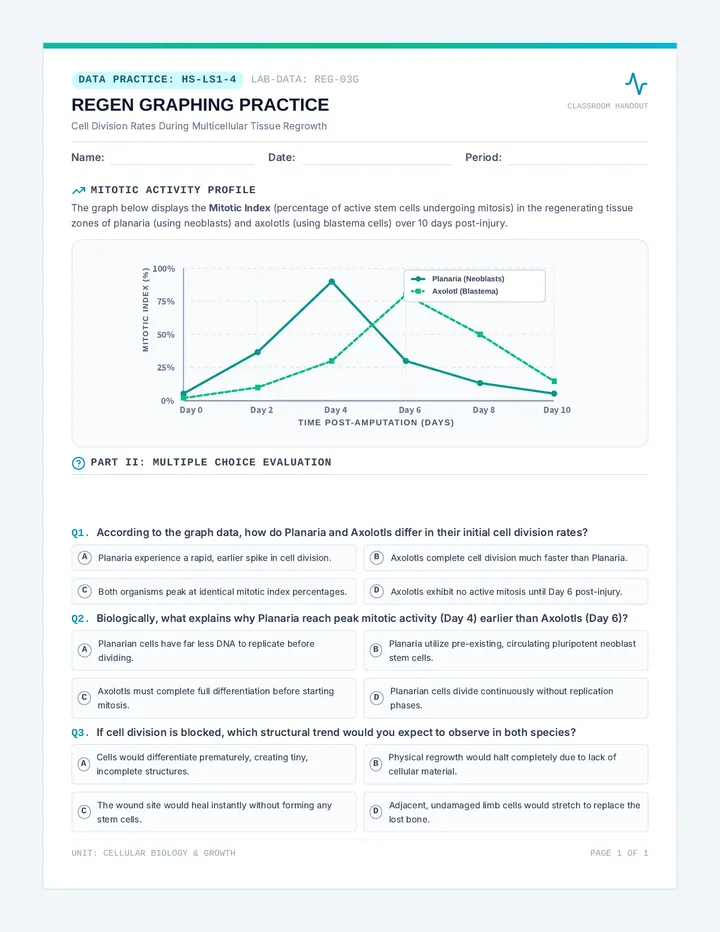
ID Reasoning Verdict Matching Rule P-101 Matches Rule 02 (IP starts with 10.1). Internal traffic is trusted. ALLOW R2 P-102 Matches Rule 01 (Port 80). Standard web traffic is allowed. ALLOW R1 P-103 Matches Rule 03 (Port 22). SSH/Remote access is a high security risk. DENY R3 P-104 Matches Rule 02 (IP starts with 10.1). DNS lookup on internal IP. ALLOW R2 P-105 Matches Rule 04 (File = Games.exe). Security policy blocks games. DENY R4 P-106 No rules (1-4) match. Hits the "Implicit Deny" default rule. DENY DEFAULT
Challenge Answer
RULE 05:
IF IP Starts with 200.5 THEN DENY
*Note:* In real firewalls, rules are often processed from top to bottom. If Rule 05 was placed at the very end, it would only apply if nothing else matched. If placed at the beginning, it would block that IP range even if they were trying to use Port 80.