Digital Pause Toolkit Lesson Plan Digital Pause Toolkit
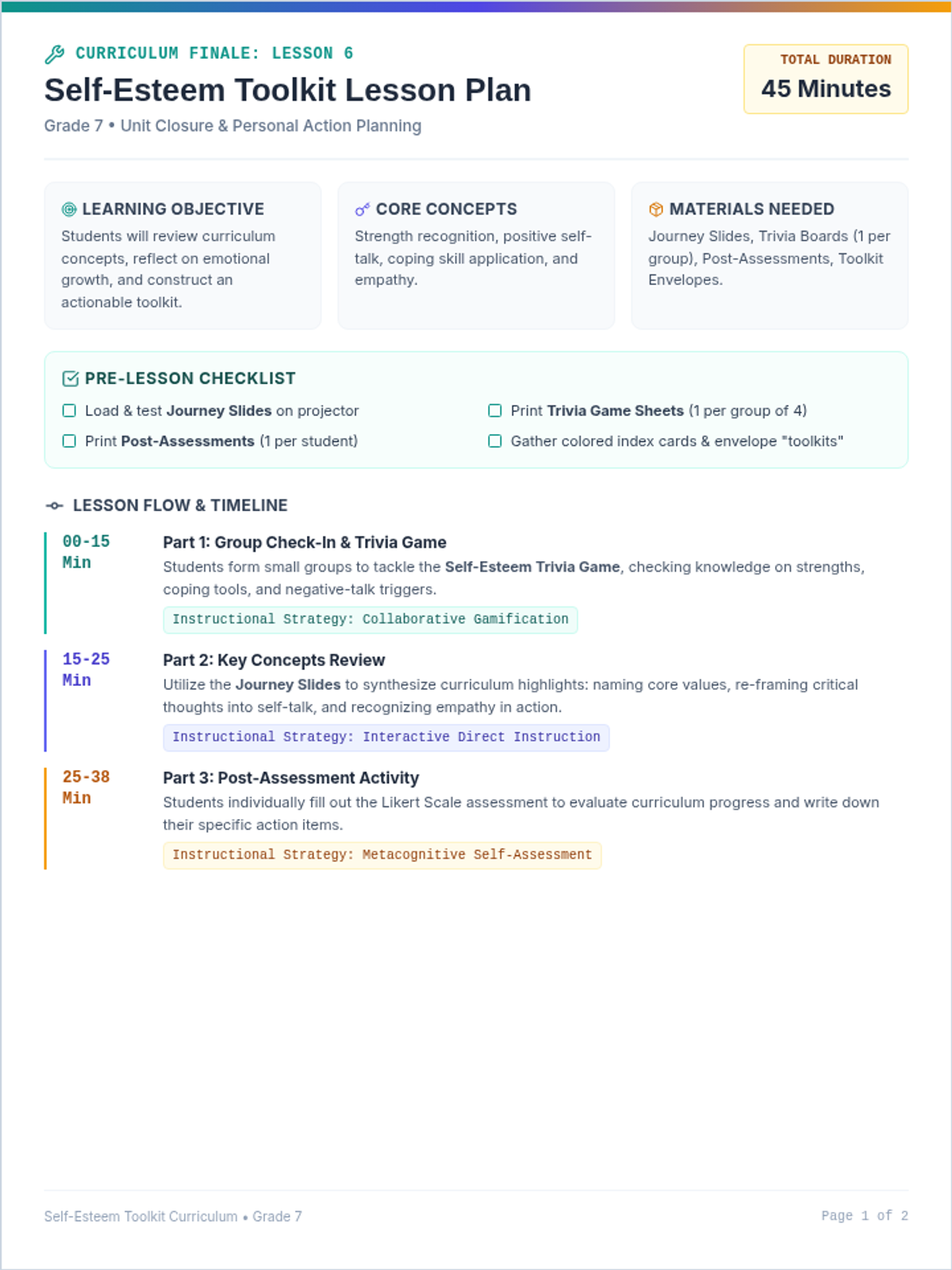
Tier 1 SEL Lesson Plan • Grade 7
45 Minutes
Objective
Master digital "pause" tools to practice impulse control through demo, stations, and reflection.
Audience
7th Grade Students (Whole Class)
Approach
Station Rotations, App Demos, Reflection
Why This Matters
Impulse control underpins focus, decision-making, and positive interactions. By exploring concrete digital strategies, students gain self-management skills to pause before reacting, reducing impulsive behaviors in and out of class.
Materials Needed
Smartphones or Tablets (4+ devices)
App Demo Slides
Timer Trial Stations Setup Guide
App Reflection Sheet (1 per student)
Tech Pledge Exit Ticket (1 per student)
Prep (10 mins)
01 Review App Demo Slides to familiarize with features.
02 Set up 4 stations around the room per the Guide.
03 Test each device's timer/app functionality.
04 Print student worksheets and exit tickets.
The Mission Sequence
Time Phase Mission Details 5m Launch Introduction & Objective
Introduce impulse control as the ability to pause before acting .
Goal: Explore digital tools that help manage impulses.
Share session outline: Demo, Practice, Reflection, Pledge.
|
| 10m | Briefing |
App Demo Slides
Walk through 3–4 featured tools (Countdown, Breathing, Focus Apps).
Highlight how each supports taking a pause with real-life examples.
Invite student Q&A on tool usefulness.
|
| 15m | Field Work |
Timer Trial Stations
Divide class into 4 groups.
3 mins per station: Test the tool, note one strength and one challenge on the group sheet.
Rotate groups every 3 minutes until all stations visited.
|
| 10m | Analysis |
App Reflection Sheet
Distribute individual App Reflection Sheets .
Students identify most effective tool and plan for use at class/home.
Collect sheets for informal review.
|
| 5m | Commit |
Tech Pledge Exit Ticket
Students write one specific commitment (e.g., "I will use a 30s timer before answering").
Volunteers share pledges.
Collect as a record of personal goals.
|
App Demo Slides Toolkit Digital Toolkit
Digital Pause Toolkit
Exploring tools to help you hit the pause button and master impulse control.
App Demo Lineup
Today we'll explore four powerful tools designed to help you slow down and think:
1 Countdown Timer App
2 Mindful Breathing App
3 Reward-Based Focus App
4 Bonus: Do-Not-Disturb Tips
Teacher Note
Walk through the structure before diving in.
Tool 01
Countdown Timer App
Features
Set custom durations (5–60 seconds)
Visual and audio alerts
Simple start/stop interface
How it helps
Creates a clear physical pause
Encourages mindful reaction time
0:10
Start Pause
Tool 02
Mindful Breathing App
Inhale...
2:45 remaining
Features
Guided inhale/exhale animations
Calming background sounds
Sessions: 30s to 5 minutes
How it helps
Physically slows heart rate
Reduces stress before a quick reaction
Tool 03
Reward-Based Focus App
Features
Earn points for waiting set intervals
Progress tracking and streaks
Customizable waiting goals
How it helps
Turns impulse control into a game
Motivates consistent daily practice
You waited 2:00!
+50 Focus Points Earned
Level 4 Master
Comparing Our Tools
01 Countdown Timer
Strength
Extremely quick to set up and use.
Challenge
Can feel rigid or stressful for some.
02 Mindful Breathing
Strength
Very calming; physically resets stress.
Challenge
Requires quiet space and focus.
03 Reward Tracker
Strength
Fun and highly motivating goals.
Challenge
Can be a distraction from the pause.
Try It Yourself
We're rotating through 4 stations. You'll have at each to test the tool and note your thoughts.
Timer Trial Stations Activity Timer Trial Stations
Teacher Setup Guide & Mission Briefing
Prep Resource
Objective
Provide hands-on practice with four digital “pause” tools. Students will test each tool’s pause feature, note one strength and one challenge, and rotate through all stations.
Station Definitions
01
Mechanical Timer
Egg timer or kitchen timer
02
Phone Countdown App
Basic timer utility on tablet/phone
03
Breathing App
Opened to a 30-second session
04
Reward Focus App
1-minute challenge mode loaded
Room Setup (10m)
Label four areas/tables clearly with station numbers.
Ensure devices are unlocked, apps are open, and batteries are charged.
Place one Group Recording Sheet at each station (4 total).
Test volume levels - enough to hear but not disrupt other stations.
Teacher Tip
Use a chime or visual signal to manage rotations every 3 minutes. Keep the energy high and the transitions quick!
Rotation Sequence
Step 1
Group 1 → St. 1
Step 2
Group 1 → St. 2
Step 3
Group 1 → St. 3
Step 4
Group 1 → St. 4
Field Report: Timer Trials
Group Name/Station #: _________________________
Instructions: At each station, test the tool for 3 minutes. Work as a group to identify one major strength and one challenge. Brainstorm one way you'd use it!
Station 01
Mechanical
Strength Noticed
Challenge Identified
Idea for Use
Station 02
Phone App
Strength Noticed
Challenge Identified
Idea for Use
Station 03
Breathing
Strength Noticed
Challenge Identified
Idea for Use
Station 04
Reward Focus
Strength Noticed
Challenge Identified
Idea for Use
App Reflection Sheet Worksheet App Reflection Sheet
Digital Pause Toolkit • Impulse Control Analysis
SEL Module 03
Student Name
Date
During our Timer Trial Stations exploration, you tested four digital tools to help practice impulse control. Reflect on what you learned and how you might apply these tools in your daily life.
1 Which tool felt most effective for you, and why?
Consider ease of use, calming effect, motivation, or focus features.
2 What is one challenge you noticed when using that tool?
3 How might you use this pause tool in class or at home? Be specific.
Example: "I will use the 30s breathing app when I feel frustrated with math homework."
4 Did any tool surprise you or change how you think about impulse control? Explain.
5 Do you have any questions or concerns about using tech to help manage impulses?
Ready for your pledge? Turn this sheet in to your teacher.
Tech Pledge Exit Ticket Cool Down Tech Pledge Exit Ticket
Make a commitment to your future self.
Student Name
Date
My Specific Pledge
I will (write what you will do, which tool you'll use, and when)...
How I'll Remember
e.g., set a daily timer, post a note on my desk, enlist a buddy...
Digital Pause Toolkit Take care of your mind
Tech Pledge Exit Ticket
Make a commitment to your future self.
Student Name
Date
My Specific Pledge
I will (write what you will do, which tool you'll use, and when)...
How I'll Remember
e.g., set a daily timer, post a note on my desk, enlist a buddy...
Digital Pause Toolkit Take care of your mind