Cultural Compass Slides Cultural Compass
Navigating Cultural Responsiveness in Behavioral Support Systems
Inclusive Check-In Systems • Lesson 1
The Power of Eye Contact?
The Scenario
During a morning check-in, a teacher repeatedly says, "Look at me when I'm talking to you," to a student who is looking down.
The teacher marks the student "0" for "Respect" on their daily point card.
What assumption is the teacher making about eye contact?
In what cultures is direct eye contact with authority figures seen as disrespectful or aggressive?
How does this bias impact the validity of the data collected?
Core Principles
Validate
Legitimize the student's cultural heritage and communication styles as a foundation for learning.
Affirm
Intentionally create positive images of the student's culture in the school environment.
Bridge
Help students transition between "home culture" and "school culture" without devaluing either.
"Behavioral expectations are not universal truths; they are cultural constructs."
Making CICO Culturally Responsive
01
Language & Terminology
Avoid idioms or "coded" language (e.g., "be a professional"). Use descriptive, neutral terms.
02
Communication Styles
Shift from directive (Teacher -> Student) to collaborative (We) check-ins.
03
Reinforcement Selection
Include rewards that reflect community values (e.g., peer collaborative time vs. individual treats).
Critique: Standard Expectations
Identify the bias in these common "Behavioral Standards"
"Sit still and remain in your seat."
"Keep your hands to yourself at all times."
"Wait for your turn to speak."
Who defined these as "good"?
How might movement-oriented or communal cultures interpret these?
Goal: Rewrite one of these to be more inclusive while maintaining safety.
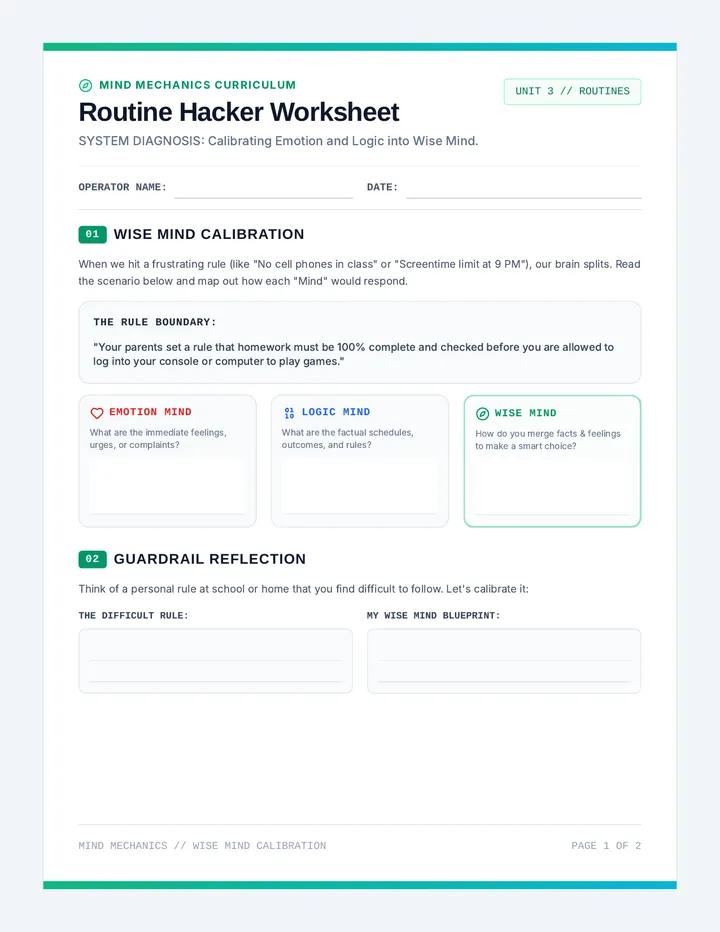
Bias Buster Worksheet Bias Buster Worksheet
Analyzing Behavioral Standards for Cultural Equity
Student Name: __________________________
Date: __________________________
Standard behavioral protocols often rely on "Common Sense" expectations that are rooted in Western, middle-class norms. For future practitioners, it is vital to distinguish between functional behavior (behavior needed for safety/learning) and cultural compliance (behavior that makes the teacher comfortable).
Part 1: Deconstructing "The Norm"
Examine the common behavior expectation below. Identify the potential cultural bias and offer an inclusive adaptation.
Standard Expectation:
"Quietly working in your own space without interacting with others."
Potential Cultural Bias:
Inclusive Adaptation:
Standard Expectation:
"Addressing adults by Title and Last Name only (e.g., Mr. Smith)."
Potential Cultural Bias:
Inclusive Adaptation:
Part 2: The Conversational Check-In
Standard Check-In/Check-Out (CICO) usually follows a transactional pattern: Did you meet your goals? Yes/No. Here is your reward.
Task: Transform the Transaction
Read the standard script below. Rewrite it to be more Relational and Culturally Validating.
Transactional Script:
"Hi Leo. I see you got 80% on your card yesterday. Good job. Today, remember to stay in your seat and use a quiet voice. If you do, you can have 5 extra minutes of computer time."
Your Culturally Responsive Script:
Critical Reflection
How does your script shift the power dynamic between the practitioner and the student?
List 3 ways you could involve the student's family in defining what "Respectful" looks like for their child's point card.
Tiny Transitions Slides Tiny Transitions
Adapting Check-In Procedures for Early Learners (PreK-2)
Inclusive Check-In Systems • Lesson 2
The Problem with Abstraction
Standard CICO
• Written point cards
• Percentages (e.g., 80%)
• Delayed rewards (end of day)
• Abstract goals ("Be Kind")
Developmental Need
• Visual representations
• Concrete counts (1, 2, 3)
• Frequent, immediate feedback
• Tangible indicators of success
"If they can't read it, they can't own it."
Early learners need to 'see' their progress in real-time.
Concrete Tools for Success
VISUAL
Emoji Cards
Replace numbers with faces. Happy, neutral, and 'not yet' faces communicate status instantly without reading.
TANGIBLE
Token Jars
Dropping a physical bead into a jar provides a sensory reinforcer that a mark on a paper cannot match.
SPATIAL
Progress Sliders
A physical slider on a desk allows a student to move their marker toward a 'goal' icon as the day progresses.
The Power of "First/Then"
Instead of complex social goals, use clear, observable pairs:
FIRST
THEN
"First, sit on the carpet..."
"...Then, choice of puzzle."
Design Challenge
You are working with Milo, a 4-year-old in Pre-K. Milo loves dinosaurs but struggles with "waiting his turn" during circle time.
Sketch or describe a 'Check-In Station' for Milo that:
Uses zero written words.
Incorporates his interest in dinosaurs.
Gives him feedback every 15 minutes.
Has a tangible way for him to see he is "close" to a reward.
Tiny Transitions Design Project Design Project
The Visual Protocol Blueprint
Designing Non-Reader Check-In Systems
Designer Name
Date
Student Profile
Target Student: Milo (4 years old)
Primary Goal: Waiting turn during Circle Time
High-Interest Area: Dinosaurs (especially T-Rex)
Setting: Pre-K Inclusive Classroom
System Visualization
In the space below, sketch or diagram the physical layout of the check-in station. Label your visual cues and tangible markers.
System Component Logic
1. Visual Representation of Success
How does the student know they have "done a good job" without reading "3/3"? (e.g., Dinosaurs moving to a volcano, filling a nest with eggs).
2. Reinforcement Schedule
Early learners need frequent feedback. How will you segment the time? (e.g., Every 10 minutes, or once per activity transition?).
3. The Physical "Check-In" Action
What physical movement does the student do to initiate the check-in? (e.g., Pushing a button, moving a Velcro icon, handing a token).
Final Challenge
Explain how this design reduces "Executive Function" load for a 4-year-old.
Adolescent Autonomy Slides Adolescent Autonomy
Modifying Check-In/Check-Out for High School & Middle School
Inclusive Check-In Systems • Lesson 3
Visibility is a Liability
Adolescent Realities
Social stigma of "Special Support"
Power struggles with authority
Need for privacy and discretion
"If my friends see me carrying a point card, I'd rather just get the detention."
The Secondary Shift
FROM
Adult Monitoring
TO
Self-Monitoring
Stealthy Support
Digital Cards
Checking in via a Google Form or private app on a phone looks like a normal student activity.
Post-It Coding
Teachers use a small, coded symbol on a Post-It note placed at the corner of a desk during work time.
Non-Verbal Cues
Predetermined hand signals (e.g., thumbs up on chest) to confirm goals without speaking.
Building Buy-In
Collaborative Choice
Adolescents are more likely to comply with behavioral targets they helped create.
Questions to ask students:
"Which period is the hardest for you to stay focused?"
"What does 'successful' look like to you in Math class?"
"How should I let you know you're off-track without embarrassing you?"
Secondary Reinforcement
Forget stickers and candy. High schoolers value:
Early Wi-Fi Access
Listening to Music
Hall Pass "Credits"
Peer Collaboration Time
"The Stealth Challenge"
In small groups, brainstorm 3 ways to implement a Self-Monitoring Card for a sophomore who sits in the middle of a crowded Chemistry lab.
Must be invisible to peers 5 feet away.
Must take less than 10 seconds.
Must involve student self-rating.
Stealth Support Brainstorm Worksheet Stealth Support Brainstorm
Designing Discreet CICO for Secondary Learners
CASE FILE: SEC-03
Objective: Develop a daily behavioral check-in system for a high school student that maximizes autonomy and minimizes social visibility. High school students often reject support that marks them as "different" in front of their peers.
1. The Delivery Mechanism
Standard CICO uses a paper card. Select and expand on a "Stealth" alternative:
Option A: Digital
QR Code on desk linking to a 2-question form.
Option B: Integrated
Rating system inside a normal academic notebook.
Option C: Physical Object
Coded paperclip placement on a folder.
Detail your chosen mechanism. How does the student "check-in" without drawing attention?
2. The Conversational Pivot
Adolescents respond better to Coaching rather than Monitoring. Critique and rewrite the following check-in exchange.
Standard Check-In (Adult-Driven):
"Hey Maya, you missed your goal for being on time this morning. Let's try harder for 2nd period, okay? Remember, no phone if you don't get your points."
Why might this fail with a 16-year-old?
Rewrite as a "Collaboration/Coaching" moment:
3. Reinforcement Audit
List 4 potential reinforcers for a high school student that do not cost money and respect their need for independence.
1
2
3
4
"Autonomy is not the absence of support; it is the presence of choice."
Neuro Nurture Slides Neuro-Nurture
Adapting Check-In Procedures for Neurodivergent Learners
Inclusive Check-In Systems • Lesson 4
Identifying the Friction
Standard CICO Barriers
Executive Function Load
Remembering the card, finding the teacher, transitioning from high-interest tasks.
Sensory Overload
The noise of the hallway during check-in time, the texture of the card, or eye contact demands.
Literal Interpretation
Vague goals like "Be Responsible" are confusing for literal thinkers.
"For many neurodivergent students, the procedure of checking in is more difficult than the behavior we are asking of them."
The Sensory Check-In
Location
Move check-ins to a "Quiet Zone" or the student's desk rather than a busy hallway or teacher's podium.
Timing
Avoid "The Bell." Check in 5 minutes before or after transition peaks to lower arousal levels.
Communication
Use visual scripts, "check-boxes," or pre-written status cards to reduce verbal processing demands.
The "Spin" Strategy
Instead of generic rewards, integrate a student's special interest into the fabric of the CICO plan.
Minecraft-themed point cards
Rewards involve sharing interest knowledge
Points = "Leveling Up" or "Collecting Items"
Why it works:
Special interests are not just hobbies; for neurodivergent learners, they provide:
1. Emotional Regulation
2. Intrinsic Motivation
3. Reduced Anxiety
Barrier Audit: "Sam"
Sam is an 8-year-old with ADHD and Sensory Processing Disorder. His CICO plan requires him to walk to the office every morning, stand in line, and verbally explain his goals to the Vice Principal.
Identify 3 Barriers
Where is Sam likely to "fail" the procedure before the day even begins?
Propose 1 Sensory Fix
How can we change the environment of the check-in?
Propose 1 Cognitive Fix
How can we change the communication method?
Neuro Inclusion Audit Worksheet Neuro-Inclusion Audit
Removing Procedural Barriers in Behavioral Support
Practitioner ID
________________
Standard CICO is often built on neurotypical assumptions: high social stamina, strong executive function, and the ability to process verbal instructions in busy environments. Use this audit to "stress-test" a standard plan for a neurodivergent learner.
Case Study: Sam
Student Profile:
• Age 8, Grade 3
• Diagnosis: Autism & ADHD
• Sensory: Hypersensitive to noise and crowds
• Interests: Trains (specifically Steam Engines)
Current CICO Plan:
Sam checks in at the Main Office at 8:15 AM (the busiest time). He must wait in line to speak with the Principal. He carries a bright yellow card all day and hands it to his teacher every 45 minutes for a verbal rating.
Step 1: The Barrier Audit
Identify three specific procedural elements that create unnecessary friction for Sam.
Step 2: Proposing Adaptations
Sensory & Environmental Fix
How can we modify the "Where" and "When" of the check-in?
Cognitive & Communication Fix
How can we modify the "How" (e.g., visual supports)?
Leveraging Special Interests
Sam loves steam engines. Redesign his "Daily Point Card" terminology to use train metaphors. Instead of "Responsible," what could you call the target behavior? Instead of "Points," what are we tracking?
Standard Term:
"Check-In Goal"
Sam's Term (Train-Themed):
Standard Term:
"Meeting Expectations"
Sam's Term (Train-Themed):
Practitioner Reflection:
Why is this "train-themed" approach more than just "making it fun"? How does it impact Sam's cognitive processing and emotional regulation?
Digital Bridges Slides Digital Bridges
Implementing Virtual & Remote Check-In Procedures
Inclusive Check-In Systems • Lesson 5
Lost in the Screen
Remote Vulnerabilities
Loss of Presence: Difficult to read body language or offer physical comfort.
Home Distractions: Family dynamics, environmental noise, and digital fatigue.
Consistency: Point cards get lost when they aren't physically handed over.
"Proximity is no longer physical; it's digital."
How do we maintain 'The Connection' through a 13-inch screen?
The Remote Tool-Kit
Interactive Docs
Shared Google Slides or Sheets where students and teachers can drop "digital stickers" in real-time.
Micro-Check-Ins
Quick 1-minute video 'blasts' or chat-based emojis to provide frequency without 'meeting fatigue'.
Gamified Forms
Google Forms with logic-branching that gives instant, themed feedback based on student input.
The Video Check-In Protocol
Establishing Safety
Always start with a non-academic "Sound Check"
Use "Visual Anchors" (Holding up an object)
Screen-share the point card to co-edit
Privacy check: "Are you in a spot where you feel okay talking?"
Digital Reinforcers
"Digital Badge for the profile"
"Selection of the teacher's Zoom background"
"5-minute private chat for a fun topic"
"Themed 'Break-Out' room with a peer"
Simulation: The Distracted Check-In
You are conducting a Zoom check-in with Leo. He is at home. His little sister is crying in the background, he hasn't eaten breakfast, and his camera is off.
Question 1
Do you demand the camera be turned on? Why or why not?
Question 2
How do you pivot the goals for the day given the home environment?
Question 3
What "Digital Bridge" tool could help Leo re-focus?
Remote Protocol Builder Worksheet Remote Protocol Builder
Synchronous & Asynchronous Check-In Design
Workshop Material
v.2026.5.0
"Remote support is not about digitizing a paper form; it's about redefining connection across distance."
Step 1: Platform Selection & Logic
The "Hub": Where does the data live?
Choose a platform (Google Slides, Seesaw, Private App) and justify its choice for accessibility.
Asynchronous Loop: How do parents see it?
Remote learners need the home-school loop. How is data shared with the family digitally?
Step 2: Virtual Check-In Simulation Script
Write a 3-minute script for a Video Morning Check-In. Your script must address three specific "Remote Realities":
1. Privacy Check
2. Visual Anchor
3. Environment Check
The Script (Teacher Lines Only): Estimated time: 3:00
Step 3: Low-Bandwidth Reinforcement
Not every student has high-speed internet. Propose 3 "Low-Bandwidth" digital rewards that still feel meaningful.
01
Reward Name:
Why it works with poor connection:
02
Reward Name:
Why it works with poor connection:
03
Reward Name:
Why it works with poor connection: