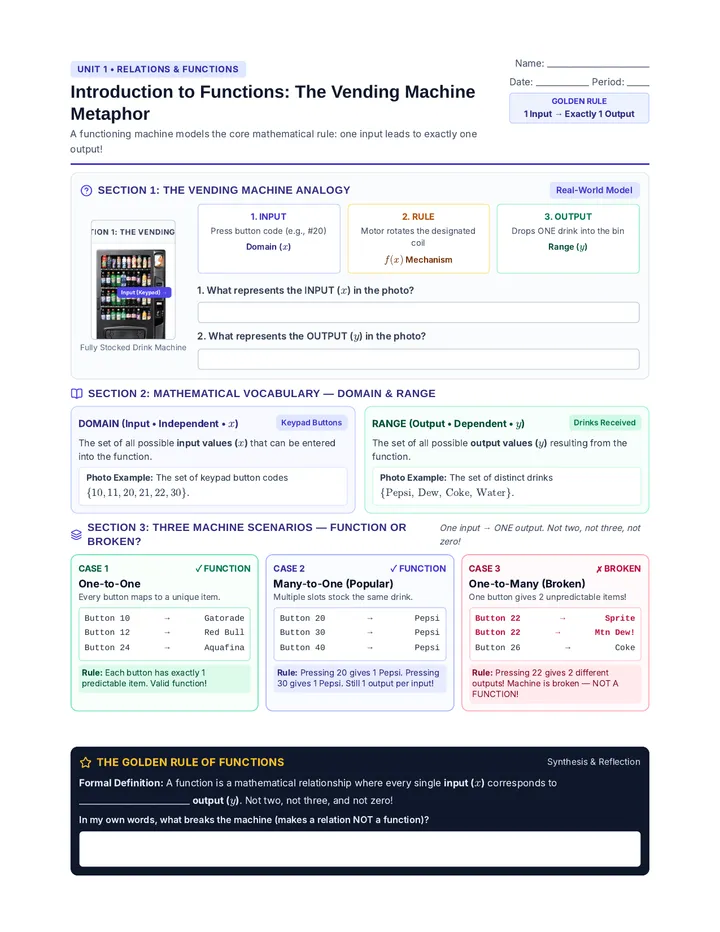
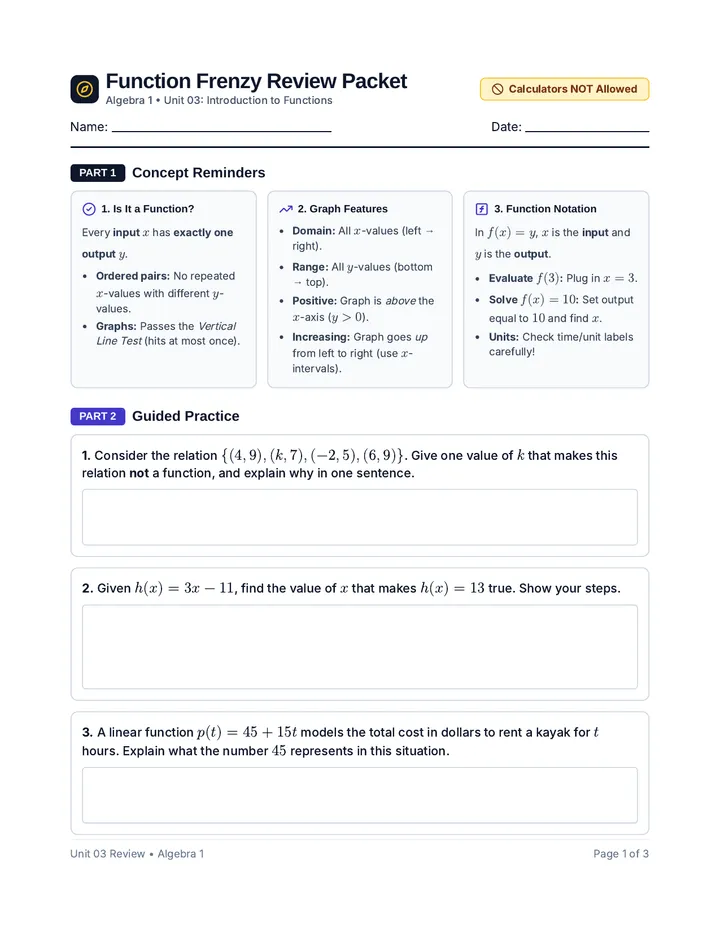
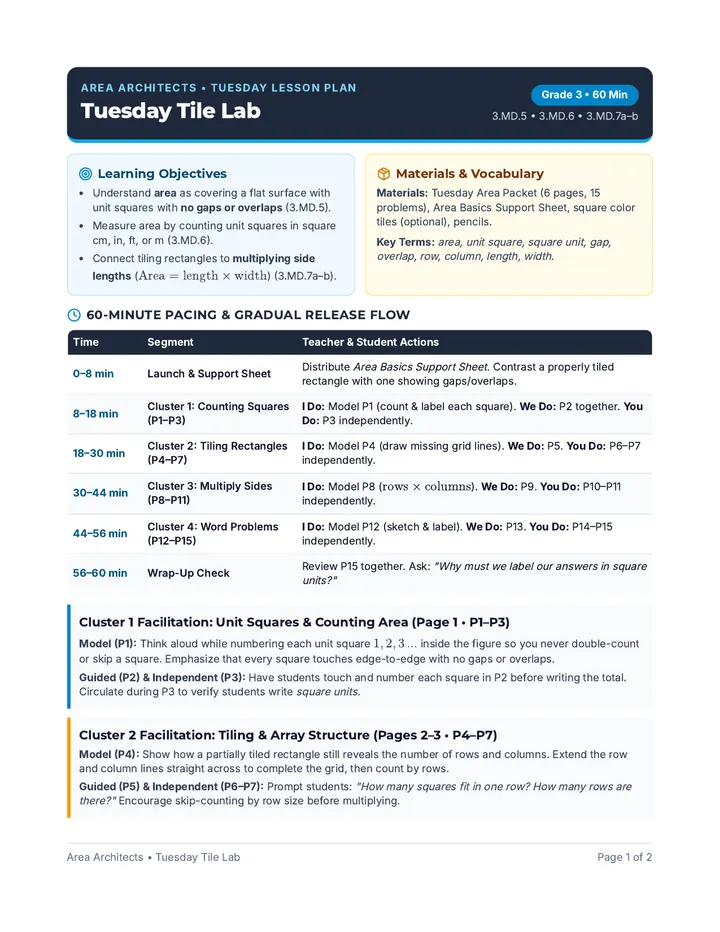
Function Machine Handout Algebra 1 Guided Notes Unit: Functions & Relations
Function Notation & The Function Machine
Demystifying inputs, outputs, and how mathematicians name their rules
Name:
Date: Period:
PART 1
Cracking the Notation: What Does \(f(x)\) Mean?
Function notation replaces "\(y =\)"
In the expression \(f(x) = \text{Rule}\), each component plays a specific role:
\(f\) ( \(x\) ) = Output
f The Name
This is the name of the function. You can also name functions g(x), h(t), or cost(m). It gives the rule a distinct label.
Rule Identifier
x The Input
This is the independent variable or domain. It represents the value you plug into the function rule.
INside Parentheses = iNPUT
f(x) The Output
This entire expression represents the dependent variable or range (replaces \(y\)). It is the result you get after evaluating.
Value Replaces "\(y\)"
Rule The Formula
This is the mathematical operation telling what to do with input \(x\) (e.g., in \(3x+6\): multiply by 3 and add 6).
Algebraic Recipe
Read Out Loud: "f of x"
Critical Warning: Parentheses do NOT mean multiplication! \(f(x)\) never means "\(f\) times \(x\)".
Real-Life Functions: Letters Have Meaning!
h(a) Height is a function of Age
h(10) = 54: Age 10 → 54 inches.
p(h) Pay is a function of Hours
p(15) = 225: 15 hrs → earns $225.
PART 2
The Function Machine in Action: 3 Inputs → 3 Outputs
Trace each colored input through the machine rule
3 Inputs into "IN": 5, 8, 20 → 3 Outputs "OUT"
Machine Placard: "Triple input and add 6"
Algebraic Rule: \(f(x) = 3x + 6\)
\(f(5)\) = \(3(5) + 6\) = 15+6 =
Pair: (5, )
\(f(8)\) = \(3(8) + 6\) = =
Pair: (8, )
\(f(20)\) = \(3(20) + 6\) = =
Pair: (20, )
The Golden Rule: Every single input fed into "IN" produces exactly one output exiting "OUT"!
PART 3
Connecting Machine to Coordinates: Mapping Diagram, Domain & Range
Fill in outputs, then draw arrows to "map" each input to its output
Function Mapping Diagram \(f(x) = 3x + 6\)
Domain \(x\)
5
8
20
Student Task: Draw arrows to "map" each input to its output
Range \(f(x)\)
Fill in the outputs in the range oval, then draw an arrow to "map" each input to its output.
Domain: { 5, 8, 20 }
Range: { , , }
Coordinates \((x, y)\):
\((5, \underline{\ \ \ })\) \((8, \underline{\ \ \ })\) \((20, \underline{\ \ \ })\)
Algebra 1 • Handout: Function Machine & Notation Page 1 of 2 • Turn over for TI-Nspire™ Handheld Master Guide →
Algebra 1 Regents Master Guide
Defining & Comparing Functions using the TI-Nspire
Name:
Date:
Why Define & Compare Functions? On the Regents exam, you frequently compare two functions (like linear vs. quadratic) to determine which is greater, where they intersect, or which grows faster. Defining \(f(x)\) and \(g(x)\) lets you compare outputs across multiple inputs in seconds!
1
How to Define a Function ON THE TI-Nspire Calculator
Step 1:Open Calculator pg
From Home screen, choose Calculator icon to open a document.
Home > 1: New Doc > Add Calculator
Step 2: Type Name
Use letter keys and parentheses to type function name.
f(x)
Step 3: Define Key!!!11
Press ctrl then := (template key).
:= (Assignment)
Step 4: Expression
Type equation and press enter.
Output: "Done"
Practice Setup: Define These 2 Target Functions on Your Handheld
One linear function • One quadratic function
Target Function
Type
Exact Calculator Input to Type
Verified "Done"?
\(f(x) = 2x + 8\)
Linear Rule
f(x):=2*x+8
\(g(x) = x^2\)
Quadratic Rule
g(x):=x^2
2
Comparing \(f(x)\) and \(g(x)\) Across Multiple Inputs
Pro Tip — Fast Recall with var: Because both functions are stored in memory, type f(1) then g(1) to compare outputs without retyping any formulas!
Target Activity: Evaluate & Compare \(f(x) = 2x + 8\) vs. \(g(x) = x^2\) Write >, <, or = in the comparison box
TI-NSPIRE CX REAL
f(x):=2x+8
Done
g(x):=x²
Done
f(4)
16
g(4)
16
At x = 4, f(4) = g(4)!
Input \(x\)
Output \(f(x)\)
Output \(g(x)\)
Comparison
Which is Greater?
\(x = 1\)
\(x = 4\)
\(x = 5\)
Regents Analysis Question: At \(x = 4\), \(f(4) = g(4) = 16\). What does this equality mean graphically about the graphs of \(y = f(x)\) and \(y = g(x)\)? What happens to the outputs when \(x > 4\)?
TI-Nspire Function Toolkit • Algebra 1 Regents Page 2 of 2
Function Machine Answer Key Teacher Answer Key & Facilitation Guide Algebra 1 Guided Notes 3.1
Function Notation & The Function Machine
Complete solutions, exemplar explanations, and instructional tips
Red Text = Student Answers
Handout Page 1 Solutions
PART 1 SOLUTIONS
Cracking the Notation: What Does \(f(x)\) Mean?
Key Takeaways & Teacher Facilitation
In the expression \(f(x) = \text{Rule}\), each component plays a specific role:
\(f\) ( \(x\) ) = Output
f The Name
Function label. Teacher tip: Point out cost(m) or p(h) to show real-world equations use descriptive names!
Rule Identifier
x The Input
Independent variable / domain. The physical item, number, or quantity dropped into the function machine.
INside Parentheses = iNPUT
f(x) The Output
Dependent variable / range. Replaces "\(y\)". Emphasize heavily: "\(f(x)\) IS the \(y\)-value package!"
Value Replaces "\(y\)"
Rule The Formula
The internal machine recipe or algebraic operation acting upon input \(x\) (e.g. \(3x+6\): triple input, then add 6).
Algebraic Recipe
Teacher Talk & Choral Check: "f of x"
Prompt: "Never distribute \(f\)! Parentheses hold inputs." If \(f(3)=15\), input is 3 and output is 15.
Real-Life Functions: Exemplar Student Translations
h(a) Height is a function of Age
h(10) = 54: "At age 10, height is 54 in."
p(h) Pay is a function of Hours
p(15) = 225: "Working 15 hrs earns $225."
PART 2 SOLUTIONS
The Function Machine in Action: 3 Inputs → 3 Outputs
Rule: \(f(x) = 3x + 6\)
3 Inputs into "IN": 5, 8, 20 → 3 Outputs "OUT"
Machine Placard: "Triple input and add 6"
Algebraic Rule: \(f(x) = 3x + 6\)
\(f(5)\) = \(3(5) + 6\) = 15+6 = 21
Pair: (5, 21)
\(f(8)\) = \(3(8) + 6\) = 24+6 = 30
Pair: (8, 30)
\(f(20)\) = \(3(20) + 6\) = 60+6 = 66
Pair: (20, 66)
Golden Rule Debrief: Points \((5, 21), (8, 30), (20, 66)\) map inputs directly to output coordinates!
PART 3 SOLUTIONS
Connecting Machine to Coordinates: Mapping Diagram, Domain & Range
Teacher Key: Completed arrows mapping inputs to outputs
Function Mapping Diagram (Teacher Solution) \(f(x) = 3x + 6\)
Domain \(x\)
5
8
20
Range \(f(x)\)
21
30
66
Notice how arrows cleanly "map" each domain input directly to its single output value.
Domain: { 5, 8, 20 }
Range: { 21, 30, 66 }
Coordinates \((x, y)\):
(5, 21) (8, 30) (20, 66)
Algebra 1 • Teacher Answer Key: Function Machine & Notation Page 1 of 2 • Flip over for TI-Nspire™ Solutions →
Teacher Answer Key & Facilitation Guide
Defining & Comparing Functions using the TI-Nspire
Handout Page 2 Solutions
Regents Strategy Note: Function comparison is tested on both Part 1 multiple choice and Part 3 constructed response. Teach students to evaluate at given inputs, look for intersection points (where \(f(x) = g(x)\)), and identify crossover points where quadratic growth surpasses linear growth.
1
How to Define a Function (Calculator App) — Facilitation
Step 1: Open App
Teach students to use fresh scratchpad or document to clear old variables.
Home > 1: New Doc > Add Calculator
Step 2: Type Name
Always include parentheses around input variable: f(x) and g(x).
f(x) and g(x)
Step 3: Define Key
Shortcut: ctrl + := inserts assignment symbol.
:= (Assignment)
Step 4: Expression
Press enter. If screen says Done, handheld stored rule!
Output: "Done"
Practice Setup: Define These 2 Target Functions (Solutions)
Two distinct function families
Target Function
Type
Exact Calculator Input to Type
Verified "Done"?
\(f(x) = 2x + 8\)
Linear Rule
f(x):=2*x+8
✓
\(g(x) = x^2\)
Quadratic Rule
g(x):=x^2
✓
2
Comparing \(f(x)\) and \(g(x)\) Across Multiple Inputs — Solutions
Facilitation Tip: Have students type f(4) = g(4) on their handheld. The TI-Nspire returns true, confirming equality algebraically!
Target Activity: Evaluate & Compare \(f(x) = 2x + 8\) vs. \(g(x) = x^2\) Complete Solutions Table
TI-NSPIRE CX REAL
f(1)
10
g(1)
1
f(5)
18
g(5)
25
g(x) overtakes f(x) at x > 4!
Input \(x\)
Output \(f(x)\)
Output \(g(x)\)
Comparison
Which is Greater?
\(x = 1\)
\(f(1) = \mathbf{10}\)
\(g(1) = \mathbf{1}\)
>
\(f(1) > g(1)\)
\(x = 4\)
\(f(4) = \mathbf{16}\)
\(g(4) = \mathbf{16}\)
=
Equal (Intersect)
\(x = 5\)
\(f(5) = \mathbf{18}\)
\(g(5) = \mathbf{25}\)
<
\(g(5) > f(5)\)
Regents Analysis Question: At \(x = 4\), \(f(4) = g(4) = 16\). What does this equality mean graphically about the graphs of \(y = f(x)\) and \(y = g(x)\)? What happens to the outputs when \(x > 4\)?
Model Student Response: "Graphically, \(f(4) = g(4) = 16\) means that the two graphs intersect at the point (4, 16). For all inputs where \(x > 4\), the quadratic function \(g(x) = x^2\) grows at an increasing rate and produces larger outputs than the linear function \(f(x) = 2x + 8\)."
TI-Nspire Function Toolkit • Algebra 1 Regents Answer Key Page 2 of 2 • Teacher Key Complete
Function Machine Spanish Handout Álgebra 1 Notas Guiadas Unidad: Funciones y Relaciones
Notación de Funciones y la Máquina de Funciones
Comprendiendo entradas, salidas y cómo los matemáticos nombran sus reglas
Nombre:
Fecha: Período:
PARTE 1
Descifrando la Notación: ¿Qué Significa \(f(x)\)?
La notación de función reemplaza a "\(y =\)"
En la expresión \(f(x) = \text{Regla}\), cada componente cumple un rol específico:
\(f\) ( \(x\) ) = Salida
f El Nombre
Este es el nombre de la función. También pueden llamarse g(x), h(t) o costo(m). Asigna una etiqueta única a la regla.
Identificador de la Regla
x La Entrada
Esta es la variable independiente o dominio. Representa el valor que introduces dentro de la regla de la función.
DENTRO del Paréntesis = ENTRADA
f(x) La Salida
Esta expresión completa representa la variable dependiente o rango (reemplaza a \(y\)). Es el resultado obtenido después de evaluar.
Valor que Reemplaza a "\(y\)"
Regla La Fórmula
Esta es la operación matemática que indica qué hacer con la entrada \(x\) (ej., en \(3x+6\): multiplicar por 3 y sumar 6).
Receta Algebraica
Lectura en Voz Alta: "f de x"
Advertencia Crítica: ¡Los paréntesis NO significan multiplicación! \(f(x)\) jamás significa "\(f\) por \(x\)".
Funciones Reales: ¡Las Letras Tienen Significado!
a(e) Altura en función de la Edad
a(10) = 54: Edad 10 → 54 pulgadas.
p(h) Pago en función de Horas
p(15) = 225: 15 hrs → gana $225.
PARTE 2
La Máquina de Funciones en Acción: 3 Entradas → 3 Salidas
Sigue cada entrada de color a través de la regla de la máquina
3 Entradas en "IN": 5, 8, 20 → 3 Salidas "OUT"
Letrero de la Máquina: "Triplica la entrada y suma 6"
Regla Algebraica: \(f(x) = 3x + 6\)
\(f(5)\) = \(3(5) + 6\) = 15+6 =
Par: (5, )
\(f(8)\) = \(3(8) + 6\) = =
Par: (8, )
\(f(20)\) = \(3(20) + 6\) = =
Par: (20, )
La Regla de Oro: ¡Cada entrada que ingresa a "IN" produce exactamente una salida en "OUT"!
PARTE 3
Conectando la Máquina con Coordenadas: Diagrama de Mapeo, Dominio y Rango
Escribe las salidas y dibuja flechas para "mapear" cada entrada a su salida
Diagrama de Mapeo de la Función \(f(x) = 3x + 6\)
Dominio \(x\)
5
8
20
Tarea: Dibuja flechas para "mapear" cada entrada con su salida
Rango \(f(x)\)
Escribe las salidas en el óvalo del rango, luego dibuja una flecha para "mapear" cada entrada.
Dominio: { 5, 8, 20 }
Rango: { , , }
Coordenadas \((x, y)\):
\((5, \underline{\ \ \ })\) \((8, \underline{\ \ \ })\) \((20, \underline{\ \ \ })\)
Álgebra 1 • Folleto: Máquina de Funciones y Notación Página 1 de 2 • Gira para la Guía de la Calculadora TI-Nspire™ →
Guía Maestra de Álgebra 1 Regents
Definir y Comparar Funciones usando la TI-Nspire
Nombre:
Fecha:
¿Por qué Definir y Comparar Funciones? En el examen Regents, con frecuencia debes comparar dos funciones (como una lineal vs. una cuadrática) para determinar cuál es mayor, dónde se intersecan o cuál crece más rápido. ¡Definir \(f(x)\) y \(g(x)\) te permite comparar salidas para múltiples entradas en segundos!
1
Cómo Definir una Función en la Calculadora TI-Nspire
Paso 1: Abrir Página
Desde la pantalla de Inicio, elige el ícono de Calculadora.
Inicio > 1: Nuevo Doc > Agregar Calculadora
Paso 2: Escribir Nombre
Usa las teclas de letras y paréntesis para el nombre.
f(x)
Paso 3: Tecla Definir
Presiona ctrl y luego := (asignación).
:= (Asignación)
Paso 4: Expresión
Escribe la ecuación y presiona enter.
Salida: "Done" (Listo)
Configuración de Práctica: Define estas 2 Funciones Objetivo en tu Calculadora
Una función lineal • Una función cuadrática
Función Objetivo
Tipo
Entrada Exacta en la Calculadora
¿Apareció "Done"?
\(f(x) = 2x + 8\)
Regla Lineal
f(x):=2*x+8
\(g(x) = x^2\)
Regla Cuadrática
g(x):=x^2
2
Comparando \(f(x)\) y \(g(x)\) a Través de Múltiples Entradas
Consejo Profesional — Recuperación rápida con var: Dado que ambas funciones están almacenadas, escribe f(1) y luego g(1) para comparar salidas sin tener que reescribir ninguna fórmula.
Actividad Objetivo: Evalúa y Compara \(f(x) = 2x + 8\) vs. \(g(x) = x^2\) Escribe >, < o = en la casilla de comparación
TI-NSPIRE CX REAL
f(x):=2x+8
Done
g(x):=x²
Done
f(4)
16
g(4)
16
¡En x = 4, f(4) = g(4)!
Entrada \(x\)
Salida \(f(x)\)
Salida \(g(x)\)
Comparación
¿Cuál es Mayor?
\(x = 1\)
\(x = 4\)
\(x = 5\)
Pregunta de Análisis Regents: En \(x = 4\), \(f(4) = g(4) = 16\). ¿Qué significa esta igualdad gráficamente sobre las gráficas de \(y = f(x)\) e \(y = g(x)\)? ¿Qué ocurre con las salidas cuando \(x > 4\)?
Kit de Herramientas TI-Nspire • Álgebra 1 Regents Página 2 de 2
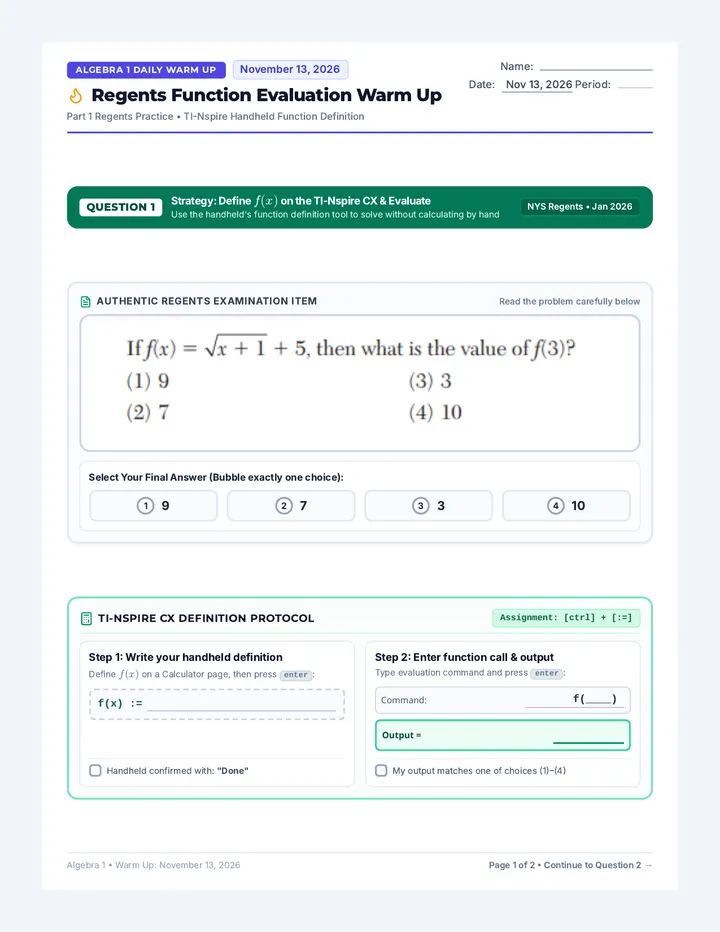
Regents Evaluation Warm Up Algebra 1 Daily Warm Up November 13, 2026
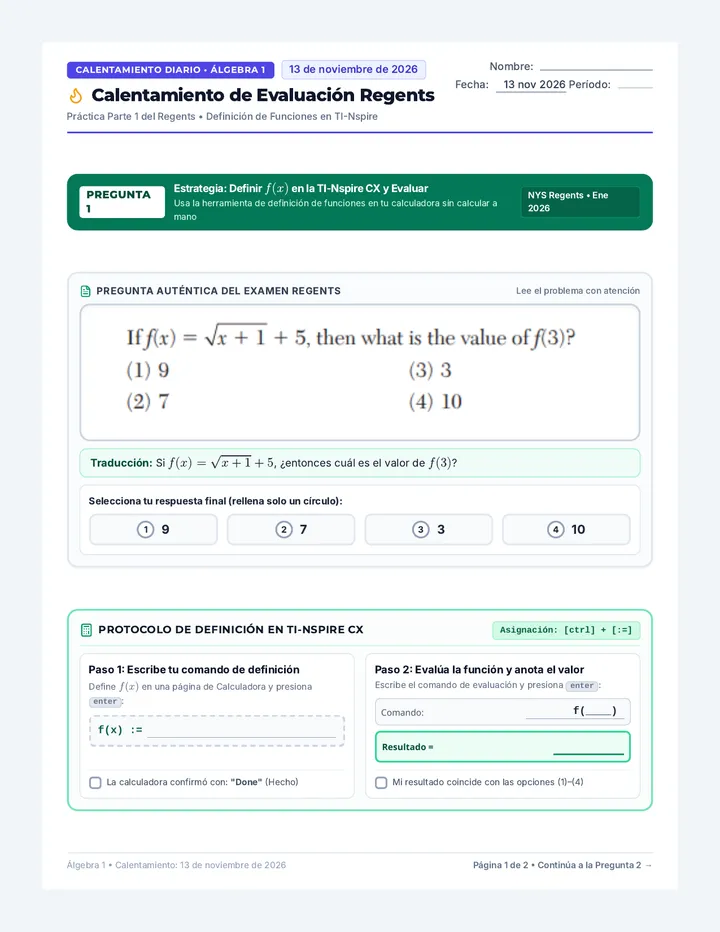
Regents Function Evaluation Warm Up
Part 1 Regents Practice • TI-Nspire Handheld Function Definition
Name:
Date: Nov 13, 2026 Period:
QUESTION 1
Strategy: Define \(f(x)\) on the TI-Nspire CX & Evaluate
Use the handheld's function definition tool to solve without calculating by hand
NYS Regents • Jan 2026
Authentic Regents Examination Item Read the problem carefully below
Select Your Final Answer (Bubble exactly one choice):
1 9
2 7
3 3
4 10
TI-Nspire CX Definition Protocol Assignment: [ctrl] + [:=]
Step 1: Write your handheld definition
Define \(f(x)\) on a Calculator page, then press enter:
f(x) :=
Handheld confirmed with: "Done"
Step 2: Enter function call & output
Type evaluation command and press enter:
Command: f(____)
Output =
My output matches one of choices (1)–(4)
Algebra 1 • Warm Up: November 13, 2026 Page 1 of 2 • Continue to Question 2 →
Algebra 1 Daily Warm Up November 13, 2026
Regents Function Evaluation Warm Up
Part 1 Regents Practice • Paper-and-Pencil Algebraic Substitution
Name:
Period:
QUESTION 2
Strategy: Paper-and-Pencil Algebraic Substitution (\(x = 8\))
Substitute 8 directly into the expression and simplify completely by hand
NYS Regents • Aug 2017
Authentic Regents Examination Item Read the problem carefully below
Select Your Final Answer (Bubble exactly one choice):
1 11
2 17
3 27
4 33
Show All Algebraic Work (Substitute \(8\) for \(x\)) Order of Operations
Substitute \(8\) into \(f(x) = \frac{1}{2}x^2 - \left(\frac{1}{4}x + 3\right)\), evaluate powers and parentheses, and simplify completely:
Final Value:
f(8) =
Test-Day Strategy Reflection Regents Exam Tip
Compare Question 1 vs. Question 2: When is defining on the calculator faster, and when is hand substitution better?
Algebra 1 • Warm Up: November 13, 2026 Page 2 of 2 • Function Evaluation
Regents Evaluation Spanish Warm Up Calentamiento Diario • Álgebra 1 13 de noviembre de 2026
Calentamiento de Evaluación Regents
Práctica Parte 1 del Regents • Definición de Funciones en TI-Nspire
Nombre:
Fecha: 13 nov 2026 Período:
PREGUNTA 1
Estrategia: Definir \(f(x)\) en la TI-Nspire CX y Evaluar
Usa la herramienta de definición de funciones en tu calculadora sin calcular a mano
NYS Regents • Ene 2026
Pregunta Auténtica del Examen Regents Lee el problema con atención
Traducción: Si \(f(x) = \sqrt{x + 1} + 5\), ¿entonces cuál es el valor de \(f(3)\)?
Selecciona tu respuesta final (rellena solo un círculo):
1 9
2 7
3 3
4 10
Protocolo de Definición en TI-Nspire CX Asignación: [ctrl] + [:=]
Paso 1: Escribe tu comando de definición
Define \(f(x)\) en una página de Calculadora y presiona enter:
f(x) :=
La calculadora confirmó con: "Done" (Hecho)
Paso 2: Evalúa la función y anota el valor
Escribe el comando de evaluación y presiona enter:
Comando: f(____)
Resultado =
Mi resultado coincide con las opciones (1)–(4)
Álgebra 1 • Calentamiento: 13 de noviembre de 2026 Página 1 de 2 • Continúa a la Pregunta 2 →
Calentamiento Diario • Álgebra 1 13 de noviembre de 2026
Calentamiento de Evaluación Regents
Práctica Parte 1 del Regents • Sustitución Algebraica a Mano
Nombre:
Período:
PREGUNTA 2
Estrategia: Sustitución Algebraica a Mano (\(x = 8\))
Sustituye 8 directamente en la expresión y simplifica completamente paso a paso
NYS Regents • Ago 2017
Pregunta Auténtica del Examen Regents Lee el problema con atención
Traducción: Si \(f(x) = \frac{1}{2}x^2 - \left(\frac{1}{4}x + 3\right)\), ¿cuál es el valor de \(f(8)\)?
Selecciona tu respuesta final (rellena solo un círculo):
1 11
2 17
3 27
4 33
Muestra todo tu trabajo algebraico (Sustituye \(8\) por \(x\)) Orden de Operaciones
Sustituye \(8\) en \(f(x) = \frac{1}{2}x^2 - \left(\frac{1}{4}x + 3\right)\), evalúa potencias y paréntesis, y simplifica completamente:
Valor Final:
f(8) =
Reflexión de Estrategia para el Examen Consejo para el Regents
Compara la Pregunta 1 y la Pregunta 2: ¿Cuándo es más rápido definir la función en la calculadora y cuándo es mejor sustituir a mano?
Álgebra 1 • Calentamiento: 13 de noviembre de 2026 Página 2 de 2 • Evaluación de Funciones