Functions Complete Master Packet
Unit 1 • Relations & Functions
Introduction to Functions: The Vending Machine Metaphor
A functioning machine models the core mathematical rule: one input leads to exactly one output!
Name: _______________________
Date: ____________ Period: _____
Golden Rule
1 Input → Exactly 1 Output
Section 1: The Vending Machine Analogy
Real-World Model

Fully Stocked Drink Machine
1. INPUT
Press button code (e.g., #20)
Domain (\(x\))
2. RULE
Motor rotates the designated coil
\(f(x)\) Mechanism
3. OUTPUT
Drops ONE drink into the bin
Range (\(y\))
1. What represents the INPUT (\(x\)) in the photo?
2. What represents the OUTPUT (\(y\)) in the photo?
Section 2: Mathematical Vocabulary — Domain & Range
DOMAIN (Input • Independent • \(x\)) Keypad Buttons
The set of all possible input values (\(x\)) that can be entered into the function.
Photo Example: The set of keypad button codes \(\{10, 11, 20, 21, 22, 30\}\).
RANGE (Output • Dependent • \(y\)) Drinks Received
The set of all possible output values (\(y\)) resulting from the function.
Photo Example: The set of distinct drinks \(\{\text{Pepsi, Dew, Coke, Water}\}\).
Section 3: Three Machine Scenarios — Function or Broken?
One input → ONE output. Not two, not three, not zero!
Case 1 ✓ FUNCTION
One-to-One
Every button maps to a unique item.
Button 10→Gatorade
Button 12→Red Bull
Button 24→Aquafina
Rule: Each button has exactly 1 predictable item. Valid function!
Case 2 ✓ FUNCTION
Many-to-One (Popular)
Multiple slots stock the same drink.
Button 20→Pepsi
Button 30→Pepsi
Button 40→Pepsi
Rule: Pressing 20 gives 1 Pepsi. Pressing 30 gives 1 Pepsi. Still 1 output per input!
Case 3 ✗ BROKEN
One-to-Many (Broken)
One button gives 2 unpredictable items!
Button 22→Sprite
Button 22→Mtn Dew!
Button 26→Coke
Rule: Pressing 22 gives 2 different outputs! Machine is broken — NOT A FUNCTION!
The Golden Rule of Functions
Synthesis & Reflection
Formal Definition: A function is a mathematical relationship where every single input (\(x\)) corresponds to _________________________ output (\(y\)). Not two, not three, and not zero!
In my own words, what breaks the machine (makes a relation NOT a function)?
Unit 1 (Cont.)
Mapping Diagrams & Function Rules
Name: ___________________ Date: _________
Mapping Diagram Secret: Focus Exclusively on the Domain!
Always check the Inputs
⊗ Red Flag 1: MORE THAN ONE Arrow
If any single input has 2 or more arrows originating from it → NOT A FUNCTION! (Like pressing one button and getting two different drinks).
⊗ Red Flag 2: NO ARROW Originating
If any input in the domain has 0 arrows leaving it → NOT A FUNCTION! (Like pressing an active button and getting nothing at all — zero outputs!).
What about the Range (outputs)? Multiple arrows can point to the same output! Do not worry about the Range side. Look only at the arrows leaving the Domain!
Inspect the Arrows Originating from the Domain
Trace arrows directly from inputs to outputs
✓ VALID FUNCTION
DOMAIN RANGE 1 2 3 A
Every input has exactly 1 arrow leaving. Shared output is fine!
✗ NOT A FUNCTION
DOMAIN RANGE 1 2 A B 2 ARROWS!
Input '1' has >1 arrow leaving (points to A and B). Broken!
✗ NOT A FUNCTION
DOMAIN RANGE 1 2 3 A B 0 ARROWS!
Input '2' has 0 arrows leaving (has no output at all). Broken!
Guided Practice: Is It a Function?
Determine whether each relation represents a function and justify.
Problem 1: Soda Dispenser Mapping Mapping
Btn 1 Btn 2 Btn 3 Cola
Is this a function? ☐ Yes ☐ No
Why? (Look exclusively at Domain arrows):
Problem 2: Coordinate Set A Points
\(\{(-7, 4), (-8, 3), (-7, 7), (5, 9), (3, 1)\}\)
Tip: Check if any input value (\(x\)) maps to multiple outputs!
Is this a function? ☐ Yes ☐ No
Why? Identify the violating input (\(x\)):
Problem 3: Table of Values Table
| Input (\(x\)) |
Output (\(y\)) |
| -6 |
5 |
| -3 |
2 |
| 1 |
2 |
| 6 |
5 |
Is this a function? ☐ Yes ☐ No
Why? (Does every single input \(x\) have exactly 1 output \(y\)?):
Problem 4: Unassigned Input Mapping
4 5 6 10 12 NO ARROW
Is this a function? ☐ Yes ☐ No
Why? Explain using the Domain Arrow Rule:
THE "SNACK TEST" DOMAIN CHECKLIST: Look at each input in the Domain. Does every input have EXACTLY ONE arrow originating from it? If an input has more than one arrow (2+ snacks) or no arrow at all (button doesn't work), the machine is broken — NOT A FUNCTION!
Unit 2 • Independent Practice
Mapping Diagrams Mastery Worksheet
Name: _____________________
Date: ___________ Score: _____
PART 1
Construct Mapping Diagrams • State Domain & Range
For each relation below, write unique inputs and outputs inside each bubble (least to greatest), draw directional arrows from input to output, and state whether the relation is a function.
1. Relation \(A\):
\(\{(1, 4), (2, -3), (3, 4), (5, 0)\}\)
Domain: ___________________
Range: ____________________
Domain
Range
Function? ☐ Yes ☐ No
Why / Why not?
2. Table of Values:
| \(x\) |
\(y\) |
| -2 |
5 |
| 0 |
1 |
| 3 |
-4 |
| -2 |
9 |
Domain: ___________________
Range: ____________________
Domain
Range
Function? ☐ Yes ☐ No
Why / Why not?
3. Relation \(C\):
\(\{(-4, 2), (-1, 2), (0, 2), (6, 2)\}\)
Domain: ___________________
Range: ____________________
Domain
Range
Function? ☐ Yes ☐ No
Why / Why not?
PART 2
Interpret Mapping Diagrams • Extract Ordered Pairs
4. Diagram \(M_1\) Trace all arrows
-3 0 5 1 7
Ordered Pairs:
Function? ☐ Yes ☐ No Arrows per input: _____
5. Diagram \(M_2\) Trace all arrows
2 4 -1 3 8
Ordered Pairs:
Function? ☐ Yes ☐ No Problem input: _____
Remember: Never repeat values inside the Domain or Range bubbles!
Unit 2 (Cont.) • Advanced Practice & Synthesis
Function Detective & Mixed Representations
Algebra 1 • Relations & Functions
PART 3
Function Detective: Inspect, Classify & Justify
Determine if each mapping diagram represents a function. State your mathematical reason using the behavior of the arrows leaving the inputs.
-2 1 4 6 10 14
Diagram A
☐ Function ☐ Not a Function
Reason:
3 8 0 5 11
Diagram B
☐ Function ☐ Not a Function
Reason:
-4 0 4 16
Diagram C
☐ Function ☐ Not a Function
Reason:
5 9 2 8
Diagram D
☐ Function ☐ Not a Function
Reason:
PART 4
Multi-Representation Bridge
Complete the missing representations for the relation described below.
1. Ordered Pairs (Given)
\(\{(-3, 1), (-1, 0), (2, 4), (4, 1)\}\)
Domain: ____________________
Range: _____________________
2. Complete Table
| Input (\(x\)) |
Output (\(y\)) |
|
|
|
|
|
|
|
|
3. Create Mapping
Domain
Range
Is it a function? ☐ Yes ☐ No
Real-World Scenario: The Vending Machine Function
A snack vending machine maps button codes (input: e.g., A1, B2, C3) to snack prices in dollars (output: e.g., $1.50, $2.00).
Scenario A:
Two different buttons (A1 and B2) both cost $1.50. Does this violate the definition of a function? Why or why not?
Scenario B:
Pressing button C3 could charge either $1.25 or $2.50 randomly. Is this a function? How would its mapping look?
Unit 3 • Algebra 1 Guided Notes
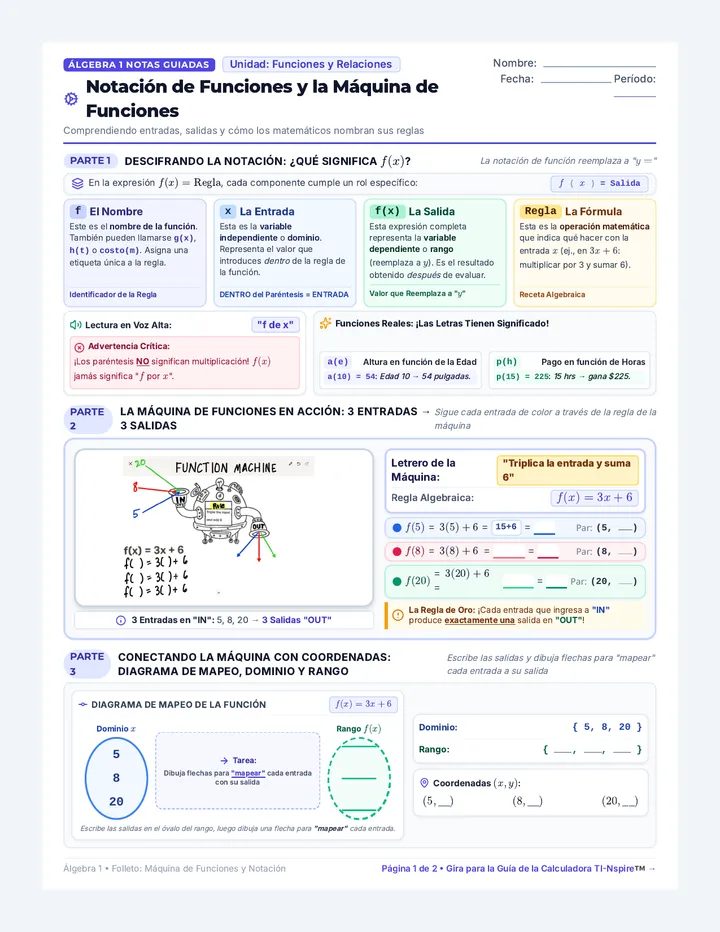
Function Notation & The Function Machine
Demystifying inputs, outputs, and how mathematicians name their rules
Name: _____________________
Date: ___________ Period: ____
PART 1
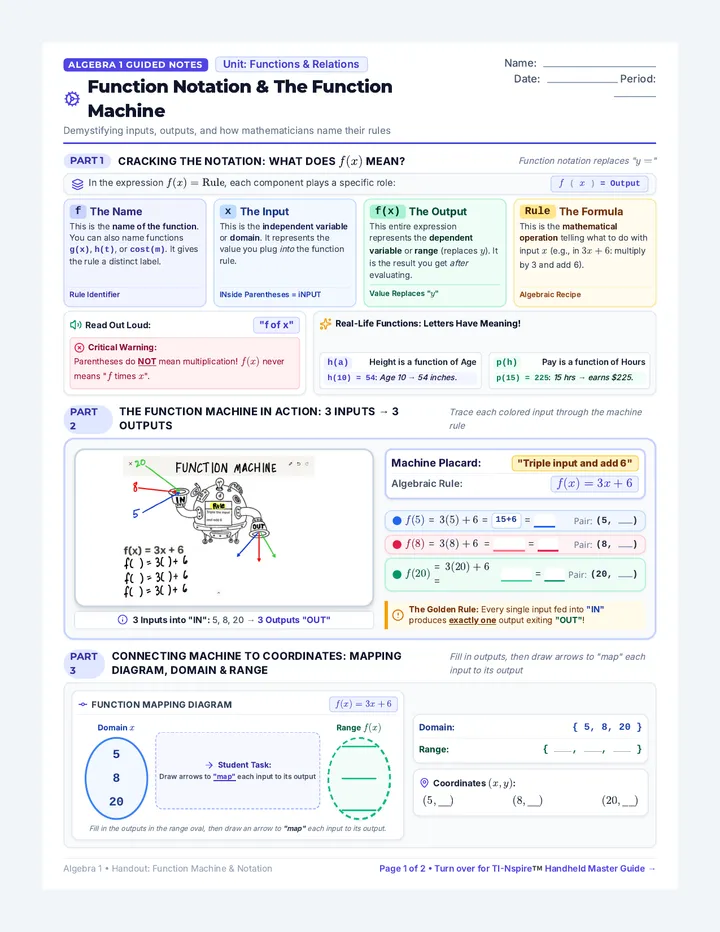
Cracking the Notation: What Does \(f(x)\) Mean?
Function notation replaces "\(y =\)"
In the expression \(f(x) = \text{Rule}\), each component plays a specific role: \(f(x) = \text{Output}\)
f The Name
This is the name of the function. You can also name functions \(g(x)\), \(h(t)\), or \(\text{cost}(m)\). It gives the rule a distinct label.
Rule Identifier
x The Input
This is the independent variable or domain. It represents the value you plug into the function rule.
INside Parentheses = iNPUT
f(x) The Output
This entire expression represents the dependent variable or range (replaces \(y\)). It is the result you get after evaluating.
Value Replaces "\(y\)"
Rule The Formula
This is the mathematical operation telling what to do with input \(x\) (e.g., in \(3x+6\): multiply by 3 and add 6).
Algebraic Recipe
🔊 Read Out Loud: "f of x"
⊗ Critical Warning: Parentheses do NOT mean multiplication! \(f(x)\) never means "\(f\) times \(x\)".
✨ Real-Life Functions: Letters Have Meaning!
h(a) Height is a function of Age
\(h(10) = 54\): Age 10 → 54 inches.
p(h) Pay is a function of Hours
\(p(15) = 225\): 15 hrs → earns $225.
PART 2
The Function Machine in Action: 3 Inputs → 3 Outputs
Trace each colored input through the machine rule

3 Inputs into "IN": 5, 8, 20 → 3 Outputs "OUT"
Machine Placard: "Triple input and add 6"
Algebraic Rule: \(f(x) = 3x + 6\)
\(f(5) = 3(5) + 6 = \) 15+6 \(=\) Pair: \((5, \_\_\_)\)
\(f(8) = 3(8) + 6 = \) \(=\) Pair: \((8, \_\_\_)\)
\(f(20) = 3(20) + 6 = \) \(=\) Pair: \((20, \_\_\_)\)
The Golden Rule: Every single input fed into "IN" produces exactly one output exiting "OUT"!
PART 3
Connecting Machine to Coordinates: Mapping Diagram, Domain & Range
\(f(x) = 3x + 6\)
Domain \(x\)
5820
→ Student Task:
Draw arrows to "map" each input to its output
Range \(f(x)\)
____________
Domain: \(\{ 5, 8, 20 \}\)
Range: \(\{ \_\_\_\_, \_\_\_\_, \_\_\_\_ \}\)
Coordinates \((x, y)\):
\((5, \_\_\_)\)\((8, \_\_\_)\)\((20, \_\_\_)\)
Unit 4 • Reference & Guided Notes
Evaluating Functions from Graphs & Tables
Name: _____________________
Date: ___________ Period: ____
The Golden Rule of Function Notation
\(f(\text{input}) = \text{output} \iff (x, y) \iff (\text{input}, \text{output})\)
INSIDE = \(x\) (Input)
OUTSIDE = \(y\) (Output)
1
Method A: Reading a Function Graph
Visual Direction Arrows (\(x \rightarrow y\))

⊕ Task 1: Given Input, Find Output — Evaluate \(g(2)\)
- Start at \(x = 2\) on the horizontal \(x\)-axis.
- Follow the amber arrow (↓) down until you hit the curve.
- Follow the amber arrow (←) straight to the \(y\)-axis to read output:
Graph point: \((2, -2)\) \(g(2) = -2\)
🔍 Task 2: Given Output, Solve for Input — Solve \(g(x) = 3\)
- Start at \(y = 3\) on the vertical \(y\)-axis.
- Follow the cyan arrow (←) across until you hit the curve.
- Follow the cyan arrow (↓) straight down to the \(x\)-axis to read input:
Graph point: \((-2, 3)\) \(x = -2\)
2
Method B: Transitioning to Function Tables
Table rows = Graph points \((x, y)\)
Function Table: \(y = f(x)\)
| \(x\) (Input) |
\(f(x)\) (Output) |
| -2 |
7 |
| 0 |
3 |
| 1 |
1 |
| 4 |
-5 |
| 6 |
3 |
→ Direction 1: Given the INPUT, find the OUTPUT — e.g., Evaluate \(f(0)\)
- Look down the \(x\) column for 0.
- Read across to the matching \(f(x)\) column: f(0) = 3
← Direction 2: Given the OUTPUT, solve for INPUT — e.g., Find \(x\) when \(f(x) = 3\)
- Look down the \(f(x)\) column for the value 3.
- Look left to find the \(x\)-values: Here, \(f(x) = 3\) when x = 0 and x = 6!
WATCH OUT FOR THE #1 STUDENT MISTAKE!
Don't swap your axes or columns! When asked for \(f(4)\), students often mistakenly search the vertical \(y\)-axis or the output column. Remember: numbers inside parentheses are ALWAYS inputs (\(x\)-axis / \(x\)-column). The answer you find is the output (\(y\)-axis / \(f(x)\)-column).
Unit 4 (Cont.) • Active Practice
Function Evaluation Workshop
Apply your graph, table & equation strategies
Section 1
Practice for Method A: Evaluating from a Graph
Student Practice Graph

1. Evaluate \(f(0)\)
\(f(0) =\)
2. Evaluate \(f(-2)\)
\(f(-2) =\)
3. Evaluate \(f(2)\)
\(f(2) =\)
4. Evaluate \(f(4)\)
\(f(4) =\)
5. Solve \(f(x) = 2\)
\(x =\)
6. Point of \(f(0)\)
(,)
Section 2
Practice for Method B: Function Tables
Function \(h(x)\)
| \(x\) |
\(h(x)\) |
| -3 |
10 |
| -1 |
4 |
| 0 |
-2 |
| 2 |
4 |
| 5 |
-8 |
7. Evaluate \(h(-1)\)
\(h(-1) =\)
8. Evaluate \(h(5)\)
\(h(5) =\)
9. Find \(x\) when \(h(x) = -2\)
\(x =\)
10. Find ALL \(x\) where \(h(x) = 4\)
\(x =\)
Section 3
Mixed Representation Challenge
Graph + Equation + Table
\(h(x) = 2x^2 + 5x - 2\)
| \(x\) |
\(f(x)\) |
| -10 |
-8 |
| -2 |
9 |
| 8 |
5 |
| -8 |
9 |
11. Find \(g(-3)\) Use Graph
Find \(y\) on \(g(x)\) at \(x = -3\):
\(g(-3) =\)
12. Find \(f(-2)\) Use Table
Find output in \(f(x)\) table:
\(f(-2) =\)
13. Find \(h(1)\) Use Equation
Substitute \(x = 1\) into \(h(x)\):
\(h(1) =\)
Unit 5 • Algebra 1 Regents Master Guide
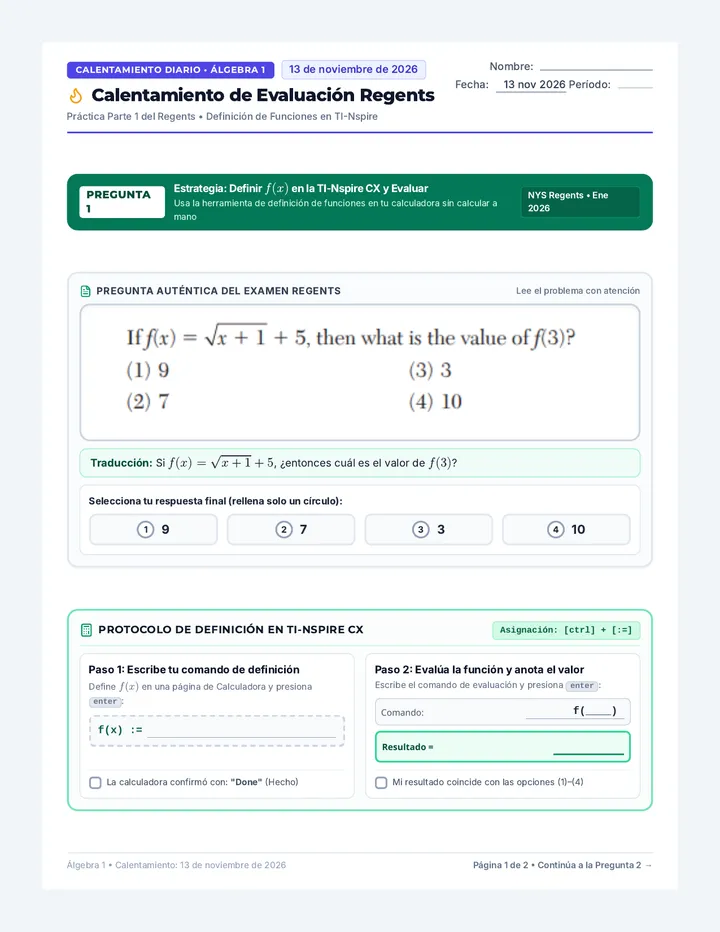
Defining & Evaluating Functions Using the TI-Nspire
Name: _____________________
Date: ______________________
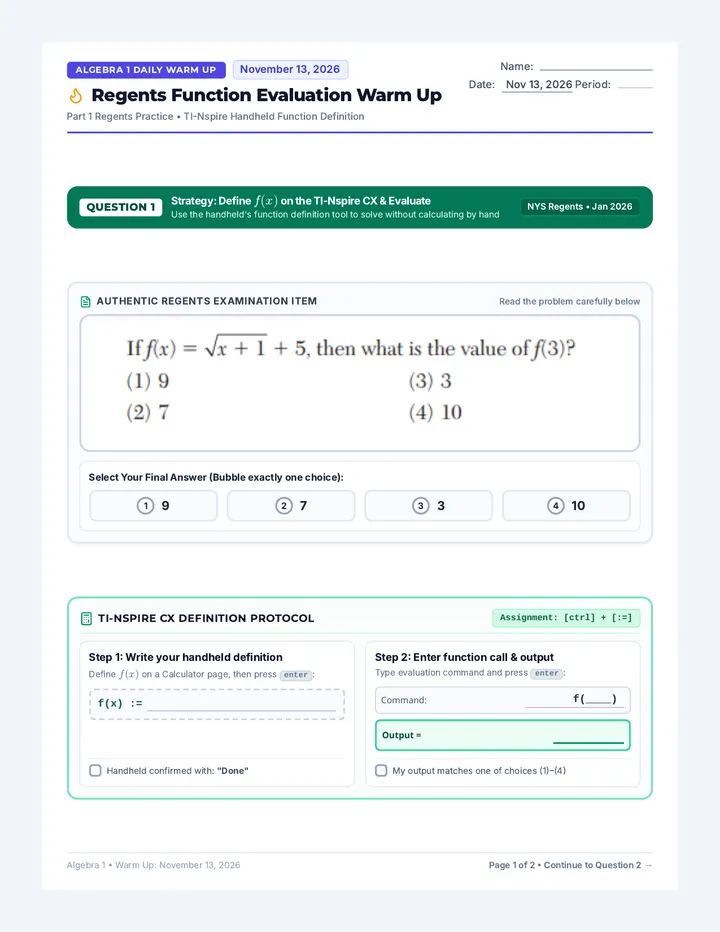
Why Master Defined Functions? Functions account for over 40% of the Algebra 1 Regents exam. Defining a function once allows you to evaluate multiple inputs instantly, generate tables, graph without retyping, and solve complex system/inequality problems accurately.
1
How to Define a Function (Calculator App)
Step 1: Open App
From Home screen, choose Calculator icon to open a document.
Home > 1: New Doc > Add Calculator
Step 2: Type Name
Use letter keys and parentheses to type function name.
f(x)
Step 3: Define Key
Press ctrl then := (template key).
:= (Assignment)
Step 4: Expression
Type equation and press enter.
Output: "Done"
Practice Setup: Define These 3 Target Functions
| Target Function |
Exact Calculator Input to Type |
Verified "Done"? |
| \(f(x) = 1.25^x\) |
f(x):=1.25^x |
☐ |
| \(g(x) = 3x + 10\) |
g(x):=3*x+10 |
☐ |
| \(h(x) = x^2 - 3x + 1\) |
h(x):=x^2-3*x+1 |
☐ |
2
Evaluating Functions & The Power of var
⚡ Pro Tip — The var Key: Press var (above the 9 key) at any time to open your saved functions menu. Select h, add parentheses with input h(-1), and hit enter.
Example 1: Evaluate \(h(-1)\) on Calculator vs. Manual Algebraic Check
TI-NSPIRE DISPLAYDEG / REAL
h(x):=x²-3x+1Done
h(-1)
5
Calculator Output: 5
Manual Substitution (Show Work by Hand):
\(h(-1) = (-1)^2 - 3(-1) + 1\)
Quick Check: Why is defining functions especially helpful when testing multiple values such as \(h(0)\), \(h(5)\), and \(h(12)\)?
TI-Nspire Function Toolkit • Algebra 1 Regents Master Guide
Unit 5 (Cont.) • TI-Nspire Comparison
Defining & Comparing Functions on the TI-Nspire
Name: _____________________
Date: ______________________
Why Define & Compare Functions? On the Regents exam, you frequently compare two functions (like linear vs. quadratic) to determine which is greater, where they intersect, or which grows faster. Defining \(f(x)\) and \(g(x)\) lets you compare outputs across multiple inputs in seconds!
1
Practice Setup: Define These 2 Target Functions
One linear function • One quadratic function
| Target Function |
Type |
Exact Calculator Input to Type |
Verified "Done"? |
| \(f(x) = 2x + 8\) |
Linear Rule |
f(x):=2*x+8 |
☐ |
| \(g(x) = x^2\) |
Quadratic Rule |
g(x):=x^2 |
☐ |
2
Comparing \(f(x)\) and \(g(x)\) Across Multiple Inputs
⚡ Pro Tip — Fast Recall with var: Because both functions are stored in memory, type f(1) then g(1) to compare outputs without retyping any formulas!
Target Activity: Evaluate & Compare \(f(x) = 2x + 8\) vs. \(g(x) = x^2\)
Write >, <, or = in the comparison box
TI-NSPIRE CXREAL
f(x):=2x+8Done
g(x):=x²Done
f(4)16
g(4)16
At x = 4, f(4) = g(4)!
| Input \(x\) |
Output \(f(x)\) |
Output \(g(x)\) |
Comparison |
Which is Greater? |
| \(x = 1\) |
|
|
|
|
| \(x = 4\) |
|
|
|
|
| \(x = 5\) |
|
|
|
|
Regents Analysis Question: At \(x = 4\), \(f(4) = g(4) = 16\). What does this equality mean graphically about the graphs of \(y = f(x)\) and \(y = g(x)\)? What happens to the outputs when \(x > 4\)?
TI-Nspire Function Toolkit • Algebra 1 Regents Master Guide
Unit 5 (Cont.) • Skills & Strategy
Comparing Functions & Testing Inequalities
Target: \(f(x) = 1.25^x\) vs. \(g(x) = 3x + 10\)
Regents Question Concept: When an exam question asks where an exponential model surpasses a linear model (\(f(x) > g(x)\)), testing multiple values by hand is time-consuming and prone to rounding errors. With defined functions, you can calculate and compare outputs in seconds.
3
Investigation: Where Does \(f(x) > g(x)\)?
Use your defined functions on your TI-Nspire. Type f(x) and g(x) for each given input value to fill in the table:
| Input (\(x\)) |
Output of \(f(x) = 1.25^x\) |
Output of \(g(x) = 3x + 10\) |
Is \(f(x) > g(x)\)? |
| \(x = 18\) |
\(f(18) \approx 55.511\) |
\(g(18) = 64\) |
False |
| \(x = 19\) |
|
|
|
| \(x = 67\) |
|
|
|
| \(x = 69\) |
|
|
|
Regents Examination Item Algebra 1 Standard F-LE.1
Based on your table and calculations, what is the smallest positive integer value of \(x\) for which \(f(x) > g(x)\)?
(1) 18
(2) 19
(3) 67
(4) 69
Justify Your Choice:
Explain how you know this value is the smallest integer that satisfies the inequality:
TI-Nspire Hidden Trick: Direct Inequality Testing
You don't even have to compare numbers in your head! You can type the inequality directly into the calculator:
Type: f(19) > g(19) and press enter Returns: true
TI-Nspire Function Toolkit • Algebra 1 Regents Master Guide
Unit 5 (Cont.) • Graphical & Algebraic Connection
Finding Where Two Functions Are Equal
Intersection & Solution Methods
4
Method A: Graphical Intersection (Graphs App)
Step 1: Reuse Defined Functions
Open the Graphs app (press doc > Insert > Graphs). In the entry bar:
f1(x) = f(x)
f2(x) = g(x)
No need to re-type full equations!
Step 2: Adjust Window Settings
Press menu > 4: Window / Zoom > 1: Window Settings.
Xmin: 0, Xmax: 30, Ymin: 0, Ymax: 120
Step 3: Analyze Intersection
Press menu > 6: Analyze Graph > 4: Intersection.
Swipe left of the cross for Lower Bound (click), swipe right for Upper Bound (click).

5
Method B: Algebraic Equality & nSolve Verification
To find when two linear or quadratic expressions are equal algebraically, set \(m(x) = k(x)\) and isolate \(x\). Then verify with TI-Nspire's nSolve command!
nSolve Shortcut: menu > 3: Algebra > 1: Numerical Solve
Syntax: nSolve(equation, variable)
Example: Given \(m(x) = 2x + 7\) and \(k(x) = 5x - 8\)
Solve \(m(x) = k(x)\) algebraically by hand:
2x + 7 = 5x - 8
Algebraic Solution: \(x =\) ________
Calculator Verification Steps:
Define both functions or type directly into nSolve:
Command:
nSolve(2x+7 = 5x-8, x)
5
Verification Check: Evaluate both functions at the solution:
m(5) = 2(5)+7 = 17 | k(5) = 5(5)-8 = 17 ✓
TI-Nspire Function Toolkit • Algebra 1 Regents Master Guide
Unit 5 (Cont.) • Regents Mastery Practice
Independent Practice & Quick Reference
Score: ________ / 10
Problem 1: Evaluating a Quadratic Function Evaluation
Define the function \(q(x) = x^2 - 5x - 6\) on your TI-Nspire handheld. Evaluate the function for \(q(-3)\) and \(q(6)\).
TI-Nspire Syntax Typed:
Output of \(q(-3)\):
Output of \(q(6)\):
Problem 2: Solving for Input when Output is Known Solving for \(x\)
Define \(p(x) = 4x + 9\). Find the exact value of \(x\) when \(p(x) = 25\). Show both methods below:
Method 1: Manual Algebraic Work
Final Answer: \(x =\) ________
Method 2: TI-Nspire Command Typed
Calculator Result: \(x =\) ________
Problem 3: Regents Real-World Function Comparison Part II Regents Style
Two rideshare companies model trip costs for \(m\) miles: Company A: \(A(m) = 2.50m + 3\) and Company B: \(B(m) = 1.75m + 7.50\).
a) Find the number of miles \(m\) where both companies charge the exact same fare (\(A(m) = B(m)\)). Show your algebraic work or calculator command:
b) If a rider travels 10 miles, which company is cheaper? Justify using defined function notation:
TI-Nspire Functions Quick Reference Cheat Sheet
Define Function
ctrl + :=
f(x):=expression
Recall Function
Press var
Select from menu
Solve for Input
menu 3 > 1
nSolve(eqn, var)
Graph Intersect
menu 6 > 4
Lower/Upper bound
Functions Sandbox Packet
Unit 1 • Relations & Functions
Introduction to Functions: The Vending Machine Metaphor
A functioning machine models the core mathematical rule: one input leads to exactly one output!
Name: _______________________
Date: ____________ Period: _____
Golden Rule
1 Input → Exactly 1 Output
Section 1: The Vending Machine Analogy
Real-World Model

Fully Stocked Drink Machine
1. INPUT
Press button code (e.g., #20)
Domain (\(x\))
2. RULE
Motor rotates the designated coil
\(f(x)\) Mechanism
3. OUTPUT
Drops ONE drink into the bin
Range (\(y\))
1. What represents the INPUT (\(x\)) in the photo?
2. What represents the OUTPUT (\(y\)) in the photo?
Section 2: Mathematical Vocabulary — Domain & Range
DOMAIN (Input • Independent • \(x\)) Keypad Buttons
The set of all possible input values (\(x\)) that can be entered into the function.
Photo Example: The set of keypad button codes \(\{10, 11, 20, 21, 22, 30\}\).
RANGE (Output • Dependent • \(y\)) Drinks Received
The set of all possible output values (\(y\)) resulting from the function.
Photo Example: The set of distinct drinks \(\{\text{Pepsi, Dew, Coke, Water}\}\).
Section 3: Three Machine Scenarios — Function or Broken?
One input → ONE output. Not two, not three, not zero!
Case 1 ✓ FUNCTION
One-to-One
Every button maps to a unique item.
Button 10→Gatorade
Button 12→Red Bull
Button 24→Aquafina
Rule: Each button has exactly 1 predictable item. Valid function!
Case 2 ✓ FUNCTION
Many-to-One (Popular)
Multiple slots stock the same drink.
Button 20→Pepsi
Button 30→Pepsi
Button 40→Pepsi
Rule: Pressing 20 gives 1 Pepsi. Pressing 30 gives 1 Pepsi. Still 1 output per input!
Case 3 ✗ BROKEN
One-to-Many (Broken)
One button gives 2 unpredictable items!
Button 22→Sprite
Button 22→Mtn Dew!
Button 26→Coke
Rule: Pressing 22 gives 2 different outputs! Machine is broken — NOT A FUNCTION!
The Golden Rule of Functions
Synthesis & Reflection
Formal Definition: A function is a mathematical relationship where every single input (\(x\)) corresponds to _________________________ output (\(y\)). Not two, not three, and not zero!
In my own words, what breaks the machine (makes a relation NOT a function)?
Unit 1 (Cont.)
Mapping Diagrams & Function Rules
Name: ___________________ Date: _________
Mapping Diagram Secret: Focus Exclusively on the Domain!
Always check the Inputs
⊗ Red Flag 1: MORE THAN ONE Arrow
If any single input has 2 or more arrows originating from it → NOT A FUNCTION! (Like pressing one button and getting two different drinks).
⊗ Red Flag 2: NO ARROW Originating
If any input in the domain has 0 arrows leaving it → NOT A FUNCTION! (Like pressing an active button and getting nothing at all — zero outputs!).
What about the Range (outputs)? Multiple arrows can point to the same output! Do not worry about the Range side. Look only at the arrows leaving the Domain!
Inspect the Arrows Originating from the Domain
Trace arrows directly from inputs to outputs
✓ VALID FUNCTION
DOMAIN RANGE 1 2 3 A
Every input has exactly 1 arrow leaving. Shared output is fine!
✗ NOT A FUNCTION
DOMAIN RANGE 1 2 A B 2 ARROWS!
Input '1' has >1 arrow leaving (points to A and B). Broken!
✗ NOT A FUNCTION
DOMAIN RANGE 1 2 3 A B 0 ARROWS!
Input '2' has 0 arrows leaving (has no output at all). Broken!
Guided Practice: Is It a Function?
Determine whether each relation represents a function and justify.
Problem 1: Soda Dispenser Mapping Mapping
Btn 1 Btn 2 Btn 3 Cola
Is this a function? ☐ Yes ☐ No
Why? (Look exclusively at Domain arrows):
Problem 2: Coordinate Set A Points
\(\{(-7, 4), (-8, 3), (-7, 7), (5, 9), (3, 1)\}\)
Tip: Check if any input value (\(x\)) maps to multiple outputs!
Is this a function? ☐ Yes ☐ No
Why? Identify the violating input (\(x\)):
Problem 3: Table of Values Table
| Input (\(x\)) |
Output (\(y\)) |
| -6 |
5 |
| -3 |
2 |
| 1 |
2 |
| 6 |
5 |
Is this a function? ☐ Yes ☐ No
Why? (Does every single input \(x\) have exactly 1 output \(y\)?):
Problem 4: Unassigned Input Mapping
4 5 6 10 12 NO ARROW
Is this a function? ☐ Yes ☐ No
Why? Explain using the Domain Arrow Rule:
THE "SNACK TEST" DOMAIN CHECKLIST: Look at each input in the Domain. Does every input have EXACTLY ONE arrow originating from it? If an input has more than one arrow (2+ snacks) or no arrow at all (button doesn't work), the machine is broken — NOT A FUNCTION!
Unit 2 • Independent Practice
Mapping & Multi-Representation Practice
Name: _____________________
Date: ___________ Score: _____
PART 1
Construct Mapping Diagrams • State Domain & Range
Write unique inputs and outputs inside each bubble (least to greatest), draw arrows from input to output, and classify.
1. Relation \(A\):
\(\{(1, 4), (2, -3), (3, 4), (5, 0)\}\)
Domain: ___________________
Range: ____________________
Domain
Range
Function? ☐ Yes ☐ No
Why / Why not?
2. Table of Values:
| \(x\) |
\(y\) |
| -2 |
5 |
| 0 |
1 |
| 3 |
-4 |
| -2 |
9 |
Domain: ___________________
Range: ____________________
Domain
Range
Function? ☐ Yes ☐ No
Why / Why not?
PART 2
Interpret Mapping Diagrams • Extract Ordered Pairs & Justify
3. Diagram \(M_1\) Trace all arrows
-3 0 5 1 7
Ordered Pairs:
Function? ☐ Yes ☐ No Reason: ______________________
4. Diagram \(M_2\) Trace all arrows
2 4 -1 3 8
Ordered Pairs:
Function? ☐ Yes ☐ No Problem input: _____
PART 3
Multi-Representation Bridge
1. Ordered Pairs (Given)
\(\{(-3, 1), (-1, 0), (2, 4), (4, 1)\}\)
Domain: ____________________
Range: _____________________
2. Complete Table
| Input (\(x\)) |
Output (\(y\)) |
|
|
|
|
|
|
|
|
3. Create Mapping
Domain
Range
Is it a function? ☐ Yes ☐ No
Remember: Never repeat values inside the Domain or Range bubbles!
Unit 3 • Algebra 1 Guided Notes
Function Notation & The Function Machine
Demystifying inputs, outputs, and how mathematicians name their rules
Name: _____________________
Date: ___________ Period: ____
PART 1
Cracking the Notation: What Does \(f(x)\) Mean?
Function notation replaces "\(y =\)"
In the expression \(f(x) = \text{Rule}\), each component plays a specific role: \(f(x) = \text{Output}\)
f The Name
The name of the function (e.g., \(g(x)\), \(h(t)\)). Gives the rule a distinct label.
Rule Identifier
x The Input
The independent variable (domain) plugged into the rule.
INside = iNPUT
f(x) The Output
The dependent variable (range, replaces \(y\)) after evaluating.
Replaces "\(y\)"
Rule The Formula
The operation telling what to do with \(x\) (e.g., \(3x+6\)).
Algebraic Recipe
🔊 Read Out Loud: "f of x"
⊗ Critical Warning: Parentheses do NOT mean multiplication! \(f(x)\) never means "\(f\) times \(x\)".
✨ Real-Life Functions: Letters Have Meaning!
h(a) Height of Age
\(h(10) = 54\): Age 10 → 54 in.
p(h) Pay of Hours
\(p(15) = 225\): 15 hrs → $225.
PART 2
The Function Machine in Action: 3 Inputs → 3 Outputs
Trace each colored input through the machine rule

3 Inputs into "IN": 5, 8, 20 → 3 Outputs "OUT"
Machine Placard: "Triple input and add 6"
Algebraic Rule: \(f(x) = 3x + 6\)
\(f(5) = 3(5) + 6 = \) 15+6 \(=\) Pair: \((5, \_\_\_)\)
\(f(8) = 3(8) + 6 = \) \(=\) Pair: \((8, \_\_\_)\)
\(f(20) = 3(20) + 6 = \) \(=\) Pair: \((20, \_\_\_)\)
PART 3
Connecting Machine to Coordinates: Mapping, Domain & Range
\(f(x) = 3x + 6\)
Domain \(x\)
5820
→ Student Task:
Draw arrows from each input to its output
Range \(f(x)\)
____________
Domain: \(\{ 5, 8, 20 \}\)
Range: \(\{ \_\_\_\_, \_\_\_\_, \_\_\_\_ \}\)
Coordinates \((x, y)\):
\((5, \_\_\_)\)\((8, \_\_\_)\)\((20, \_\_\_)\)
TI-Nspire Tech Check: Build Your Function Machine!
In Calculator app, press ctrl + := to type f(x):=3*x+6, then press enter.
Test: f(5), f(8), f(20)
Match your hand work? ☐ Yes
Unit 4 • Reference & Guided Notes
Evaluating Functions from Graphs & Tables
Name: _____________________
Date: ___________ Period: ____
The Golden Rule of Function Notation
\(f(\text{input}) = \text{output} \iff (x, y) \iff (\text{input}, \text{output})\)
INSIDE = \(x\) (Input)
OUTSIDE = \(y\) (Output)
1
Method A: Reading a Function Graph
Visual Direction Arrows (\(x \rightarrow y\))

⊕ Task 1: Given Input, Find Output — Evaluate \(g(2)\)
- Start at \(x = 2\) on the horizontal \(x\)-axis.
- Follow the amber arrow (↓) down until you hit the curve.
- Follow the amber arrow (←) straight to the \(y\)-axis to read output:
Graph point: \((2, -2)\) \(g(2) = -2\)
🔍 Task 2: Given Output, Solve for Input — Solve \(g(x) = 3\)
- Start at \(y = 3\) on the vertical \(y\)-axis.
- Follow the cyan arrow (←) across until you hit the curve.
- Follow the cyan arrow (↓) straight down to the \(x\)-axis to read input:
Graph point: \((-2, 3)\) \(x = -2\)
2
Method B: Transitioning to Function Tables
Table rows = Graph points \((x, y)\)
Function Table: \(y = f(x)\)
| \(x\) (Input) |
\(f(x)\) (Output) |
| -2 |
7 |
| 0 |
3 |
| 1 |
1 |
| 4 |
-5 |
| 6 |
3 |
→ Direction 1: Given the INPUT, find the OUTPUT — e.g., Evaluate \(f(0)\)
- Look down the \(x\) column for 0.
- Read across to the matching \(f(x)\) column: f(0) = 3
← Direction 2: Given the OUTPUT, solve for INPUT — e.g., Find \(x\) when \(f(x) = 3\)
- Look down the \(f(x)\) column for the value 3.
- Look left to find the \(x\)-values: Here, \(f(x) = 3\) when x = 0 and x = 6!
WATCH OUT FOR THE #1 STUDENT MISTAKE!
Don't swap your axes or columns! When asked for \(f(4)\), students often mistakenly search the vertical \(y\)-axis or the output column. Remember: numbers inside parentheses are ALWAYS inputs (\(x\)-axis / \(x\)-column). The answer you find is the output (\(y\)-axis / \(f(x)\)-column).
Unit 4 (Cont.) • Active Practice
Function Evaluation Workshop
Apply your graph, table & equation strategies
Section 1
Practice for Method A: Evaluating from a Graph
Student Practice Graph

1. Evaluate \(f(0)\)
\(f(0) =\)
2. Evaluate \(f(-2)\)
\(f(-2) =\)
3. Evaluate \(f(2)\)
\(f(2) =\)
4. Evaluate \(f(4)\)
\(f(4) =\)
5. Solve \(f(x) = 2\)
\(x =\)
6. Point of \(f(0)\)
(,)
Section 2
Practice for Method B: Function Tables
Function \(h(x)\)
| \(x\) |
\(h(x)\) |
| -3 |
10 |
| -1 |
4 |
| 0 |
-2 |
| 2 |
4 |
| 5 |
-8 |
7. Evaluate \(h(-1)\)
\(h(-1) =\)
8. Evaluate \(h(5)\)
\(h(5) =\)
9. Find \(x\) when \(h(x) = -2\)
\(x =\)
10. Find ALL \(x\) where \(h(x) = 4\)
\(x =\)
Section 3
Mixed Representation Challenge
Graph + Equation + Table
\(h(x) = 2x^2 + 5x - 2\)
| \(x\) |
\(f(x)\) |
| -10 |
-8 |
| -2 |
9 |
| 8 |
5 |
| -8 |
9 |
11. Find \(g(-3)\) Use Graph
Find \(y\) on \(g(x)\) at \(x = -3\):
\(g(-3) =\)
12. Find \(f(-2)\) Use Table
Find output in \(f(x)\) table:
\(f(-2) =\)
13. Find \(h(1)\) Equation + TI
Substitute \(x = 1\) (verify on TI):
\(h(1) =\)
Unit 5 • Algebra 1 Regents Master Guide
TI-Nspire: Defining, Evaluating & Comparing Functions
Name: _____________________
Date: ______________________
1
How to Define & Recall a Function (Calculator App)
Functions = 40%+ of Regents Exam
1. Open Calculator
Choose Calculator from Home screen.
New Doc > Calculator
2. Type Name
Type function name & input variable.
h(x)
3. Define Key
Press ctrl then :=.
:= (Assign)
4. Expression
Type rule and press enter.
Output: "Done"
⚡ Pro Tip — The var Key: Press var (above 9) anytime to recall saved functions without retyping! Select h, type h(-1), and hit enter.
2
Evaluating: \(h(x) = x^2 - 3x + 1\) at \(h(-1)\)
TI-NSPIRE DISPLAYDEG / REAL
h(x):=x²-3x+1Done
h(-1)
5
Instant check — no sign errors!
Manual Substitution (Verify by Hand):
\(h(-1) = (-1)^2 - 3(-1) + 1\)
3
Comparing Two Functions: \(f(x) = 2x + 8\) vs. \(g(x) = x^2\)
Define f(x):=2*x+8 and g(x):=x^2
TI-NSPIRE CXREAL
f(x):=2x+8Done
g(x):=x²Done
f(4)16
g(4)16
At x = 4, f(4) = g(4)!
| Input \(x\) |
\(f(x)\) |
\(g(x)\) |
>, <, = |
Which is Greater? |
| \(x = 1\) |
|
|
|
|
| \(x = 4\) |
|
|
|
|
| \(x = 5\) |
|
|
|
|
Regents Analysis: At \(x = 4\), \(f(4) = g(4) = 16\). What does this equality mean graphically about \(y = f(x)\) and \(y = g(x)\)? What happens when \(x > 4\)?
TI-Nspire Function Toolkit • Algebra 1 Regents Master Guide
Unit 5 (Cont.) • Skills & Strategy
Comparing Functions & Testing Inequalities
Target: \(f(x) = 1.25^x\) vs. \(g(x) = 3x + 10\)
Regents Question Concept: When an exam asks where an exponential model surpasses a linear model (\(f(x) > g(x)\)), testing values by hand is slow and error-prone. Define both functions first:
1. f(x):=1.25^x Done ☐
2. g(x):=3*x+10 Done ☐
1
Investigation: Where Does \(f(x) > g(x)\)?
Use var on your TI-Nspire to evaluate f(x) and g(x) for each input value:
| Input (\(x\)) |
Output of \(f(x) = 1.25^x\) |
Output of \(g(x) = 3x + 10\) |
Is \(f(x) > g(x)\)? |
| \(x = 18\) |
\(f(18) \approx 55.511\) |
\(g(18) = 64\) |
False |
| \(x = 19\) |
|
|
|
| \(x = 67\) |
|
|
|
| \(x = 69\) |
|
|
|
Regents Examination Item Algebra 1 Standard F-LE.1
Based on your table and calculations, what is the smallest positive integer value of \(x\) for which \(f(x) > g(x)\)?
(1) 18
(2) 19
(3) 67
(4) 69
Justify Your Choice:
Explain how you know this value is the smallest integer that satisfies the inequality:
TI-Nspire Hidden Trick: Direct Inequality Testing
You don't even have to compare numbers in your head! Type the inequality directly into the calculator:
Type: f(19) > g(19) and press enter Returns: true
TI-Nspire Function Toolkit • Algebra 1 Regents Master Guide
Unit 5 (Cont.) • Graphical & Algebraic Connection
Finding Where Two Functions Are Equal
Intersection & Solution Methods
1
Method A: Graphical Intersection (Graphs App)
Step 1: Reuse Defined Functions
Open the Graphs app (press doc > Insert > Graphs). In the entry bar:
f1(x) = f(x)
f2(x) = g(x)
No need to re-type full equations!
Step 2: Adjust Window Settings
Press menu > 4: Window / Zoom > 1: Window Settings.
Xmin: 0, Xmax: 30, Ymin: 0, Ymax: 120
Step 3: Analyze Intersection
Press menu > 6: Analyze Graph > 4: Intersection.
Swipe left of the cross for Lower Bound (click), swipe right for Upper Bound (click).

2
Method B: Algebraic Equality & nSolve Verification
To find when two expressions are equal algebraically, set \(m(x) = k(x)\) and isolate \(x\). Then verify with TI-Nspire's nSolve command!
nSolve Shortcut: menu > 3: Algebra > 1: Numerical Solve
Syntax: nSolve(equation, variable)
Example: Given \(m(x) = 2x + 7\) and \(k(x) = 5x - 8\)
Solve \(m(x) = k(x)\) algebraically by hand:
2x + 7 = 5x - 8
Algebraic Solution: \(x =\) ________
Calculator Verification Steps:
Define both functions or type directly into nSolve:
Command:
nSolve(2x+7 = 5x-8, x)
5
Verification Check: Evaluate both functions at the solution:
m(5) = 2(5)+7 = 17 | k(5) = 5(5)-8 = 17 ✓
TI-Nspire Function Toolkit • Algebra 1 Regents Master Guide
Unit 5 (Cont.) • Regents Mastery Practice
Independent Practice & Quick Reference
Score: ________ / 10
Problem 1: Evaluating a Quadratic Function Evaluation
Define the function \(q(x) = x^2 - 5x - 6\) on your TI-Nspire handheld. Evaluate the function for \(q(-3)\) and \(q(6)\).
TI-Nspire Syntax Typed:
Output of \(q(-3)\):
Output of \(q(6)\):
Problem 2: Solving for Input when Output is Known Solving for \(x\)
Define \(p(x) = 4x + 9\). Find the exact value of \(x\) when \(p(x) = 25\). Show both methods below:
Method 1: Manual Algebraic Work
Final Answer: \(x =\) ________
Method 2: TI-Nspire Command Typed
Calculator Result: \(x =\) ________
Problem 3: Regents Real-World Function Comparison Part II Regents Style
Two rideshare companies model trip costs for \(m\) miles: Company A: \(A(m) = 2.50m + 3\) and Company B: \(B(m) = 1.75m + 7.50\).
a) Find the number of miles \(m\) where both companies charge the exact same fare (\(A(m) = B(m)\)). Show your algebraic work or calculator command:
b) If a rider travels 10 miles, which company is cheaper? Justify using defined function notation:
TI-Nspire Functions Quick Reference Cheat Sheet
Define Function
ctrl + :=
f(x):=expression
Recall Function
Press var
Select from menu
Solve for Input
menu 3 > 1
nSolve(eqn, var)
Graph Intersect
menu 6 > 4
Lower/Upper bound