Division Blueprint Anchor Chart
Math Strategy Anchor Chart
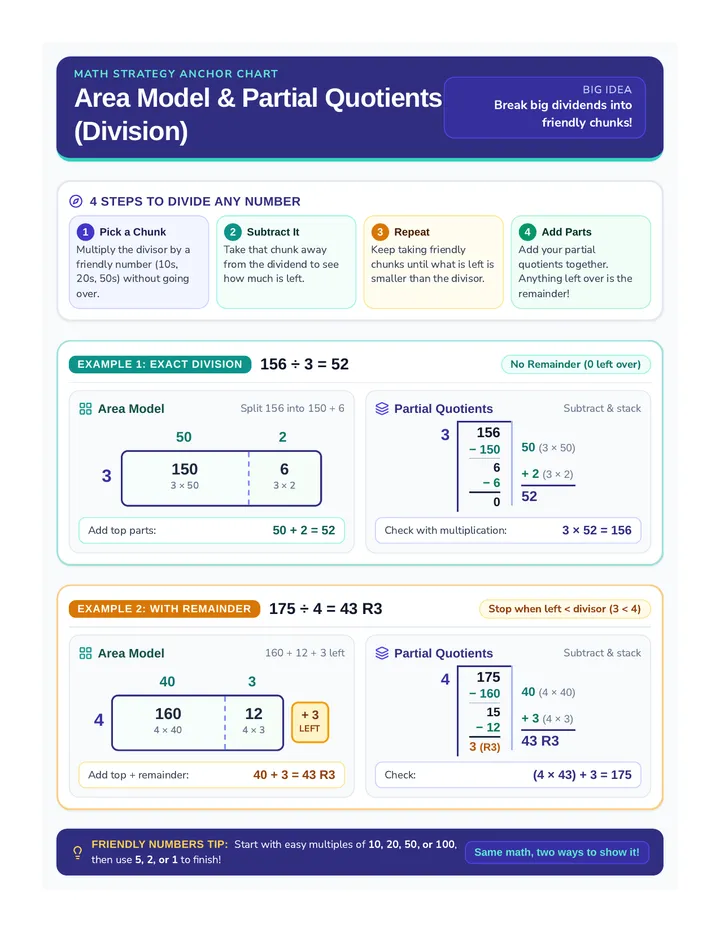
Area Model & Partial Quotients (Division)
Big Idea
Break big dividends into friendly chunks!
4 Steps to Divide Any Number
1 Pick a Chunk
Multiply the divisor by a friendly number (10s, 20s, 50s) without going over.
2 Subtract It
Take that chunk away from the dividend to see how much is left.
3 Repeat
Keep taking friendly chunks until what is left is smaller than the divisor.
4 Add Parts
Add your partial quotients together. Anything left over is the remainder!
Example 1: Exact Division
156 ÷ 3 = 52
No Remainder (0 left over)
Area Model Split 156 into 150 + 6
3
50
2
150 3 × 50
6 3 × 2
Add top parts: 50 + 2 = 52
Partial Quotients Subtract & stack
3
156
− 150
6
− 6
0
50 (3 × 50)
+ 2 (3 × 2)
52
Check with multiplication: 3 × 52 = 156
Example 2: With Remainder
175 ÷ 4 = 43 R3
Stop when left < divisor (3 < 4)
Area Model 160 + 12 + 3 left
4
40
3
160 4 × 40
12 4 × 3
+ 3
Left
Add top + remainder: 40 + 3 = 43 R3
Partial Quotients Subtract & stack
4
175
− 160
15
− 12
3 (R3)
40 (4 × 40)
+ 3 (4 × 3)
43 R3
Check: (4 × 43) + 3 = 175
Friendly Numbers Tip: Start with easy multiples of 10, 20, 50, or 100, then use 5, 2, or 1 to finish!
Same math, two ways to show it!
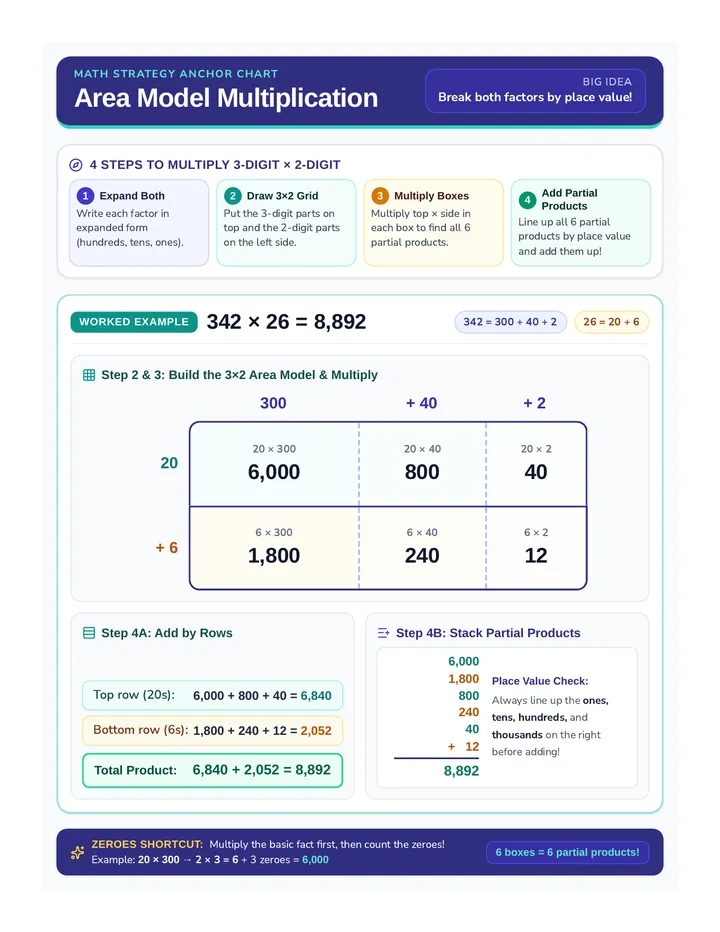
Area Model Multiplication Chart
Math Strategy Anchor Chart
Area Model Multiplication
Big Idea
Break both factors by place value!
4 Steps to Multiply 3-Digit × 2-Digit
1 Expand Both
Write each factor in expanded form (hundreds, tens, ones).
2 Draw 3×2 Grid
Put the 3-digit parts on top and the 2-digit parts on the left side.
3 Multiply Boxes
Multiply top × side in each box to find all 6 partial products.
4 Add Partial Products
Line up all 6 partial products by place value and add them up!
Worked Example
342 × 26 = 8,892
342 = 300 + 40 + 2 26 = 20 + 6
Step 2 & 3: Build the 3×2 Area Model & Multiply
300
+ 40
+ 2
20
20 × 300 6,000
20 × 40 800
20 × 2 40
+ 6
6 × 300 1,800
6 × 40 240
6 × 2 12
Step 4A: Add by Rows
Top row (20s): 6,000 + 800 + 40 = 6,840
Bottom row (6s): 1,800 + 240 + 12 = 2,052
Total Product: 6,840 + 2,052 = 8,892
Step 4B: Stack Partial Products
6,000
1,800
800
240
40
+ 12
8,892
Place Value Check: Always line up the ones, tens, hundreds, and thousands on the right before adding!
Zeroes Shortcut: Multiply the basic fact first, then count the zeroes! Example: 20 × 300 → 2 × 3 = 6 + 3 zeroes = 6,000
6 boxes = 6 partial products!