Podcast Blueprint Workbook Session 1: Creative Planning
PODCAST BLUEPRINT
MIC DROP
Creator Name:
Workshop Date:
STEP 1
The Big Idea & Hook
What is your podcast about, and why will people choose to listen to you instead of a million other shows? Be hyper-specific.
Working Show Title
Short, memorable, easy to spell. Avoid puns unless they are incredibly clever.
The Hook (Your Show's Elevator Pitch)
Complete this sentence: "This is a podcast for ________ who want to ________ by ________."
STEP 2
Your Dream Listener
Design one fictional person who represents your ideal audience. Speak directly to them when you record.
Demographics & Habits
Name, age, job, when/where do they listen to podcasts?
Pain Points & Desires
What are they struggling with? What makes them happy/excited?
Podcast Blueprint • Page 1 of 3 Mic Drop Workshop
Session 1: Creative Planning
THE SHOW FORMAT
MIC DROP
STEP 3
Choose Your Format & Vibe
Solo Show 1 Host • Highly scripted/focused • Easy to schedule & edit
Co-Hosted 2+ Hosts • Natural chemistry • Shared work • Harder audio editing
Interview Host + Guest • High value • Constant outreach • Great for networking
Target Episode Length
How long will a typical episode be? (e.g., 15m, 30m, 45m)
Release Frequency
How often? Consistency beats frequency. (e.g., Weekly, Bi-weekly)
STEP 4
Episode 1 structural map
Structure keeps your audience hooked. Outline the core segments of your very first episode below.
Segment Estimated Time Key Points / Talking Topics Intro & Hook 0:00 - 1:30 (90s) Self-intro, episode topic, the big promise. Core Segment 1 1:30 - 8:00 (6.5m) Core Segment 2 8:00 - 15:00 (7m)
|
| Outro & CTA | 15:00 - 17:00 (2m) | Where to subscribe, review, final call-to-action. |
Podcast Blueprint • Page 2 of 3 Mic Drop Workshop
Session 1: Creative Planning
THE 60s INTRO SCRIPT
MIC DROP
STEP 5
Write Your Audio Handshake
Listeners decide whether to stay or skip within the first 60 seconds. Fill in this outline to draft a bulletproof intro that hooks your listeners instantly.
1. The Hook Question / Visual (0 - 15 Seconds) Grab Attention
Start with a surprising stat, a deep question, or a high-stakes scenario. E.g., "Have you ever wondered why..."
2. Name & Show Intro (15 - 30 Seconds) Introduce Yourself
Keep it crisp. E.g., "Welcome to [Show Name], the podcast where we [show mission]. I'm your host, [Name]..."
3. Today's Core Value (30 - 60 Seconds) Set Expectations
Tell them exactly what they will gain from this episode. E.g., "In today's episode, we are diving deep into..."
Podcast Blueprint • Page 3 of 3 Mic Drop Workshop
Audio Quickstart Guide Session 2: Audio Engineering
AUDIO QUICKSTART
MIC DROP
Great audio doesn't require a $1,000 studio. By picking the right low-cost gear, setting up your space correctly, and understanding basic settings, you can produce broadcast-ready sound from home.
1. Budget-Friendly Gear Stack
Dynamic USB Microphones
Choose Dynamic mics over Condenser mics. Dynamic mics block out background room echo and family/traffic noise.
Recs: Audio-Technica ATR2100x ($79) or Samson Q2U ($69).
Over-Ear Wired Headphones
Never use Bluetooth earbuds when recording. The lag causes echo, and built-in Bluetooth mics have poor audio quality.
Recs: Sony MDR-7506 ($99) or any wired analog earbuds.
2. Hack Your Recording Room
Audio is shaped by your environment. A $500 mic in a kitchen with hard tiles sounds worse than a $50 mic in a walk-in closet.
Dampen Echo
Record in a carpeted room with soft furnishings. Bookshelves, rugs, and curtains naturally absorb sound waves.
The Closet Studio
The gold standard for beginners: record in a walk-in closet. Your clothes act as incredible sound dampening panels.
Mic Technique
Keep your mouth exactly 4-6 inches (about one fist width) away from the microphone at a slight 45° angle.
3. Audacity Recording Checklist
Audacity is 100% free, open-source audio software available on Mac, Windows, and Linux.
Setting Type
Correct Value / Action
Audio Host Windows: MME or WASAPI • Mac: Core Audio
Recording Device Ensure your external USB microphone is explicitly selected (not Internal Mic)
Recording Channel Select 1 (Mono) Recording Channel (mics capture mono; do not record in stereo)
Project Rate Set default to 44,100 Hz or 48,000 Hz (standard studio quality)
Audio Quickstart Guide • Page 1 of 2 Mic Drop Workshop
Session 3: Editing & Launch
EDIT & PUBLISH
MIC DROP
1. The 3-Step Audacity Audio Polish
Apply these core software filters in Audacity in this order to make your recording sound crisp and commercial-grade.
01
Noise Reduction
Highlight 5 seconds of silent room tone. Go to Effect > Noise Removal > Noise Reduction , click "Get Noise Profile". Highlight all your tracks, open Noise Reduction again, and click "OK". This strips out hums.
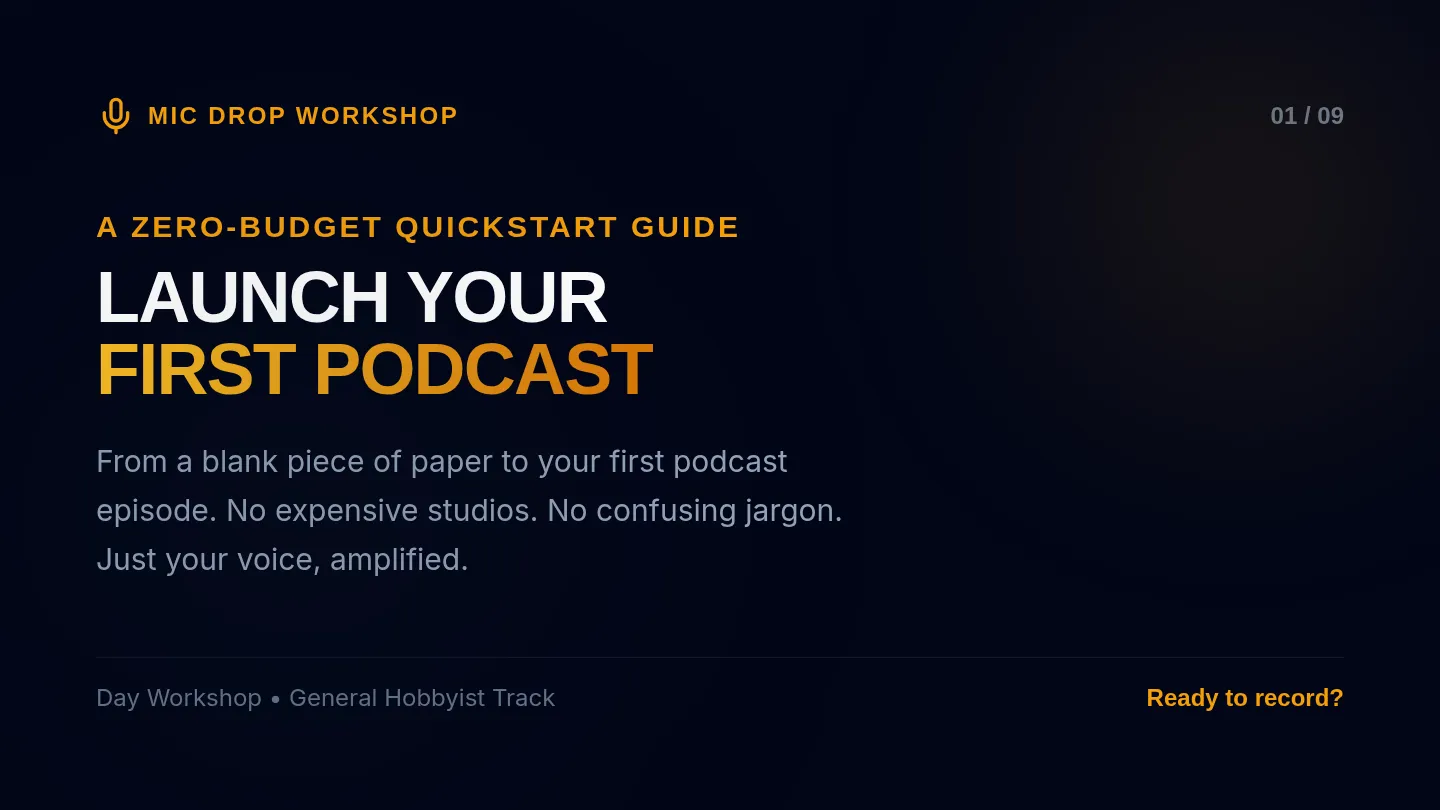
Mic Drop Slides Mic Drop Workshop
01 / 09
A Zero-Budget Quickstart Guide
LAUNCH YOUR
FIRST PODCAST
From a blank piece of paper to your first podcast episode. No expensive studios. No confusing jargon. Just your voice, amplified.
Day Workshop • General Hobbyist Track Ready to record?
The Game Plan
02 / 09
Today's Schedule
10:00 - 11:30 01. Creative Planning
Show hooks, name selection, listener avatars.
Workbook • P.1
11:30 - 13:00 02. Audio Gear & Setup
USB micro-budget stacks, acoustic room hacks.
Quickstart • P.1
13:00 - 14:00 03. Lunch Break
Step away, clear your throat, and recharge.
Rest Zone
14:00 - 15:30 04. Editing & Logic
Audacity tools, the 3 filters, export parameters.
Quickstart • P.2
15:30 - 17:00 05. Scripts & Launch
Drafting intros, hosting platforms, Q&A.
Workbook • P.3
We have exactly 7 hours together — let's maximize every minute! Stay on track
Step 1: The Concept
03 / 09
What is Your Hook?
There are over 3 million podcasts. To stand out, you don't need to be the biggest expert—you need to have a clear, specific hook.
The Golden Formula:
"This is a podcast for Target Avatar who want to Achieve X by Unique Approach ."
A.
Be Hyper-Specific
Not "a tech podcast", but "a tech podcast explaining smart-home gadgets to grandparents."
B.
Define Your Listener
Talk to one real person (your avatar) when you sit in front of the microphone.
Workshop Materials Reference: Page 1 of Blueprint Workbook Focus on the Hook
Step 2: Formatting
04 / 09
The 15-Minute Blueprint
01 Intro (90s)
Hook them instantly. State the big question, introduce yourself, and declare the value of today's episode. No rambling.
"The Audio Handshake"
02 Body (12m)
Deliver your promise. Break it into 2 distinct, structured segments. Guide the listener clearly through each point.
"The Meat & Potatoes"
03 Outro (90s)
Say goodbye and leave them with one clear call-to-action. Where should they click or go right now?
"The Lasting Impression"
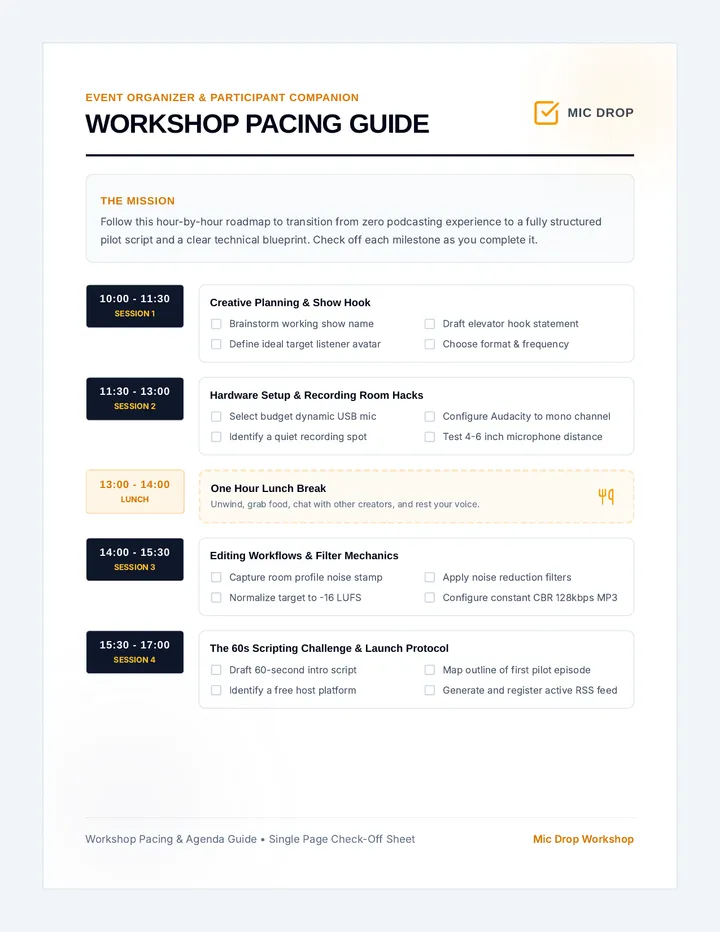
Workshop Pacing Guide Event Organizer & Participant Companion
WORKSHOP PACING GUIDE
MIC DROP
The Mission
Follow this hour-by-hour roadmap to transition from zero podcasting experience to a fully structured pilot script and a clear technical blueprint. Check off each milestone as you complete it.
10:00 - 11:30 SESSION 1
Creative Planning & Show Hook
Brainstorm working show name
Draft elevator hook statement
Define ideal target listener avatar
Choose format & frequency
11:30 - 13:00 SESSION 2
Hardware Setup & Recording Room Hacks
Select budget dynamic USB mic
Configure Audacity to mono channel
Identify a quiet recording spot
Test 4-6 inch microphone distance
13:00 - 14:00 LUNCH
One Hour Lunch Break
Unwind, grab food, chat with other creators, and rest your voice.
14:00 - 15:30 SESSION 3
Editing Workflows & Filter Mechanics
Capture room profile noise stamp
Apply noise reduction filters
Normalize target to -16 LUFS
Configure constant CBR 128kbps MP3
15:30 - 17:00 SESSION 4
The 60s Scripting Challenge & Launch Protocol
Draft 60-second intro script
Map outline of first pilot episode
Identify a free host platform
Generate and register active RSS feed
Workshop Pacing & Agenda Guide • Single Page Check-Off Sheet Mic Drop Workshop
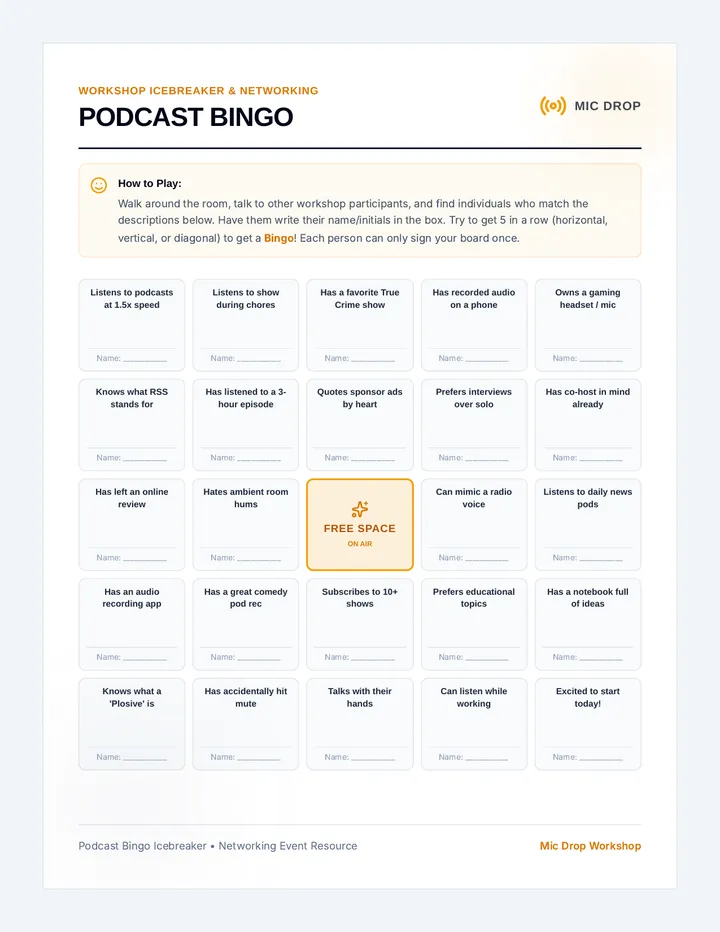
Podcast Bingo Cards Workshop Icebreaker & Networking
PODCAST BINGO
MIC DROP
How to Play: Walk around the room, talk to other workshop participants, and find individuals who match the descriptions below. Have them write their name/initials in the box. Try to get 5 in a row (horizontal, vertical, or diagonal) to get a Bingo ! Each person can only sign your board once.
Listens to podcasts at 1.5x speed
Name: ____________
Listens to show during chores
Name: ____________
Has a favorite True Crime show
Name: ____________
Has recorded audio on a phone
Name: ____________
Owns a gaming headset / mic
Name: ____________
Knows what RSS stands for
Name: ____________
Has listened to a 3-hour episode
Name: ____________
Quotes sponsor ads by heart
Name: ____________
Prefers interviews over solo
Name: ____________
Has co-host in mind already
Name: ____________
Has left an online review
Name: ____________
Hates ambient room hums
Name: ____________
FREE SPACE ON AIR
Can mimic a radio voice
Name: ____________
Listens to daily news pods
Name: ____________
Has an audio recording app
Name: ____________
Has a great comedy pod rec
Name: ____________
Subscribes to 10+ shows
Name: ____________
Prefers educational topics
Name: ____________
Has a notebook full of ideas
Name: ____________
Knows what a 'Plosive' is
Name: ____________
Has accidentally hit mute
Name: ____________
Talks with their hands
Name: ____________
Can listen while working
Name: ____________
Excited to start today!
Name: ____________
Podcast Bingo Icebreaker • Networking Event Resource Mic Drop Workshop