Court Creators Packet Physical Education • Game Design Project
COURT CREATORS PACKET
Name:
Period:
Date:
Group Members:
Your Mission
Design your own original basketball game that uses at least 3 basketball skills. You may research games online for inspiration. Fill out each box below, then submit your completed packet in Canvas.
1. ONLINE GAME SCOUTING REPORT
Research
Found a basketball game online that you like? Record it below and explain how you changed it to make it your own.
Name of the Online Game & Website / Source:
Explain the Rules of the Online Game (How is the original game played?):
How I Changed It to Make It My Own (What rules, skills, scoring, or setup did you change?):
Creating a brand-new game from scratch? Check here: ☐ Invented from scratch (skip Section 1) Page 1 of 4
2. GAME NAME & NEEDED EQUIPMENT
Setup
Your Game Name:
Needed Equipment (List every item and how many you need—balls, cones, pinnies, hoops, etc.):
Players & Teams (How many?):
Court / Playing Area Setup:
3. BASKETBALL SKILLS BEING USED
3 Required
Check 3 basketball skills used in your game, then explain how players perform each skill.
☐ Dribbling
☐ Chest / Bounce Pass
☐ Overhead Pass
☐ Layups
☐ Jump / Set Shooting
☐ Free Throws
☐ Rebounding
☐ Defense / Guarding
☐ Pivoting / Footwork
Skill #1:
How is Skill #1 used in your game?
Skill #2:
How is Skill #2 used in your game?
Skill #3:
How is Skill #3 used in your game?
Tip: Make sure all 3 skills are clearly connected to how your game is played. Page 2 of 4
4. YOUR GAME RULES
Write your rules clearly so a classmate who has never played can understand how to start, play, score, and win.
How the Game Starts (Tip-off, pass-in, rock-paper-scissors, etc.):
Step-by-Step Rules (How do players move, pass, shoot, and play defense?):
Scoring & How to Win (Point values, time limit, or target score):
5. FOULS, PENALTIES & SAFETY
Fouls & Out-of-Bounds (What happens when someone breaks a rule?):
Safety Rules (How will you keep players safe during the game?):
Tip: Read your rules out loud to see if anything is missing or confusing. Page 3 of 4
6. COURT & MOVEMENT DIAGRAM
Sketch
Sketch your court setup below. Label players (X / O), cones (▲), hoops, and zones. Use solid arrows (→) for player movement and dashed arrows (- - >) for passes or shots.
7. READY-TO-SUBMIT CHECKLIST
Check off every box below before submitting your completed packet in Canvas:
☐ I listed my name and all group members (if working in a group).
☐ My game has a creative name, player count, needed equipment list, and court setup.
☐ If I used an online game, I explained its rules and how I changed it to make it my own.
☐ My game clearly uses at least 3 basketball skills and explains how each is used.
☐ My rules clearly explain how to start, play, score, handle fouls, stay safe, and win.
☐ My court diagram is labeled and easy to follow.
☐ All sections are complete and ready to submit in Canvas!
Double-check every page before submitting your assignment in Canvas. Page 4 of 4
Court Creators Rubric Physical Education • Game Design Project
COURT CREATORS RUBRIC
Total
20 Pts
Game Name:
Student / Group:
Period:
| Criteria |
4 • All-Star
Exceeds
|
3 • Starter
Meets
|
2 • Rookie
Developing
|
1 • Bench
Needs Work
|
| --- | --- | --- | --- | --- |
|
3 Basketball Skills
Packet + Gameplay
____ / 4
| Actively uses 3+ basketball skills in meaningful ways; packet clearly explains how each skill is performed. | Uses 3 basketball skills in the game; packet explains how each skill is used with minor gaps. | Uses only 2 basketball skills, or explanations of how skills fit the game are unclear. | Uses 0–1 basketball skills or skill explanations are missing from the packet. |
|
Rules, Setup & Diagram
Clarity & Detail
____ / 4
| Game name, equipment list, step-by-step rules, scoring, and labeled court diagram are thorough and easy to follow. | All setup, rules, scoring, and diagram sections are complete and mostly clear to a new player. | Missing key details (such as scoring, equipment quantities, or diagram labels), making rules hard to follow. | Rules, equipment list, or court diagram are incomplete or missing. |
|
Research & Originality
Remix or Scratch
____ / 4
| Clearly explains the online game's rules and creative changes made to make it their own (or invents a highly original game). | Identifies the online game, explains its rules, and describes at least 1–2 changes made (or creates a solid original game). | Online game rules or changes are vague, or the game is copied with very few changes. | Scouting report is blank when using an online game, or no original effort is shown. |
|
Safety & Fair Play
Fouls & Boundaries
____ / 4
| Thoughtful safety rules, fouls, and out-of-bounds penalties keep everyone safe, active, and playing fairly. | Includes clear safety rules and foul/out-of-bounds consequences that work during gameplay. | Safety or foul rules are too brief or leave gaps that cause confusion during play. | Safety rules and foul/penalty guidelines are missing or unsafe. |
|
Teaching the Class
Demo & Leadership
____ / 4
| Clearly explains rules and demonstrates skills before play; organizes equipment/teams smoothly; coaches and encourages classmates. | Explains rules clearly and helps set up equipment/teams; answers questions and keeps the game running smoothly. | Explanation or setup is disorganized; class needs teacher help to understand rules or stay on track. | Unprepared to teach the game, does not explain rules, or does not help lead the activity. |
Final Score
_____ / 20
Teacher Feedback & Notes:
Court Creators • Physical Education Assessment Rubric Page 1 of 1
Teaching Day Prep Sheet Court Creators • Teaching Day
TEACHING DAY PREP SHEET
Game Name:
Group Members:
Period:
1. COACHING ROLES (WHO DOES WHAT?)
Teamwork
Equipment & Court Setup Lead
Gathers balls, cones, and pinnies; sets up court boundaries before play.
Who:
Rules & Safety Explainer
Explains how to start, score, win, and stay safe in under 2 minutes.
Who:
Skill Demonstrator(s)
Shows the class how all 3 basketball skills are used during the game.
Who:
Referee & Scorekeeper
Calls fouls/out-of-bounds, tracks points, and keeps classmates active.
Who:
2. 60-SECOND GAME INTRO PLAN
Goal of the Game (How do you explain it in 1–2 sentences?):
3 Basketball Skills We Will Demonstrate:
Top 2 Safety & Foul Reminders for Classmates:
Pre-Whistle Gym Checklist
☐ All equipment gathered and counted
☐ Court cones and boundaries set up
☐ Teams divided quickly and fairly
☐ Ready to explain rules & demo skills
Keep your explanation short and active—get classmates playing fast! Page 1 of 2
PEER FEEDBACK CARD
Court Creators
Your Name:
Game Played:
Rules were clear & easy to follow:
☐ 4 Super Clear ☐ 3 Mostly ☐ 2 Confusing ☐ 1 Unclear
Used 3 basketball skills:
☐ Yes, all 3 ☐ Saw 1–2 ☐ Not sure
Fun & safe to play:
☐ 4 Awesome ☐ 3 Fun ☐ 2 Okay ☐ 1 Needs Work
1 Thing That Worked Great:
1 Suggestion to Make It Even Better:
Cut Here (or fill out both)
PEER FEEDBACK CARD
Court Creators
Your Name:
Game Played:
Rules were clear & easy to follow:
☐ 4 Super Clear ☐ 3 Mostly ☐ 2 Confusing ☐ 1 Unclear
Used 3 basketball skills:
☐ Yes, all 3 ☐ Saw 1–2 ☐ Not sure
Fun & safe to play:
☐ 4 Awesome ☐ 3 Fun ☐ 2 Okay ☐ 1 Needs Work
1 Thing That Worked Great:
1 Suggestion to Make It Even Better:
Be specific and encouraging—help your classmates make their game even better! Page 2 of 2
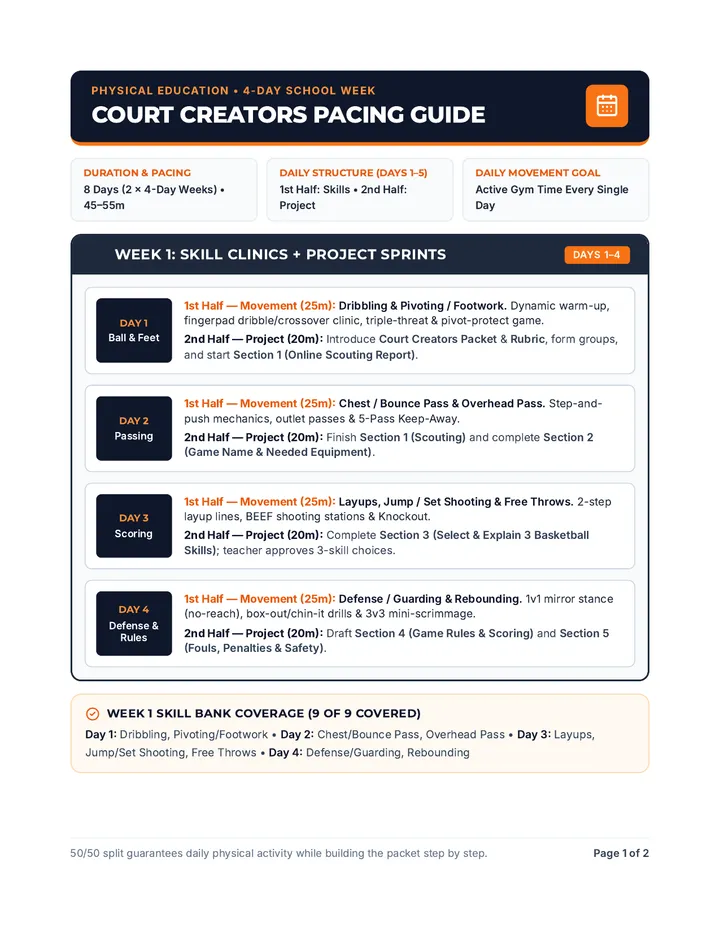
Court Creators Pacing Guide Physical Education • 4-Day School Week
COURT CREATORS PACING GUIDE
Duration & Pacing
8 Days (2 × 4-Day Weeks) • 45–55m
Daily Structure (Days 1–5)
1st Half: Skills • 2nd Half: Project
Daily Movement Goal
Active Gym Time Every Single Day
WEEK 1: SKILL CLINICS + PROJECT SPRINTS
Days 1–4
Day 1 Ball & Feet
1st Half — Movement (25m): Dribbling & Pivoting / Footwork. Dynamic warm-up, fingerpad dribble/crossover clinic, triple-threat & pivot-protect game.
2nd Half — Project (20m): Introduce Court Creators Packet & Rubric, form groups, and start Section 1 (Online Scouting Report).
Day 2 Passing
1st Half — Movement (25m): Chest / Bounce Pass & Overhead Pass. Step-and-push mechanics, outlet passes & 5-Pass Keep-Away.
2nd Half — Project (20m): Finish Section 1 (Scouting) and complete Section 2 (Game Name & Needed Equipment).
Day 3 Scoring
1st Half — Movement (25m): Layups, Jump / Set Shooting & Free Throws. 2-step layup lines, BEEF shooting stations & Knockout.
2nd Half — Project (20m): Complete Section 3 (Select & Explain 3 Basketball Skills); teacher approves 3-skill choices.
Day 4 Defense & Rules
1st Half — Movement (25m): Defense / Guarding & Rebounding. 1v1 mirror stance (no-reach), box-out/chin-it drills & 3v3 mini-scrimmage.
2nd Half — Project (20m): Draft Section 4 (Game Rules & Scoring) and Section 5 (Fouls, Penalties & Safety).
Week 1 Skill Bank Coverage (9 of 9 Covered)
Day 1: Dribbling, Pivoting/Footwork • Day 2: Chest/Bounce Pass, Overhead Pass • Day 3: Layups, Jump/Set Shooting, Free Throws • Day 4: Defense/Guarding, Rebounding
50/50 split guarantees daily physical activity while building the packet step by step. Page 1 of 2
WEEK 2: FINALIZE, PLAYTEST & TEACHING DAYS
Days 5–8
Day 5 Map & Submit
1st Half — Movement (25m): All-9-Skills Circuit / 3v3 Scrimmage. Students rotate through skill stations or half-court games to inspire final rule tweaks.
2nd Half — Project (20m): Sketch Section 6 (Court Diagram), verify Section 7 Checklist, and submit Packet in Canvas.
Day 6 Playtest & Prep
1st Half — Movement (25m): Live Half-Court Playtest. Groups test their own game on the court to spot rule, boundary, or scoring gaps.
2nd Half — Prep (20m): Complete Teaching Day Prep Sheet (Page 1: Assign Coaching Roles, script 60-sec intro, Gym Setup Checklist).
Day 7 Teach Rd 1
Full-Gym Teaching Day — Round 1 (Half of Class Presents)
Class Flow: Setup (5m) → Two 12-minute game rotations (60-sec intro + gameplay + 2-min Peer Feedback Card) → Cleanup (5m). Teacher: Grade presenting groups with Court Creators Rubric (20 pts).
Day 8 Teach Rd 2
Full-Gym Teaching Day — Round 2 & Unit Debrief
Class Flow: Setup (5m) → Remaining groups teach in two 12-minute rotations with Peer Feedback Cards → Final 5-minute unit reflection & equipment return. Teacher: Finalize Rubric scores.
Materials Checklist
• Gym Gear: 1 basketball per 2 students, cones, pinnies (2–3 colors), whistle, timer.
• Digital/Print: Court Creators Packet (Canvas/tablets or clipboards), Teaching Day Prep Sheet + Feedback Cards, Rubric.
Transition & Pacing Tips
• Fast Transitions: Have Chromebooks or clipboards staged on the bleachers so groups switch from drills to planning in under 2 minutes.
• Large Classes: Run 3 shorter (8-min) rotations on Days 7–8 so every group teaches.
Aligned with Court Creators Packet, Teaching Day Prep Sheet, and 20-pt Grading Rubric. Page 2 of 2