A comprehensive Microsoft Word beginners worksheet with a 'Word Wizardry' theme. It includes vocabulary exercises, step-by-step tutorials for creating and saving files, text formatting practice, clipboard mastery tasks, and a final guided project.
A participant handout for Lesson 2 (Decomposition) with a Rally Coach section for low-lift tasks, a Professional Blueprint for classroom application, and a reflective Coach's Corner connecting early exposure to long-term CS success.
A 5-slide presentation for Lesson 2 (Decomposition) featuring the Allison Cuttler quote, the video intro, Rally Coach instructions, and professional application examples across storytelling, standards, and math.
Updated facilitation guide for Lesson 2 (Decomposition), featuring quotes from Krauss & Prottsman and Allison Cuttler, a Rally Coach instructional strategy, and cross-curricular connections from literacy to industrial tech.
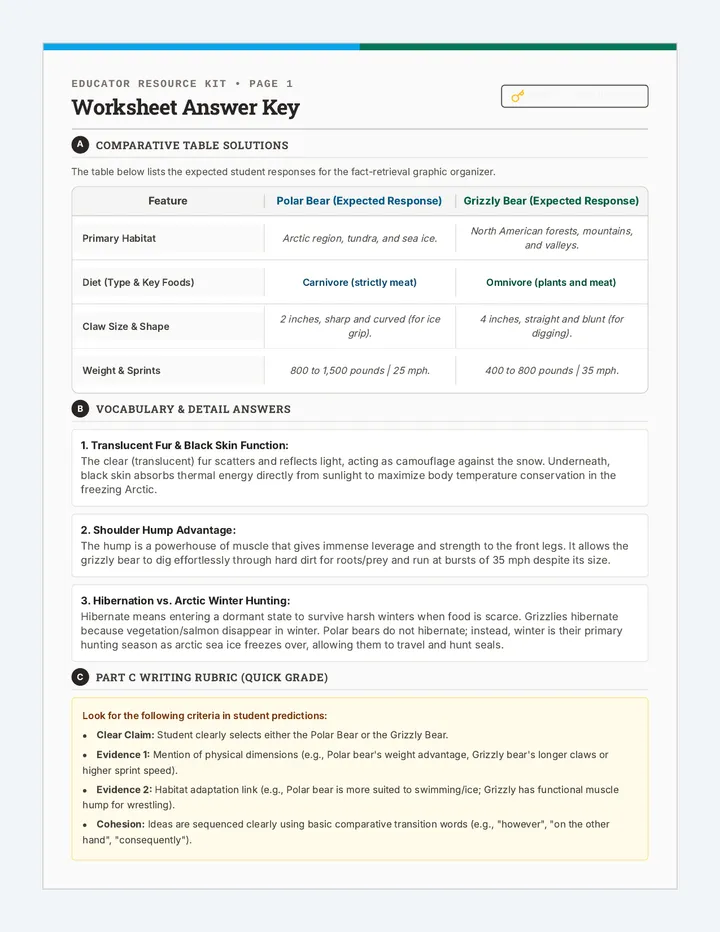
A comprehensive answer key for the Food Chain Builder Activity and the Chain Reaction Worksheet, including all eight ecosystem chains and vocabulary definitions.
A teacher-facing facilitation guide providing lesson objectives, a pacing guide, discussion prompts, and notes on common student misconceptions regarding food chains.
A worksheet featuring vocabulary matching, a food chain diagram analysis (Corn -> Mouse -> Owl), and a creative section for students to draw their own food chain. Designed for 3rd-grade assessment.
A hands-on activity where students cut out organism cards and paste them into the correct ecosystem food chains. Covers all eight requested ecosystems: Grassland, Backyard, Rainforest, Tundra, Ocean, Desert, Forest, and Pond.
A set of interactive slides that introduce the concept of food chains, define producers and consumers, and showcase example chains from eight diverse ecosystems. Includes clear visuals and directional arrows to illustrate energy flow.
Teacher's reference and answer key for the Cycle Quest worksheet, providing suggested responses and textual evidence for RI.3.1 assessment.
A comprehensive reading passage about the water cycle with targeted 'How' and 'Why' comprehension questions to build RI.3.1 proficiency.
A vibrant slide deck introducing RI.3.1 skills through the lens of the water cycle, teaching students how to distinguish between 'how' and 'why' questions using scientific evidence.
Dynamic slides for Lesson 27, teaching students how to sort, filter, and apply conditional formatting to identify market segments. Includes the 'Needle Test' hook and visual logic demonstrations. Fixed tracking and contrast issues.
A professional student reference sheet for sorting, filtering, and identifying market trends. Includes visual examples of conditional formatting and a step-by-step segment search guide. Fixed exit ticket placeholder.
Detailed teacher guide for Lesson 27, teaching students how to sort, filter, and apply conditional formatting to survey data to identify market trends.
Dynamic slides for Lesson 26, exploring the power of spreadsheet formulas. Covers the equals sign, cell referencing vs. static numbers, and the Big Three functions (=SUM, =AVERAGE, =COUNT). Fixed minor typographical and contrast issues.
A high-quality technical reference sheet for spreadsheet formulas (=SUM, =AVERAGE, =COUNT). Includes visual guides for cell referencing and the fill handle.
Comprehensive teacher guide for Lesson 26, focusing on introductory spreadsheet formulas (=SUM, =AVERAGE, =COUNT) and the concept of cell referencing. Fixed minor spacing issues in pacing list.
Dynamic slides for Lesson 25, explaining real-time data syncing between forms and sheets, the importance of file organization, and the technical steps for freezing header rows. Fixed tracking and spacing issues in headers and action items.
A student technical reference for Lesson 25, explaining the automated link between forms and spreadsheets, the concept of the 'database chain', and a checklist for the Data Sprint activity.
A detailed teacher facilitation guide for Lesson 25, focusing on linking forms to spreadsheets, the concept of real-time syncing, and the technical skill of freezing rows for data management.
Dynamic slides for Lesson 24, featuring the biased question hook, definitions of quantitative and qualitative data, and technical setup for survey deployment. Fixed tracking, layout spacing, and checklist completeness.
A student reference sheet and checklist for professional survey design. Covers quantitative vs. qualitative data, how to avoid bias, and the 5-question framework for market research. Optimized for a single page.
A detailed teacher facilitation guide for Lesson 24, focusing on survey design principles, avoiding bias, and the technical setup of market research forms. Fixed placeholder text and redundant labels.